hi,all.there is no camera preview window when i choose the maincamera in the hierarchy.who can tell me why?And it doesn’t work when i reinstall unity3d.
Good question.
This feature is missing for me aswell. I think it’s only a pro feature.
I have it and I don’t have Pro. I only have iOS basic, but the project was set to web player distribution so it shouldn’t matter.
but my unity3d version is pro.
i have camera preview too, i have ios basic, but i had it when i was still on unity free, so it may be a bug
Select the camera and you will see options in the inspector. Simply click on the “Camera” component to expand the options for that component. Keep that component’s options expanded to keep the preview window enabled.
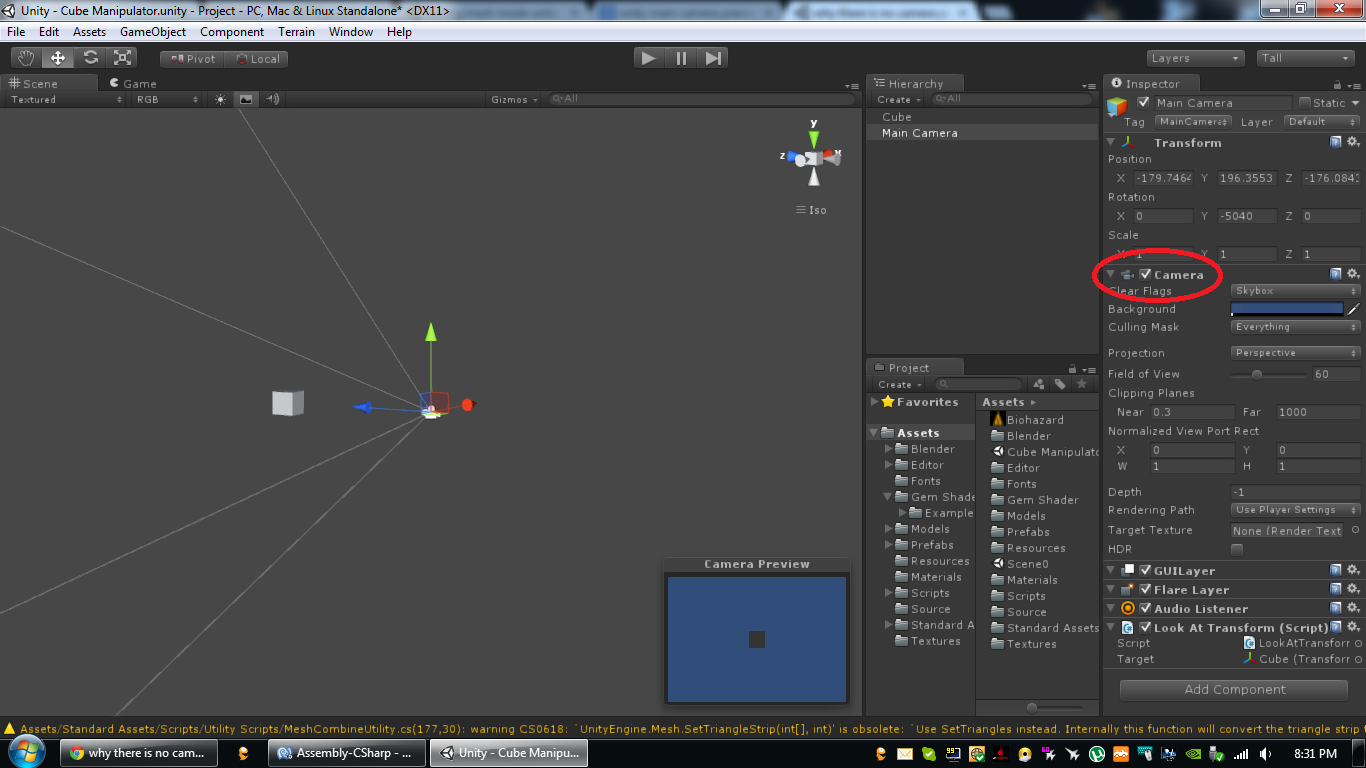
2 Likes
I have the same problem, toggling the camera window does nothing. No camera preview at all. Help!
I’m having this problem now as well in 2017…using SDK 2.3 and Unity 2017.3
I had this problem, and I think it’s because of custom layout, I changed mine to default, and my camera preview showed up.
3 Likes
This worked, thanks.
Weird thing is, I haven’t changed the layout, was using the default. All I did was select it from the menu. Worse, changing the layout shouldn’t have this side effect. :-/
The Solution from aajarrar and it worked for me too…thank you
This works for me - On the scene, press gizmo. For me it will show what the camera see’s and the preview.
nothing from the above mentioned solutions worked for me, actually all of them were my current settings…
1 Like
it‘s work, Thanks!