Hello everyone 
I recently got a little problem with the behaviour of the GetComponent method that it’s driving me crazy because it seems quite… random, and can’t figure out the problem.
I have a character with a control script attached, and i’m trying to call it in other scripts to have it referenced (instead of making the variable public and adding it in the inspector)
private Mob player;

	public void Awake() {
		player = GameObject.FindGameObjectWithTag("Player").GetComponent<Mob>();
    }
This way i would have the script that it’s going to be used to get some of the methods.
I have the character tagged as ‘Player’ and attached to it the script named (to be original with it) ‘Player’ that extends ‘Mob’.
This works… kinda.
The first time that i run unit and start running the scene it doesn’t fail and do what it’s supposed to do, all right there, but when i stop it and restart, there are times in which it works again and other times in which it throws an error
‘NullReferenceException’
highlighting the code where the variable is called, for example
public void Update() {
     if(player.getCurrentEnergy() < spell.getCost()) {}
}
This line throws error.
I’ve went into double checking the script, and it’s still there, not deleted by mistake:
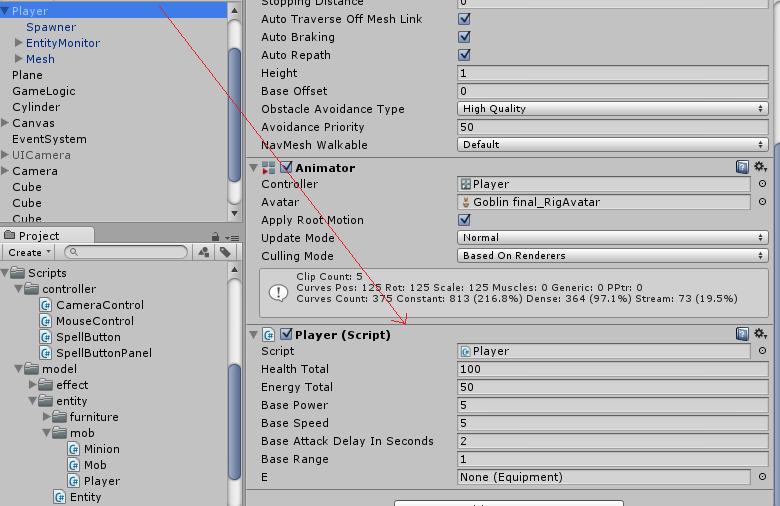
I’ve checked if it could be the ‘Player’ tag
	if(GameObject.FindGameObjectWithTag("Player") != null) {
			Debug.Log("Player: " + GameObject.FindGameObjectWithTag("Player"));
			if(GameObject.FindGameObjectWithTag("Player").GetComponent<Mob>()) != null) {
				Debug.Log("Component: " + GameObject.FindGameObjectWithTag("Player").GetComponent<Mob>());
			} else {
				Debug.Log("Component NULL");
			}
		} else {
			Debug.Log("Player NULL");
		}

Changing tags or names doesn’t seem to help.
What drives me crazy is the randomness of it, it sometimes happen after a pair of runs and other at the second one (the first oppening always runs properly), and it happens more when i start playing the the transitions of the animator (don’t know if it’s relevant).
Once happened it does not recover :o
Did someone faced the problem before? How can i solve it, and over all, why does this happen? O-o
Than you ^-^
Just an idea: In the debug screenshot it prints out the name of the player object: Player(Clone). In the Hierarchy screenshot it shows a Player Prefab already in the scene which will not be named Player(Clone) when playing. Objects will only be named clone if they are instantiated. Are you instantiating any other objects named Player which also have the tag "Player"?
– GameVortexWhen using Debug.Log you can provide a object. Then when clicking on the debug log in the console the object provided is highlighted. So do that to see which object also has the "Player" tag. foreach(GameObject ob in GameObject.FindGameObjectsWithTag("Player")) { Debug.Log (ob.name, ob); }
– GameVortexOh :o didn't know that, thank you for the advice ^-^ Added the ob to the debug line, and in the log, when i click over the one with normal cordinates (real player) the hierarchy highlights it, but when i press on any of the others (the zero ones) no object is highlighted :/ [40149-warning.jpg|40149] (Lack of null errors is because all the relative code is commented :/ )
– Defective02Very interesting. They are either set to be hidden (doubtful) or they are destroyed after awake. I see you have a Spawner object in your player, what does that do? You could always try to use the FindObjectOfType instead of by Tag. Which will always grab the correct type if it exists: Mob player = FindObjectOfType<Mob>();
– GameVortex