I download a lot of animations on Mixamo, but some of them unfortunately don’t let me turn on In-Place, and my game object translate like so:

Is there anyway I can make this animation “in-place” like the one below but within Unity?

Oh btw, I went into the rig tab for the animation fbx and made sure it’s on humanoid, I also tried going to the animation tab tried the Root Motion Node options: root transform and character, but get same results 
Hope I made sense and I can change my animations to in place within Unity. Thanks for reading!
Try turning root motion off entirely.
Hi Joe, thanks for the quick reply. I just set Root Motion Node to None, but the character still moves forward, is that how you turn it off? This is what I have set for this animation.
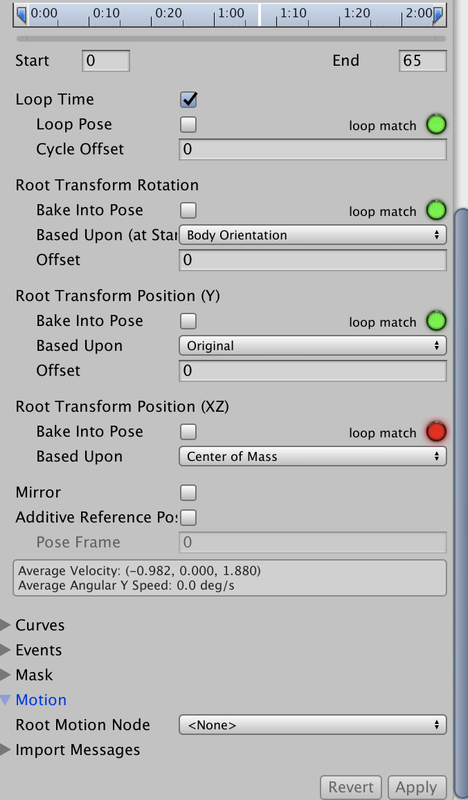
No… I think you need to fiddle with those Bake Into Pose settings. To be honest, root motion always confuses me too, but perhaps this page of the manual will help.
Yeah it’s a bit confusing right? I’ll take a look at the documentation, thanks again Joe!
It’s in the Animator component. Untick apply Root Motion should do it.
Hi Bill, I actually unticked that option and it unfortunately didn’t stop the translation. I’m going to get into Blender and modify it myself though 