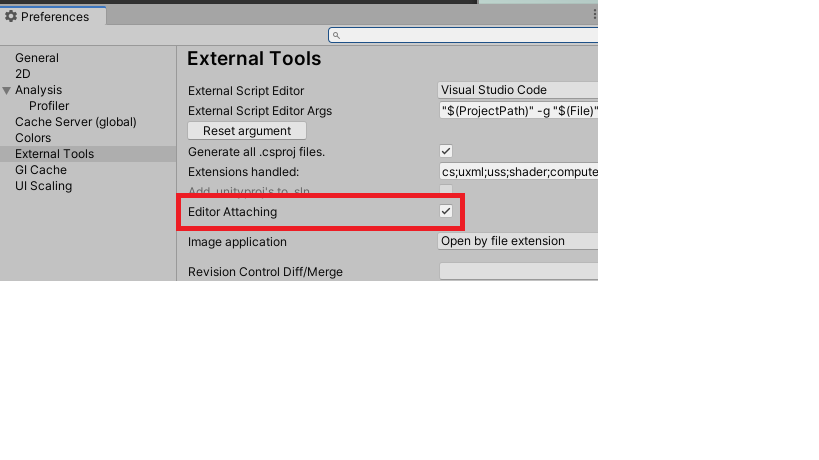
Greetings,
I can’t seem to debug Unity projects via Visual Studio Code. I’m using the Debugger For Unity extension for VS Code, v. 1.2.1. Thing is, after combing through the forums and issue tracker on Github without success, I decided to try on my laptop with the same configuration and, surprise, it works, while on my desktop it just won’t, no matter how many times I tried. I can’t figure out what the problem is.
My config:
- Windows 7 Ultimate 64 bits;
- Unity 2017.2.0f1 64 bits, Personal → decided to update to latest (2017.3.0f3) after discovering that that the latter works on my laptop;
- VS Code 1.19.2 (tried both x86 and x64 on both machines, either works on my laptop);
I tried with an empty project too. When I launch the debugger on VS Code I get the following output, before and after I begin Play mode on Unity:

Afaik, the only difference between desktop and laptop is that I was getting way more (sub)entries in the call stack section on the latter.
The problem is that the debugger just won’t pause at breakpoints.
Other infos:
- My PATH env. variable:
C:\ProgramData\Oracle\Java\javapath;
C:\Program Files\Haskell\bin;
C:\Program Files\Haskell Platform\8.2.1\lib\extralibs\bin;
C:\Program Files\Haskell Platform\8.2.1\bin;
D:\Cygwin64\bin;
c:\program files (x86)\intel\icls client\;
c:\program files\intel\icls client\;
c:\windows\system32;
c:\windows;
c:\windows\system32\wbem;
c:\windows\system32\windowspowershell\v1.0\;
c:\program files (x86)\intel\intel(r) management engine components\dal;
c:\program files\intel\intel(r) management engine components\dal;
c:\program files (x86)\intel\intel(r) management engine components\ipt;
c:\program files\intel\intel(r) management engine components\ipt;
c:\python27;
c:\program files\openvpn\bin;
c:\program files (x86)\windows kits\8.1\windows performance toolkit\;
c:\program files\microsoft sql server\client sdk\odbc\110\tools\binn\;
c:\program files (x86)\microsoft sql server\120\tools\binn\;
c:\program files\microsoft sql server\120\tools\binn\;
c:\program files\microsoft sql server\120\dts\binn\;
c:\program files (x86)\skype\phone\;
C:\Program Files (x86)\NVIDIA Corporation\PhysX\Common;
C:\Program Files\doxygen\bin;
C:\Program Files\Haskell Platform\8.2.1\mingw\bin;
C:\Program Files (x86)\GtkSharp\2.12\bin;
C:\ProgramData\chocolatey\bin;
C:\Program Files\dotnet\;
C:\Program Files (x86)\Microsoft VS Code\bin
- MonoDevelop’s debugger works;
- I have intsalled the OmniSharp C# For Visual Studio Code extension for VS Code;
- I tried a complete re-install of both programs, again without success;
- I also tried using dotBunny’s VSCode plugin for Unity, but it hasn’t been of help thus far (note: Unity crashes on exit if I enable it);
- Control panel shows only one instance of the .NET Core SDK installed, I don’t know if it’s important.
Any ideas? Thanks in advance for any help.