Erebus - ‘Epic’ Soft Shadows and AO for Unity3D
By Michael Rochon And Christian Kahler
Technical Preview :

Community Discord : Titan Assets
SDF^3 is a comprehensive shading kit that relies on ray tracing distance fields to achieve a number of effects. The system is based heavily on the DF GI engine found in the Unreal Real Engine Since UE4. The system as of now has a fully realized implementation of the DFAO and Directional Light Soft Shadowing.
The package also includes a suite of tools for converting meshes to SDFs, with encoding options for UVs and Color packing, volume rendering shaders for rendering mesh SDF’s in a variety of manor and a few shaders to enhance the look of traditional meshes using their converted SDF data as well.
Aside from SDF related rendering, the package also includes a number shadowing and AO techniques using terrain heightfields and screen space information.
There’s also plans for handling indirect diffuse lighting and reflections following a similar methodology as lumen.
In-Terms of the full package the current road map is as follows, in descending
order:
1 Release DFAO and DF Shadowing
2. Integrate SDF Path Trace / Reflections an Indirect Diffuse
3.Integrate Hardware Path tracing (RTX)
Intro
Long Range Software Raytraced Shadows and AO
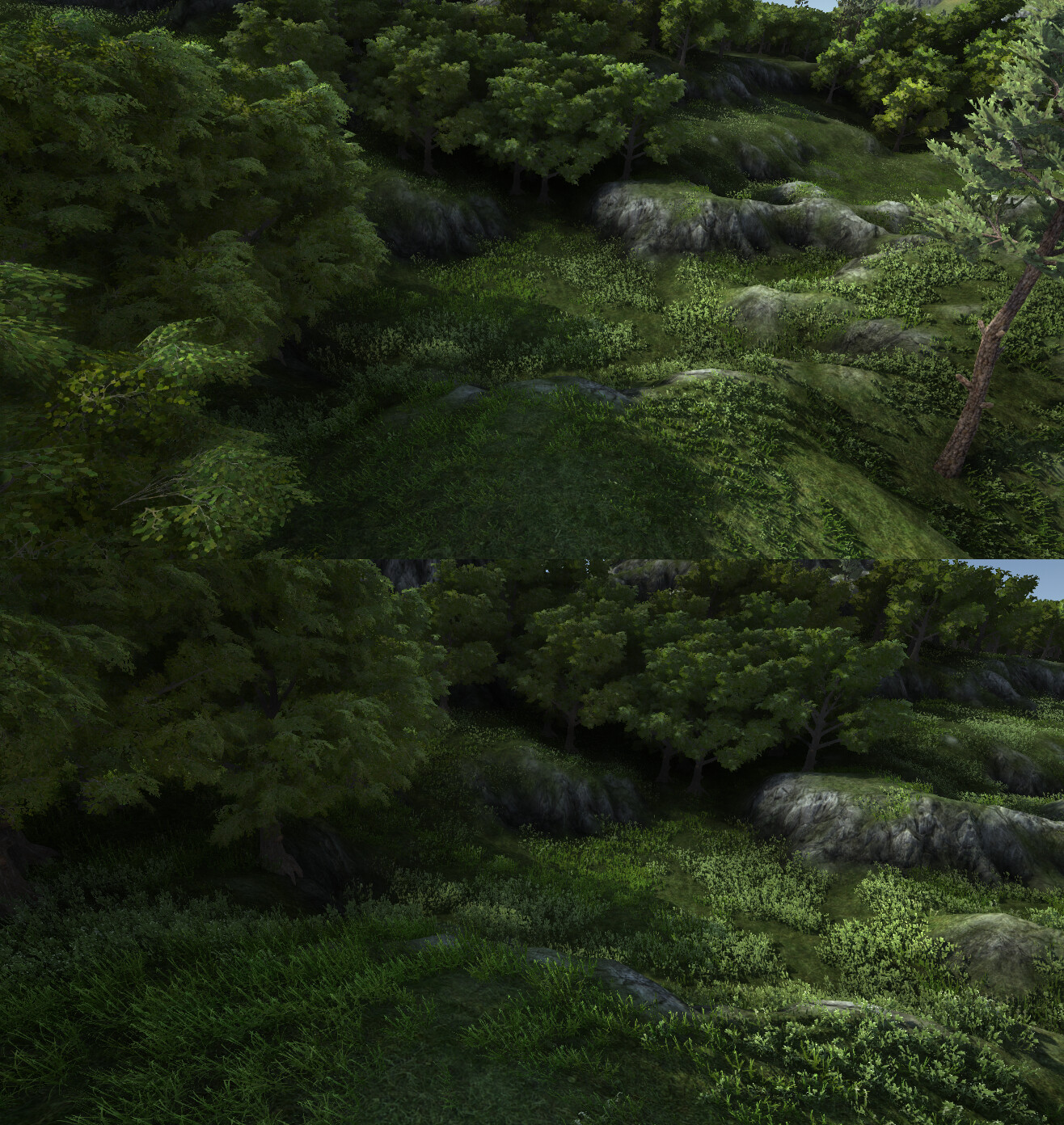
Top Image; All Tracing Effects On Bottom Image ; All Tracing Effects Off
Top Image; All Tracing Effects On Bottom Image ; All Tracing Effects Off
This system was designed with the intent of solving a big problem when it comes to finding a robust GI solution that doesn’t put restrictions on artists while also being an applicable solution for large scale open world building.
From my perspective the only applicable option that didn’t make sacrifices was Unreal’s SDF work. I ended up spending a few years on my off time researching and building up similar tech to what they use to manage SDFs as well as the methods the use to trace them.
Recently I’ve put the final pieces together and I think I can safely say I have a solution that doesn’t compromise and be utilized in practically any rendering scenario, large scale or small and doesn’t hamper on quality in order to get there.
So like UE4s offerings :
This supports any mesh and responds instantly to changes made to them;
Meshes Receiving AO and Soft Shadowing As Well As Contributing
All meshes in the scene above are both receiving and contributing real-time GI. No data is baked, all objects can be moved and the scene will respond accordingly. Shadows ray trace against high resolution instance data, AO traces against high resolution instance data as well, with fall back to a distance field clip map.
Because the system uses SDF in the same vein as unreal, there’s never any worry about object count or density in your scene.
Because it traces against high resolution instance data you will always get a stable, high quality result no matter what transform manipulation objects goes through and regardless of how they are set up or organized in you scene.
Handles large scale scenes with ease;
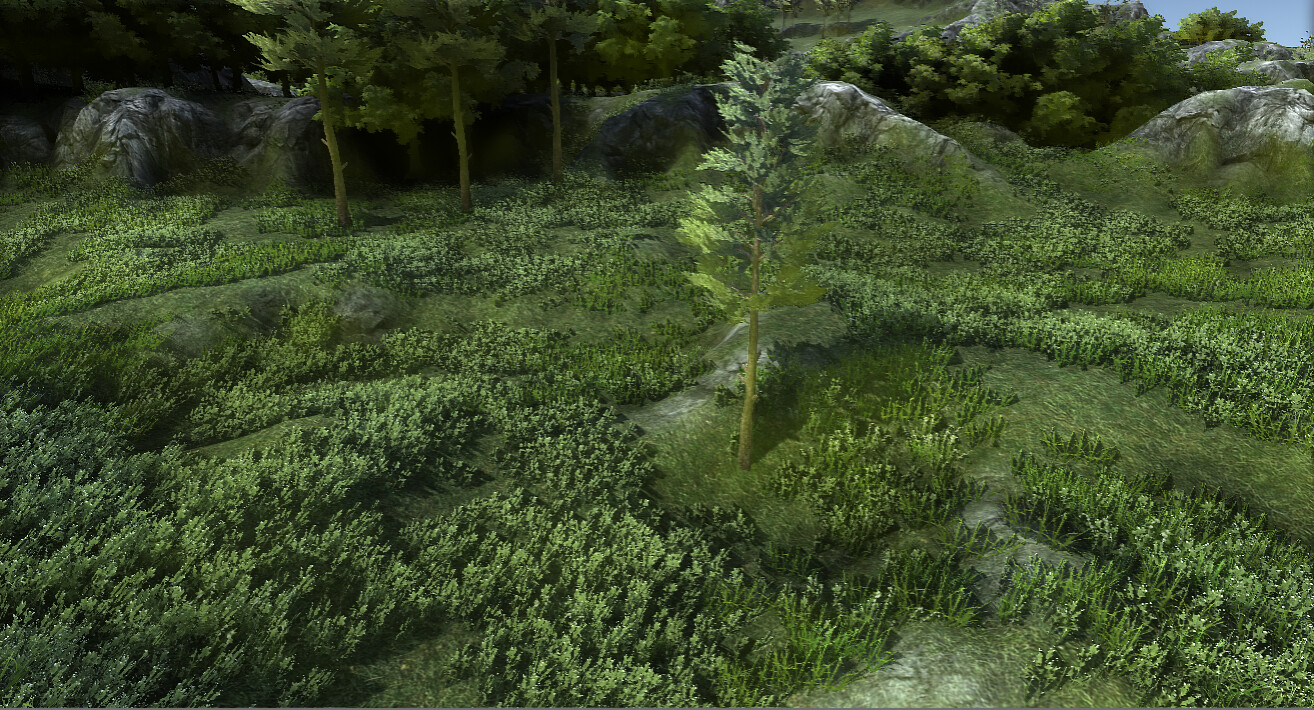
Even at 2000 meters away, the system can reliably trace instance shadows, and AO.
There isn’t much of a scene size limitation, especially with modern hardware. Even on a 1050gtx, rendering an entire terrains AO an shadows along with it’s vegetation instance keep well with in the 30-40 fps mark running all effect wide open. (Highest quality, no optimizations)
Not only does it handle large render distances well, but it’s also extremely responsive to mass changes made to scenes. Because of how the system works, every tree on this map could be updated in real time with no noticeable effect to the ray tracings performance. This means large scale simulation using rigid objects, like traffic sim, or racing games can utilize this tech as well with no problems, or precession issue otherwise found with voxel-based GI systems.
Final Render with AO Applied and Debug View
AO On Top;
AO Off Bottom;
Above all, we made no compromises to quality. On average our system typically outputs better results than most screen space effects are currently capable of. Offering long range high-detailed traces that never suffer from issues like lack of screen space data or gird resolution found with-in voxel based GI systems.
On top of this, issues like light bleeding and self occlusion should never be a problem. Our system uses high res SDF data for tracing close to instances, ensuring rays never miss a surface.
Render Showcase
Using some primitives to ‘probe’ the AO and shadow receival.
Plays well with other lights in the scene.
With ‘Mid Day’ Lighting Factors
With ‘Late Day’ Dawn/Dusk lighting factors.
Renders Below Are Extremely Outdate; Information is correct though.
Features
Real Time Ray Traced Lighting Derived From SDF Data
So just to show there’s no cheating.  This would be the meat and potatoes. Meshes are converted to SDF’s and baked into an atlas to be used for ray tracing against instances of that object present in the scene. A lower resolution clip is also maintained that is generated around the current rendering view port.
DFAO utilizes both the clip map and the high resolution instance data for cone-tracing ambient occlusion into the scene. After the tracing passes finish, bent normals are derived from the traced cones averaged visibility and mix with the the scenes main light directional lights lighting pass. This is what Unreal refers to as ‘Sky Occlusion’, or essentially modifying the input normal when sampling
DF Shadows exclusively cone trace against the instance data which ensures a high enough quality to be usable for production. They’re extremely fast, tracing an entire terrains worth of objects direct light blocking into the view port faster then the built in cascaded shadow system.
DF shadows are better when coupled with PCSS Shadows for handling details close to the camera, namely wind animated foliage and skin meshes. As of now the system will overlay the DF shadows with the results of Unitys making it easy to couple it with other shadow rendering systems available on the market currently. For PCSS support I would recommend NGSS personally.
DFAO
AO derived from instance SDF tracing, SDF clipmap tracing, and height map tracing.
DFAO and Heightfield AO Composition
Like the soft shadowing, DFAO and Heightfield AO both utilize ray tracing against SDF and Height field data to derive accurate, stable large radius AO in any scene.
Currently like unreal, our system traces against both the full res volume data as well as a clipmap.
The instance tracing would be akin to how one would expect RTX tracing to work, just with SDF volumes rather then BVH.
The clip map tracing works roughly the same as other voxel GI setups, with the exception that rather then store voxels, we store distance field values instead.
Like Unreal you can set up the instance tracing to only trace around a small object radius and then continue that trace against the clip map in a later pass, this makes things a lot cheaper to run with out compromising on appearance by much, if at all given how the distances tend to average the further an the source object being sampled is.
Currently like unreal, we trace against the height map injected into the clip as well as against the heightmap itself as a substitute for high resolution instance volume data, so built in terrain is well supported.
All of the AO passes also contribute to the generation of a bentnormals which are injected into the scenes main directional light pass and mixed with original screen space normals, replicating the effect Unreal Refers to as sky occlusion as well as specular occlusion.
SDF Soft Shadows
Soft Shadows Ray Traced From Instance SDF Data and Terrain Heightfield
Shadows operate like unreal, where the softening is governed by a user defined light ‘Cone Angle’ parameter**. On the right a low light angle is used keeping the shadows sharp, on the left a higher light angle is used softening the shadows.**
Supports thousands of meshes and ‘infinite’ range at a fraction of the cost of what traditional cascaded shadow mapping methods would incur. Shadows in this scene use around 4ms of a 1050 GTX)

SDF Convertor And Rendering Tool
I’m also including another package I was working on before. It’s a fully feature mesh to SDF convertor with a bunch of volume rendering shaders. SDF baking also supports something unique, which I haven’t seen, full color and UV baking support. All of the deer in the header image above with the exception of the one visibly wireframe’d are volume rendered using a bunch of different models ranging from legacy diffuse/specular, SSS variants of each as well as a standard rendering model built in.

The convertor as well will handle any mesh and game object hierarchy with settings for every mesh as well as each sub mesh those meshes are composed of for converting your meshes to SDFs for the most optimal tracing of that object.
Mesh Converter Supports Any Game Object Hierarchy and host of comprehensive settings for converting meshes to SDF

I use a similar method as Unreal does for generating SDF versus the conventional shortest distance to the triangle test. This allows for supporting planer geometry and some really nice point clipping using asset/material alpha masks. It also gives a solid metric for determining the interior of a mesh vs not making SDFs from basically anything that I have thrown at. Houses like the one above composed of 200 gameobjects, trees, people, furniture, cars, etc.
Some Shading Options as well as a debugging view for SDF Tweaking

There’s a quite bit more I could go over in regard to the SDF convertor itself, but I’m going to keep it short for now. Gist is though, for prepping your scene data for ray tracing this convertor should definitely have you have covered for that purpose explicitly with pretty minimal effort.


 did you single handedly solve one of the biggest limitations for rendering run-time/dynamic scenes in Unity?