[InfinityPBR.com] Anubis Pack PBR - Texture Customization | Music | Animation | Mesh Morphing


Texture Customization | Mesh Morphing | Sound Effects | Concept Art | Re-Mixable Custom Music

Unity Asset Store - Preferred Method
https://assetstore.unity.com/packages/top/assets/75983

InfinityPBR.com
https://www.InfinityPBR.com/?pack=anubis

Download Mac Demo | Download Windows Demo
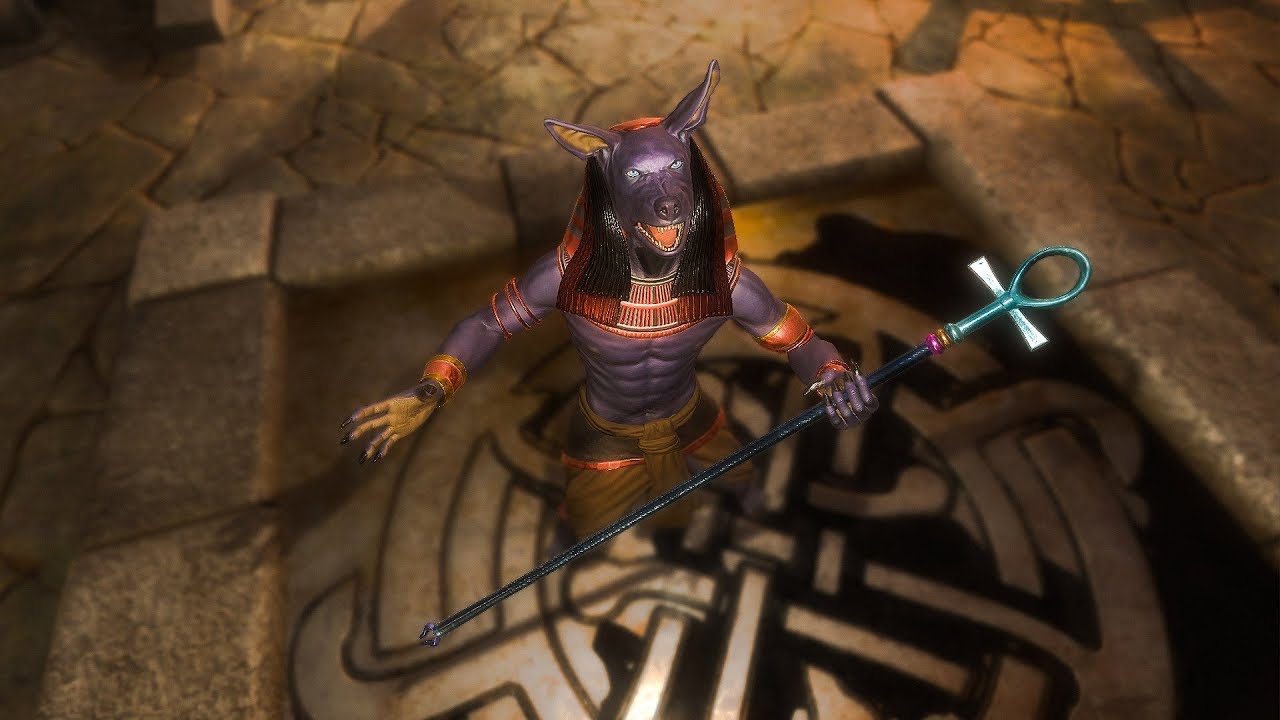
Anubis Pack PBR is a highly detailed PBR character featuring the ancient Egyptian god Anubis. Details have gone into this character that will probably be invisible in most game – fine movements of the eyes, the snout, and even how the ankle bracelets react to animations.

This is a great addition to the Egyptian theme, starting with the Mummy & Sarcophagus Pack PBR. He features a Humanoid rig (re-targetable to and from other humanoids!) with a staff as his main weapon. The staff is held with two hands, although he also uses it one-handed at times. It can be replaced with any other staff or spear for even more customization.

Texture Customization
Take control of the models, and make them match your project. Use the included Substance Painter source files to create custom textures in minutes, exported to work with Unity using a single click. Works with HDRP and non-HDRP projects!

Of course if you don’t have any interest in creating your own textures, I often ship my packs with multiple texture options that are ready to be used out of the box. If you sign up at InfinityPBR.com there may be more downloads availalbe for free.

Mesh Morphing
Blend Shapes give you the power to change the physical mesh of the model, often creating characters that look very different from the default. Our editor script will expose specific Blend Shapes in the Inspector, with sliders to change the values. You can even code the changes. That means your players can customize the mesh of their character, or spawned enemies can be given random values so each is different from the next.

Sound Effects
We include sound effects to go with the animations. These are created by sound designers specifically for Anubis Pack PBR, often using practical foley recordings. We often include variations, so each time the sound is triggered, a script will randomly choose one of the variations to play. And sometimes we include multiple layers of audio, so you can mix and match and create the right effect for your game.

The included script makes it easy to play clips & loops called via Aniamtion Events or other trigger methods. Options include multiple clips (randomly chosen), volume levels & modifications for volume by velocity, as well as the ability to play clips only some of the time. This way, for example, enemies can grunt during their idle loop, but only as often as you want them to.

Re-Mixable Custom Music
A composer has creates original tracks to accompany these packs. Some tracks are more like Theme Music, while others are more Ambient, or anywhere in between. Music is always included in layers. Each stem, often a single instrument, can be used in the Unity Audio Mixer so you can create your own mixes. The Demo scene will include a selection of Snapshots ready to be used, as well as scripts showing how you can modify the sound during gameplay.

The music can now adapt to your game. Fade to another snapshot based on in-game variables such as Player Health, Time Remaining or whether the game is Paused or not. While a Composers Mix is always included if you do not want to mix your own tracks, we urge you to try it out. The power you have is insane.

This video showcases 20 second clips from each of the included game-ready mixes. You can create your own mixes quickly and easily, and export them into .wav files with a single click!

Concept Art
You know what often separates the AAA studios from you? Their advertising channels are full of concept art, and yours isn’t. As far as I know, there are no other Asset Store packages that include Concept Art. Using this, you can populate your website, Steam page, Facebook feed, Twitter, with compelling artwork to excite your fans before you have a game to show.

At least 3 images are provided in both PNG & Photoshop format. The Photoshop files are layered, so you can turn on/off body parts and armor whenever possible, or modify the color or look for some layers but not others. These images are ultra high resolution.

Animations
Realistic animations are important. I don’t know about you, but when I swing a bat real hard, my whole body moves. So if a character swings their sword, I think their whole body should move too. The world they live in may be fantasy, but we work to make sure that the perceived physics of the animations are realistic and highly detailed, including facial & wardrobe animation when possible.

• Attack 1
• Attack 2
• Attack 3
• Attack 4
• Attack Idle
• Attack Idle Break
• Attack Idle to Guard Idle
• Cast
• Death
• Dodge
• Got Hit
• Guard Idle
• Guard Idle Break
• Guard Idle to Attack Idle
• Tuant
• Walk
• Walk Backward

Humanoid & Spears
The Anubis, although he’s got the head of a dog, is set up as a Humanoid, so his animations can be used with other humanoids, and other humanoid animations can be used with him.

The staff he uses can also be replaced with any other staff or spear as well.

YouTube Videos

This is the demo of our first Demo Scene. It showcases the animations as well as the included texture sets.
Demo of the sound effects

About Infinity PBRI made a 30+ hour RPG using all Asset Store artwork. Without the Asset Store, that would have been impossible, and I am forever grateful for the artists who published their work. But I wanted more. I wanted more than just a few texture types. I wanted audio specific to the animations – and I wanted animations that were realistic. I wanted the ability to change the look of my creatures, and dress my characters in a variety of clothing. And I wanted all of that wardrobe to be itself customizable. I wanted high quality PBR mateirials.

Infinty PBR includes work from over a dozen artists, each specializing in their specific area.
My goal is to provide you with packages that are more than what you’ve ever been exposed to before. Concept Art to help you market your work, Mesh Morphing & Texture Customization to keep things exciting in your game while also helping differentiate your game from others who use the same Asset Store packs. Animations & Sound Effects that feel real and bring characters to life. Music that can be adapted to fit the mood of your game, your scene, and your players.

If you think what I’m doing is valuable, I urge you to subscribe to all of my work. You can sign up at InfinityPBR.com, and you can choose to get all new characters for just $30, the day they’re released. You get a huge discount, often over 50%, and I get a budget to work with. If enough of you sign up, I’ll not only be able to continue making more character & environment packs, but I’ll be able to contract with more high quality artists to produce everything faster, add more animations, more wardrobe and all that. Thank you for your support!

Unity Asset Store
https://assetstore.unity.com/packages/top/assets/75983

InfinityPBR.com
https://www.InfinityPBR.com/?pack=anubis

The Anubis Pack PBR is now available exclusively @ InfinityPBR.com (will be available @ the asset store once they approve the package)

Anubis Pack PBR is Now Available on the Unity Asset Store!

Anubis Pack PBR now features Mesh Morphing! Use sliders to customize the physical mesh of the body, face & wardrobe. Create brand new looks, saved as prefabs, in preset files, or even code it all at run time!


I’m about to get the Anubis… It looks like an excellent package with great customization options.

What’s the ETA on the Egyptian pack?

I’d love to see other Egyptian gods or creatures like Bast (similar to Anubis but with a cat head and female body), Horus (eagle head), Thoth (Ibis head). These would all work in an upcoming project I’m doing.

1 Like

Once there are three characters I can make it into a pack. The next will probably be a sphinx character – a statue that can come alive. And a scarab beetle is on my list. But the other gods sound cooo and I’ll check them out

Don’t forget Sobek! I had this notion as well, but after all of that excellent facial blend shape work, having a variety of animal heads seems like it’s asking for too much. Maybe an add-on pack?

I think each one being a separate character would be best. Not only can we then get more wardrobe, but we can add more interesting features. I’d not heard of Sobek before, but looking him up, I’d imagine that featuring scales down his back, stuff like that, would be really cool.

They do seem to all have very very similar wardrobe…but I’m sure we could play around and make them unique.

1 Like

Concept Art is now available! Download it at http://www.InfinityPBR.com

You know what often separates the AAA studios from you? Their advertising channels are full of concept art, and yours isn’t. As far as I know, there are no other Asset Store packages that include Concept Art. Using this, you can populate your website, Steam page, Facebook feed, Twitter, with compelling artwork to excite your fans before you have a game to show.

At least 3 images are provided in both PNG & Photoshop format. The Photoshop files are layered, so you can turn on/off body parts and armor whenever possible, or modify the color or look for some layers but not others. These images are ultra high resolution.

Anubis Pack PBR now features Adaptive music! The track, “Protector of Tombs” has been composed specifically for this package. It comes with 10 mixes already (including the Composers mix), and you can quickly re-mix your own versions in the editor. When you’re ready, one click will export all mixes to game-ready .wav files!

Hello I just purchase this very nice asset, Im try making deferents heros from anubis but I dont see how I can save all the modifications as a prefab, do you have any tutorial? any tip helps. Thank you

I make many modifications to anubis, but How I can use that modifications? where are they save? or how I can save this new anubis? can you please explain step by step? Thank you

Hey! I’m on a vacation for the next few days with the child, so I can’t look up the best videos on my YouTube right now.

But the easiest way is to use the demo scene, and use the blend shape scripts in the demo character, then drag the character as you want it to anywhere in the project window. This will save it and its settings as a prefab.

You can also use the blend shapes script to save a “blend shapes preset file”, check the inspector window for that. It will allow you to load the settings via script if that works better for your project than prefabs.

Andrew

Hi - I’ve recently downloaded the Anubis pack from your website - the artwork and customization are stunning - it’s an amazing asset.

However, all the animations seem to be broken. The demo scene for example, doesn’t actually do anything - the model is completely static and none of the animation buttons work. Digging through the pack, it looks like the animation files are just missing altogether from the models.

You can reproduce this by simply starting a new project, importing the Anubis asset and looking at the model files.

Given that you’ve got videos of the Anubis character fully animated, I presume that something has just gone wrong with the upload - can you please take a look ASAP and let me know when I can re-download the asset with everything in place?

Hi,

I’m re-uploading the package, just in case – should be done in about 10 minutes. however the file size is the same, so something else may be going on.

The animations are attached to the model .fbx files, so if you see the model, then you should have the animations, and the demo should be working. I did check the scene to make sure, and it’s fine on my end.

What version of Unity are you using?

Many thanks for the quick response. Unfortunately exactly the same issue occurs with the new download.

Repro scenario:
– Download fresh install of Unity 5.6.3f1
– Start new project.
– Import AnubisPackPBR

Ah - I’ve just noticed that there are import warnings. With just the above steps I get the following warning on import:

“File ‘Anubis Demo’ avatar creation failed: Transform ‘L_eye 1’ for human bone ‘LeftEye’ not found”

Likewise clicking on the “Rig” button in the Inspector with the imported fbx shows exactly the same message (but categorising it as an “Error found while importing rig in this animation file” - and then the same text about the eye). Does that help you diagnose the issue?

[NB. I have some of your other models, and the animations all work fine with them - it’s just this one Anubis file that seems to be broken.]

That’s the error – I’ve created projects in 5.3.4, 5.6.x, and 2017.1.x

The error didn’t happen in 5.3.4, but did in the later versions.

Seems like something changed in Unity so it’s no longer accepting the anubis rig. I’m going to email the animator and see if he knows what may be happening. Sorry about this!

Workaround! The anubis rig can be set as “Generic” and should work. You won’t be able to retarget other humanoid animations, but it’ll work just fine with the animations we provided it looks like.

Let me know if that works for you. I’ve reached out to the animator either way, so that we can avoid that issue going forward.

That’s great - thank you. The workaround works for me.

One other point I’d noticed - the audio snapshot exporter also doesn’t seem to be working for the Anubis pack. Using the clean Unity 5.6.3f1 install as per the above, if you try and export the audio (by clicking on the button in SFB_AudioSnapshotExporter), then you get the following:

Warning: Exposed name does not exist: ProtectorOfTombs_BassSitar
UnityEngine.Audio.AudioMixer: GetFloat(String, Single&)
SFB_AudioSnapshotExporter:ExportSnapshots(Boolean) (at Assets/SFBayStudios/SFB_Audio Snapshot Exporter/SFB_AudioSnapshotExporter.cs:225

This is then followed by an import asset error as the exported wav file is 0 size. Again, exporting the audio works fine for me for other packs of yours, but just not for this Anubis pack. Any ideas what could be causing that?

1 Like