[RELEASED] Imposter System OPTIMIZATION

THIS THREAD IS DEPRECATED

Finally IMPOSTERS in Unity! Imposter System in a few clicks will speed up your scene 20 times! System replace complex 3D objects with 2D sprites (imposters).
Now available on ASSET STORE!!!
(full source code)

Unique features of Imposter System:

  • Fully realtime
  • Works with multiple cameras(VR support, see known issues)
  • Works with non-static objects
  • Internal imposters mesh combining, allows to render 4k objects with one drawcall
  • Super fast water reflection
  • Fading between imposters

Some of the advantages of Imposter System:

  • Full source code included

  • Increases FPS in the scene 20-30 times

  • No preprocessing

  • Works on any platform

  • Easy to install

In the future:

  • Viewport imposters (v1.3)
  • Terrain-like imposters (v1.4)

Your feedback may change the priority of development

Known issues:

  • Unity 2017.2 and patches of 2017.1 - incorrect work. Problem: unity bug in Instantiate() method. Workaround: set ‘isStatic’ field of ImposterController to false and hit ‘Apply’.
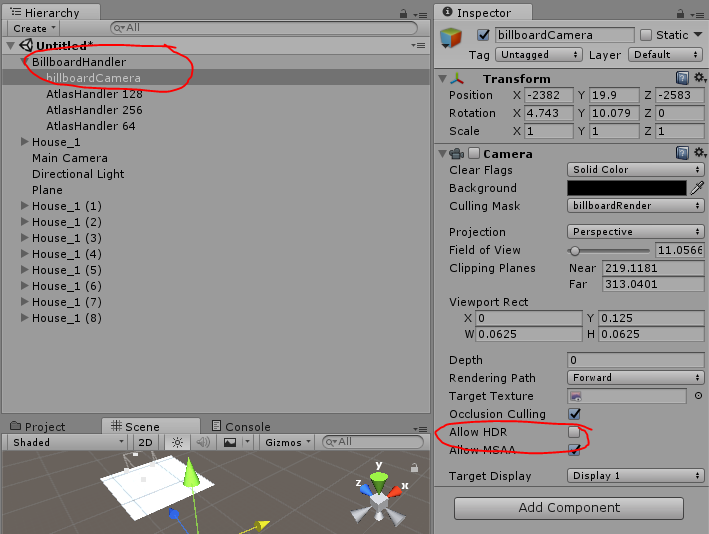
  • Unity 5.6 and later - incorrect rendering. Fix: disable “Allow HDR” on imposterCamera gameobject.
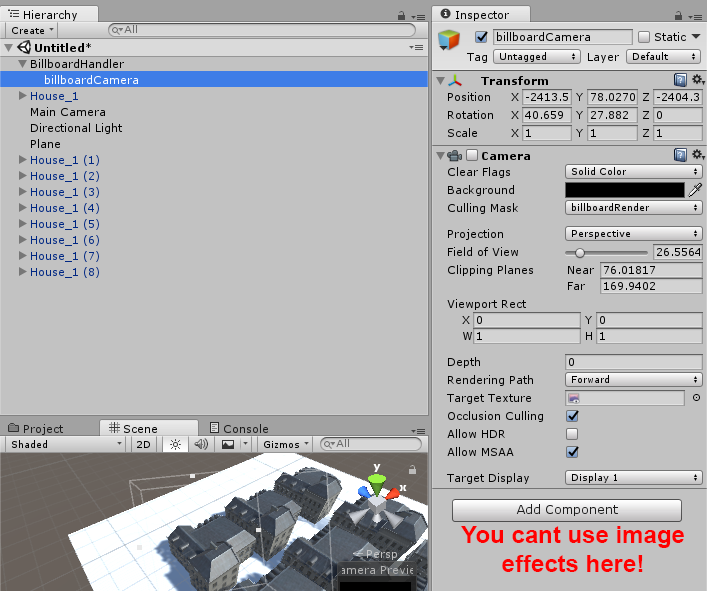
  • You cant use image effects on ‘imposterCamera’ otherwise you will have incorrect atlas rendering.
  • VR doesn’t work with native VR integration like in Unity5.6 and later due to the limitation of changing fieldOfView on cameras.

Links:
YouTube playlist

Video:

https://www.youtube.com/watch?v=VR0LWH9jmzo
https://www.youtube.com/watch?v=bHBVkwpnZBg

New version development:
https://forum.unity.com/threads/wip-impostors-2019.759110/

4 Likes

Полезная вещь!
Думаю, если совместить с Occlusion Culling, то результат будет весьма фееричным.

Very impressive, I will definitely follow this thread :slight_smile:

A smooth transition between 3d model and billboard could be useful, because I think it’s really hard to get an instant trnasition between model and billboard where the play really sees absolutely nothing.

1 Like

Very nice. Is each billboard its own gameobject (or graphics.drawmesh)?

Each billboard its own gameobject because graphics.drawmesh quite slowly when 2000 GO on the scene.
Test:

  • Drawmesh - 75 FPS.
  • MeshRenderer - 120 FPS

Thanks for the reply!
Here is video that shows “transition between 3d model and billboard”.

https://www.youtube.com/watch?v=kikW7U2xJZI

I think its hard to see when actually the transition occurs.

One bad point is the transition between billboards. I think I will add smooth transition for billboards in future.

1 Like

Check out NEW demonstrational video!!!

Realtime Billboard System with Directional Light 4100 OBJECTS.
Duration of the original video - 15 minutes. Billboards are updated every 8 seconds.

1.How can down?
2.Can be affected by GI?
3.Memory usage will increase?
4.Shadow how to deal with?
5.The far people how to into the room

New video about Realtime Billboard System OPTIMIZATION!!! Check this out!!!

1 Like

Now you can try Realtime Billboard System for FREE!!!

TRIAL VERSION

Here is new DEMO!!!
Try it out!
(for max performance use fullscreen mode)

1 Like
  1. “How can down?”
    Currently system in revision in Asset Store, but you can download TRIAL VERSION and buy asset directly from me.
  2. “Can be affected by GI?”
    It’s works like a normal unity rendering. Anyway, do you really need GI for very far objects?
  3. “Memory usage will increase?”
    Yes, memory usage depends on detalisation level. For example: ‘example’ scene with 4096 objects use only 24 MB - this is for one RenderTexture with size 2048x2048.
    3153638--239768--memory usage.PNG
  4. “Shadow how to deal with”
    In future you will can enable shadow rendering and maybe shadow casting.
  5. “The far people how to into the room”
    How to start work with asset? I shared video tutorial where you find how to work with this asset.

https://www.youtube.com/watch?v=Zhbu1lOto0M

Currently I’m working on new feature of Billboard System.
Check this out!

So, today I made a little research. I was looking for competitors and I found them! Real Imposter LOD optimization - very similar to my Billboard System Optimization, but has many defects.
For example:

  • works only with one camera
  • produce one draw call for every single object
  • doesnt work with transparent object
  • creator stop developing.

Billboard System Optimization does not have such problems.

But that’s not all!
According to this posts:

I must change the name of my asset to something like ‘Imposter System Optimization’… I’m very confused!
So, I asking You, guys: What you think about changing the name?

1 Like

Tested and works fine in editor without lags .Real Imposter LOD optimization had lags .I will test it more

wow… Where you attach post processign image effect? And what is that image effect? What version of Unity?

Problem still exist after remove it.
So i think problem was not post effects

After removing all Post Processing Stack components from all cameras
Unity 5.6.1p4

So what version of Unity?
if Unity 5.6 or later Fix: disable “allowMSAA” on ‘billboardCamera’ gameobject.