Think I need more info…What is not working?
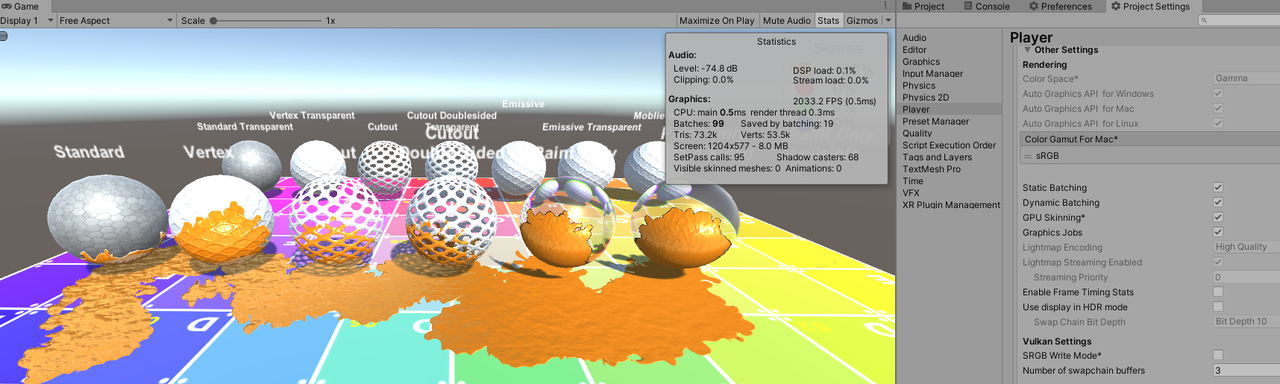
I enabled static/dynamic batching, set all objects as static…
Hitting 2000+ fps in editor…
Think I need more info…What is not working?
I enabled static/dynamic batching, set all objects as static…
Hitting 2000+ fps in editor…
Sorry for long reply!
I recorded a video.
At the end of the video i showing my statically batched scene and how it looks in a frame debugger after painting
Ok, I see…this is what I think is happening.
When you first paint an object, a new texture is created and a new material instance is created.
This will break batching since the objects are now using different materials.
The only fix I see is to merge your objects into a single mesh.
Which is a good idea anyway, for example…
say you have 50 small rocks in the scene.
much better to combine them, and put 1 paint target on it instead of 50 and hope it batches.
Hello!
I try to use you asset with obi. But I cant find “PaintManager” which need for first step.
Where is it?
Updated:
Sorry, just find it in separate package in Paintz/Extensions folder
You have to import the “Paintz\Extensions\Obi.unitypackage” folder.
*This is not included in the free version.
This is included as a package because without Obi installed it would cause errors.
Customer Request added for next version: Baked Paint
Quick video of baking paint…
*Simply select object, click “Setup for bake”
Enter Playmode…and Paint
*Baked textures can be auto updated or manual updated

Hey, I’m new to this functionality, and Obi fluids, and I just wanted to be sure that this requires the Obi package. My team bought this not knowing, and before we buy the Obi Fluids package, just wanted to double check that it is required. Kinda wish it said this on the main page or somewhere to make sure customers are factoring in both costs. Thanks! 
it says “Obi Fluid Support/Extenstion”…obviously we can’t include another paid asset.
It is NOT requried. buy Obi Fluid if you need the fluid simulation, and we provide a way to paint it.
Does this work in HDRP?
Not out of the box, nobody has ever requested HDRP support…only URP.
I did a quick test, and took the URP shader graph and replaced the output with HDRP.
It worked, but would require alot more polish to release.

@bocs Hi there! I was curious if Paintz worked well in WebGL?
1st Post has WebGL demo, see how it works for you.
Thanks for the reply! Sorry I missed it in the post!
The demo works as expected in Firefox. But doesn’t load in my chrome and only gives me the blue channel in Safari. And it doesn’t paint like it did in Firefox, it only turns the whole material to the paint color.
@bocs Quick question, can Paintz’s splattered textures be changed in runtime? i.e. if I have an image texture I want to place on the splat, can I have an image be on the surface of a splat (and alpha’ed as the splat is alpha’ed) Or are they only flat colors with the edges normal mapped? Is there a UV that is accessible from the runtime splats? If so how does that work across objects?
Also separate question, can the depth be modified both higher/thicker and negative depth too?
And how is performance on mobile/VR for URP? Any gotchas?
I’m also assuming your test scene script in the demo first post here is included?
thanks!
Paintz uses a Sign Distance Field as the splat brush/texture. This is why a hard limit on colors, 1 per channel (RGBA)
The reason for SDF is so you get smooth round at any resolution texture. If you need Image splats a decal system would be more suited.
It uses and requires Lightmap UV’s.
Performance is good, it is just another texture mixed after painted. Memory would be the biggest concern for mobile.
Yes, the scene and script is included.
If anyone needs an update to use Obi Fluid 6, just contact me.
*The current version included was for Obi Fluid 5
hi, trying to make a game using this asset, that includes invisible items. Could you please give me a hint on how to make the invisible wall you are having on your video?
Just use Paint Only or Paint Only Double Sided as the Material shader


