[RELEASED] RimGui - Code-Driven GUI Library

RimGui

Links

AssetStore Page
Demo
Demo2
Github
Introduction | RimGui

Introduction

RimGui is an easy-to-use, code-driven Immediate Mode GUI library built from scratch for rapid iteration, rather than extending existing UI Toolkit or uGUI.

I’ve often found existing GUI libraries frustrating to use:

  • Building UIs usually involves tedious drag-and-drop operations
  • Even simple UI can involve a lot of boilerplate code
  • Adding, removing, and managing UI elements like buttons can be a hassle
  • Registering and unregistering events like click handlers takes unnecessary effort

With RimGui, there’s no need to build UIs with drag-and-drop or manually manage the lifecycle of UI elements.

You can render them with very concise code, like Gui.Button().

Works with all Unity versions 2021+ including 2021, 2022, 2023 & Unity 6.

Render Pipeline Support

  • Supports Built-in Render Pipeline, URP, and HDRP.

Customizable

  • Easily tweak various parameters to fit your needs.
  • You can even render freely from the triangle mesh level for complete control.

Cross-platform Support

  • Works not only on PC but also on WebGL and mobile platforms.

Font Support

  • Supports custom fonts and texture atlas generation.

Optimized Immediate Mode GUI (ImGui)

  • Designed with minimized GC (Garbage Collection) allocation.
  • Draw calls are reduced by using a single Shader and Material, and by consolidating all images, including text, into one Texture.

Build UI Rapidly with Code Only

  • To add a slider, just write a single line of code—no drag-and-drop required. To remove it, simply delete that single line.

Flexible Scalability:

  • You can easily change the size and scale of UI widgets, making it simple to support multiple resolutions. This enables optimal UI display across various screen sizes.

It’s not designed for GUIs that require flashy effects, but it’s perfect if you need a simple and clean interface.

Example Code

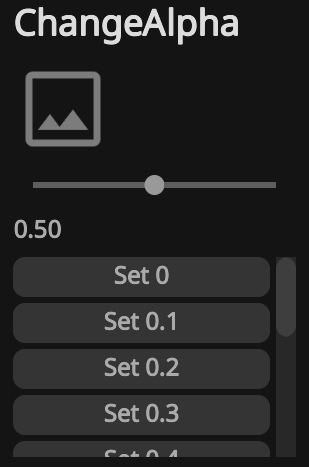
Gui.Heading("ChangeAlpha");

using (ImageColors.Begin(new Color(1f, 1f, 1f, alpha)))
    Gui.Image(Sprite);

Gui.Slider(ref alpha, 0f, 1f);
Gui.Text(alpha.ToString("F2"));

if (Gui.NextHeight(100f).BeginScroll())
{
    for (int i = 0; i < 11; i++)
    {
        if (Gui.Button($"Set {i / 10f}"))
            alpha = i / 10f;
    }
    Gui.EndScroll();
}

The following UI is displayed by the code above.

Goals

  • Easy-to-use GUI library
  • Rapid UI creation
  • Simplicity
  • High performance
  • Usable not only for debugging and tools but also in actual games
  • Minimal dependencies

Non-goals

  • Support for GUIs with heavy visual effects

Features

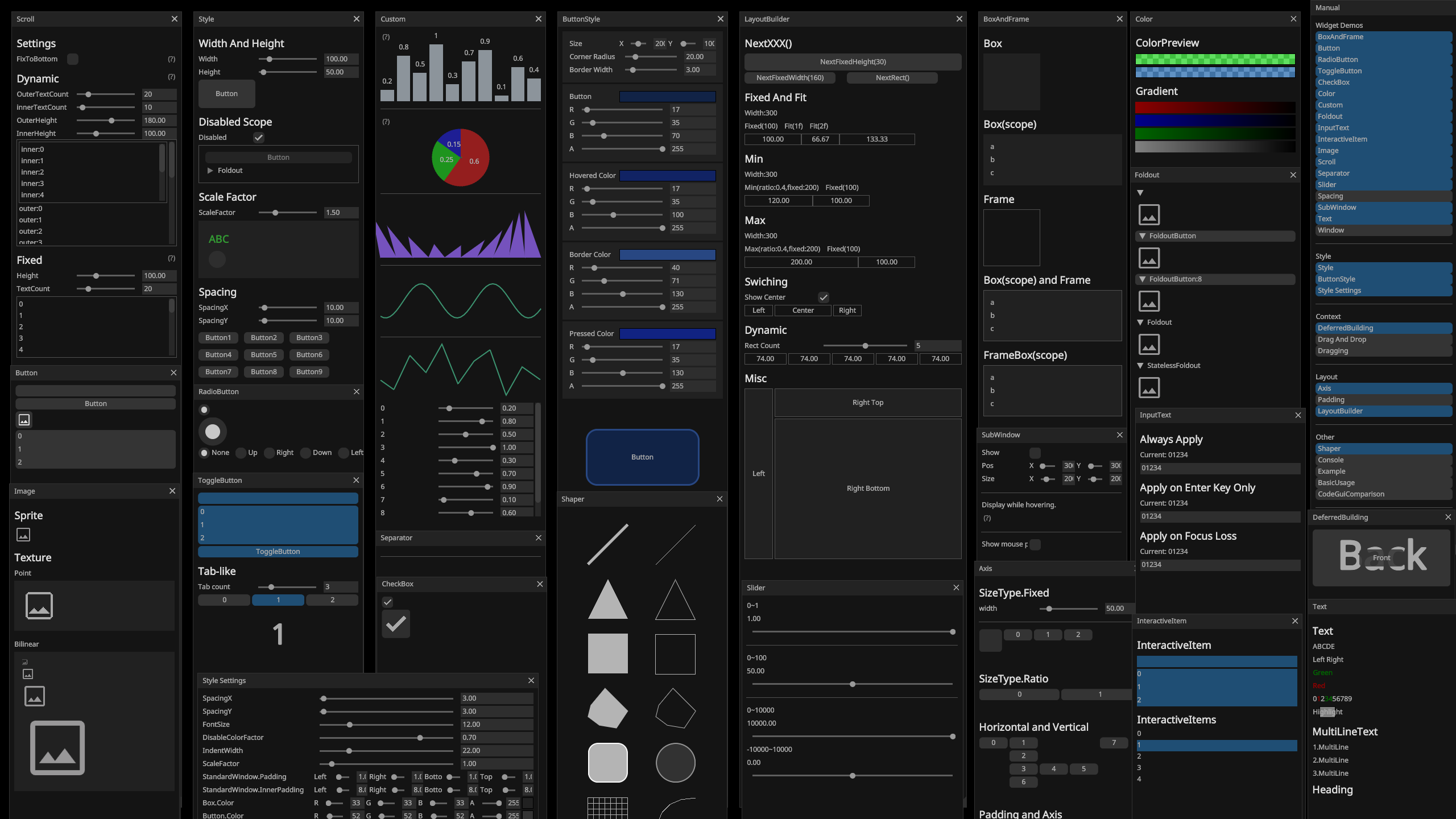
  • Box
  • Button
  • ToggleButton
  • RadioButton
  • CheckBox
  • ColorPreview
  • Custom
  • Foldout
  • Frame
  • InputText
  • Scroll
  • Separator
  • Slider
  • Sprite
  • Text
    — Various numeric types
    — bool
    — char
  • Splitter
  • Texture
  • Window
  • Heading
  • Spacing
  • InteractiveItem
  • Drag and Drop
  • SliderNumeric
  • VerticalBarHandle
  • SnapVerticalBarHandle
  • RectInnerPointHandle
  • SnapRectInnerPointHandle
  • Hyperlink
  • Label
  • ComboBoxButton
  • SlidePad
  • EditableText
  • Dropdown
  • InputDropdown
  • DragInput
  • Input
    — Various numeric types
    — char
    — bool
    — Vector2
    — Vector3
    — Vector4
    — Vector2Int
    — Vector3Int
    — Rect
    — RectInt
    — Bounds
    — BoundsInt
    — Color
    — Color32
    — HsvColor
    — Utilities for drawing tree
  • And many more!

Rendering

  • Line, Anti-Aliased Line,Closed Anti-Aliased Line
  • Triangle
  • Rectangle
  • Circle
  • Grid
  • Anti-Aliased Convex Polygon
  • BezierCurve
  • Text
  • Texture
  • And many more!

Differences Between Unity IMGUI and RimGui

  • High-Performance Design: RimGui is designed for high performance, including efforts to minimize GC (Garbage Collection) allocation. It also reduces draw calls by using a single Shader and Material, and by consolidating all images, including text, into one Texture.
  • Modern Rendering Pipeline Compatibility: RimGui is compatible with the URP (Universal Render Pipeline) and HDRP (High Definition Render Pipeline), enables seamless integration with the latest Unity projects.
  • Wide Platform Support: RimGui supports a diverse range of platforms, including PC, Mobile, and WebGL, allowing you to target your desired environments without limitations.
  • Flexible Scalability: With RimGui, you can easily change the size and scale of UI elements, making it simple to support multiple resolutions. This enables optimal UI display across various screen sizes.

Support

If you have any bugs or feature requests, please submit them via this page.
You are also welcome to post them in this Discussions.
For direct support, you can reach us at support [at] gridrand [dot] com.
2 Likes

I’ve released version 1.1.0, which includes a setting to make Foldouts open by default, the ability to enable or disable input to the GUI, and several bug fixes!

Added

  • Implemented setting to make Foldouts open by default.
  • Implemented methods such as LabelInputUShort().
  • Implemented Shaper.AddTriangle().
  • Implemented Context.IsInputEnabled().
  • Implemented Context.EnableInput().

Changed

  • Simplified code around ITreeNodeHandler.
  • Changed exception messages.
  • Refactored CustomDemo.
  • Renamed LayoutDemo to LayoutBuilderDemo.
  • Renamed BoxDemo to BoxAndFrameDemo.
  • Renamed Style.RawStandardHeight and made it configurable.
  • Adjusted values in StyleDemo.
  • Adjusted style values for Heading.
  • Added space between Slider and InputText.
  • Moved padding settings from the base class to each individual class in Style.

Fixed

  • Fixed mistakes in TreeDemo.
  • Fixed bug in Gui.LabelInputBool().
  • Fixed bug where handle in ColorPicker and HueBar could go below the bottom edge.
  • Removed OverrideFoldoutStatus.
  • Fixed issue where the “G” in RGB was cut off.
  • Fixed issue where WebGL build could not be operated on mobile.
  • Fixed incorrect multiplication of ScaleFactor in the manual.

I plan to support major types such as Vector2 and Rect.

Released version 1.2.0!

This release includes support for Vector2, Vector3, Vector4, Vector2Int, Vector3Int, Rect, RectInt, Bounds, and BoundsInt. We’ve also made changes to the Demo!

2 Likes

Is there a public API reference for this? It’s very interesting but it’s hard to get a sense for all customizability from the demo.

Hello!

There isn’t an API list, but the code used in the Demo can be found within the accordion sections of Widgets and Layout in the documentation.
Box and Frame | RimGui

Having just looked at the documentation, I realize it’s not very clear where the Demo code is located, so I might reorganize it in the near future.

Hi, looks interesting! What are the current features when it comes to text rendering? The demo shows colored text, what about other commonly used text styling such as bold, italic, etc. It would be nice to know what text rendering the asset uses under the hood if possible. Thanks!

Hi!
Thanks for your interest.

Currently, bold and italic text styles are not supported. Text rendering is handled by rasterizing glyphs using StbTrueTypeSharp, a C# port of stb_truetype. The rendered glyphs are written into a texture atlas and drawn as textured quads, which is a fairly common approach.

We’re not using TextMeshPro in order to maintain flexibility and keep the rendering pipeline lightweight.

Thank you for the swift reply, much appreciated.

Are there plans to add support for aforementioned styles and other common text styling features down the line or would this be up to the customer to figure out?

I’m planning to support this feature in the future.
I might implement it either by temporarily switching the font to a bold or italic variant, or by applying the style programmatically.

Hi, I’m considering using rimgui for a Unity-based tool application (not purchased yet), and I have a few questions before making the decision:

  1. Do you have any plans to support R3 or ReactiveProperty integration (e.g. exposing UI events as IObservable)?
  2. You mention that GC is minimal — could you clarify how low the GC allocations are in practice?
  3. Is rimgui intended or tested for long-running tool applications? I’m particularly curious about stability over extended periods of use.
  4. Are there any suggested patterns or features in rimgui for implementing Undo/Redo or input history tracking?
  5. Lastly, could you share anything about your update plans or how actively the project will be maintained going forward?

Thanks in advance — the project looks great!

Thank you for your questions and for taking the time to look into this library!

  1. I currently don’t have plans to support R3 or ReactiveProperty. I’m not very familiar with them, but they may not be a good match for the ImGui-style approach.

  2. The library is designed so that after the first run, there are essentially no further allocations, using pooling and other techniques. Not all widgets are allocation-free yet, but only a small number still allocate. Reducing allocations to zero across all widgets is a future goal.

  3. I haven’t observed any memory leaks, even during extended use.

  4. Undo/Redo functionality has not been taken into account in the current design. That said, I’d like to support it in the future.

  5. To start with, I plan to focus on fixing bugs and improving usability. Polygon anti-aliasing is also on the roadmap, though I’m not sure yet when it will be ready. While all widgets are currently accessible through Gui.XXX() methods, the Gui class now contains over 100 public methods, so I’m planning to split it into two classes to better structure the API. I can’t guarantee how frequently updates will be released, but I use this library daily myself, so I intend to continue working on it actively.

Thank you very much for your detailed and thoughtful reply — I really appreciate it!

It’s great to hear that you’re aiming for zero allocations and that the library has been stable even with long-running usage. That gives me a lot of confidence in using it for tool applications.

Understood about R3 and ReactiveProperty — I’ll consider handling that side separately if I go that route.

I’m especially excited to see that you’re actively using and improving the library yourself. Looking forward to future updates like polygon anti-aliasing and the API refactor!

If I may ask just a few more things:

  • Do you have any recommended practices for integrating rimgui with asynchronous operations (e.g. file I/O, long-running tasks)?
  • I’m also curious what kinds of apps or games rimgui has been used in so far — even just the types or genres would be helpful.

Sorry to keep asking questions — I really appreciate your time and generosity in answering!

Thanks again — I’m looking forward to working with rimgui!

Thank you so much for your kind words!

Regarding integration with asynchronous operations (like file I/O or long-running tasks), there aren’t any specific best practices unique to RimGui at the moment. It might be helpful to look at how other immediate-mode GUI libraries (like Unity IMGUI or dear imgui) handle async patterns, as similar principles should apply.

As for usage in real-world apps or games — since RimGui was only released about a month ago, there aren’t any known examples of it being used in production yet. At this point, it’s mostly just the tools I’m building personally for my own development work.

Thanks again for your interest and thoughtful questions!

Thank you again for your thoughtful reply!
I really appreciate your honest and clear explanations.

This has given me a solid understanding of where the library currently stands and where it’s headed. It’s been incredibly helpful for deciding how to approach my tool’s UI, and I’m looking forward to future updates.

Thanks once again — I’ll be cheering you on as development continues!

RimGui 2.0.0 and RimGui Extensions Have Been Released!

We’re excited to announce the release of RimGui version 2.0.0 and RimGui Extensions!

We’ve migrated some of RimGui’s functionalities to RimGui Extensions, and as a result, we’ve significantly reduced the price from approximately $97 to about $28. Although a certain amount of functionality has been moved to Extensions, this is an aggressive price setting, and we plan to increase the price once a certain number of units have been sold.

For those who purchased RimGui prior to the split with Extensions (RimGui 1.2.0 or earlier), we will provide you with a free voucher for Extensions. We apologize for the inconvenience, but please send your invoice number to support[at]gridrand[dot]com.

Key Changes in RimGui 2.0.0:

Added

  • Added support for setting the frame color during press in RadioButtonWidget

  • Added support for setting the frame color during press in CheckBoxWidget

  • Added CanInteract() method to Context as a replacement for the removed IsValidPointerIn()

  • Added BeginVertical() and BeginHorizontal() methods to Context for consistency with BeginAxis()

  • Added BeginIndent() and EndIndent() methods to Context to match naming with other scope methods

  • Added IEquatable<Padding> implementation for the Padding struct

  • Added SliderStyle.TrackThicknesses

  • Moved AdvanceFixedScrollItem() from Gui to Context to maintain separation between layout and drawing logic

  • Added InteractiveItemStyle.HoveredColors

  • Added Context.IsWindowInteractive() method

  • Implemented anti-aliasing support with Shaper.AddLineAA(), AddClosedLineAA(), and AddConvexPolygonAA()

  • Allowed setting the selected mark color in RadioButtonWidget

  • Made Gui.BeginFixedScroll() allocation-free

  • Introduced ColorPreviewStyle and added Style.ColorPreview

  • Added Gui.BeginInteractiveItem() and Gui.EndInteractiveItem()

  • Added Context.MarkLastDropTarget() method

  • Added parameterless overload for Gui.CustomDelegate()

Changed

  • Reordered the constructor and fields of HsvColor to follow the order h, s, v, a

  • Renamed CompositeScope to CompositeWidgetScope

  • Renamed all IsXXXThisFrame() methods such as IsLastPressedThisFrame() to WasXXXThisFrame() for accuracy

  • Removed the Is prefix from WidgetStatusFlags.IsHovered and IsPressed

  • Updated button behavior to properly handle click events

  • Renamed IReadOnlyKeyContext to IReadOnlyKeysContext

  • Renamed IInputContext.KeyContext to Keys

  • Improved Gui.SlidePad() to ensure WasLastPressed() and similar methods return correct values

  • Modified Gui.FocusedInputText() to accept initial text as ReadOnlySpan<char>

  • Changed the slider handle shape to a circle

  • Renamed SliderStyle.HandleHalfThicknesses to HandleRadiuses

  • Removed Gui.LayoutBuilder and moved its functionality to Context

  • Changed the return value of Gui.InputText() to InputTextResult

  • Removed Gui.HorizontalGradient() as it was a redundant helper for Gui.Gradient()

  • Updated ToggleButton to use ToggleButtonStyle instead of ButtonStyle

  • Renamed Context.GetTargetWindowId() to GetInteractableWindowId()

  • Removed GuiMeshMaterials

  • Made the check mark in CheckBoxWidget thicker

  • Removed GuiAssets.PerfectCircleSprite as it is no longer used

  • Updated ButtonWidget, ToggleButtonWidget, and CheckBoxWidget to render based on BorderWidth, BorderColor, and CornerRadius

  • Renamed CheckBoxStyle.Thicknesses to BorderThicknesses

  • Modified ScrollBarWidget to render using CornerRadius

  • Added spacing between the scrollbar and the scrollable area

  • Enabled anti-aliasing for FoldoutTriangleWidget

  • Refined foldout widget behavior

  • Unified field naming to PascalCase for all public static readonly fields

  • Implemented implicit conversions between Gridrand.Contracts.Vector3/Vector3Int and UnityEngine’s types

  • Renamed Vector2.UnitPerpendicular() to UnitNormal()

  • Optimized IFigure.IsInside() to avoid GC allocations

  • Fixed a typo in Vector2.GetSqrMagnitute() by renaming it to GetSqrMagnitude()

  • Updated Gui.CustomDelegate() to support NextWidth(), NextHeight(), and NextRect()

  • Removed FixedSizeWidgetStyle due to unclear extension pattern

  • Removed RadioButtonsWidget which lacked support for flexible layout and multiple selections with [Flags]

  • Added demonstration of flexible radio button usage in RadioButtonDemo

  • Implemented IEquatable<Color32> for Color32

  • Implemented IEquatable<Color> for Color

  • Updated Gui.BeginFixedScroll() to use style-based configuration instead of fixed parameters for height

  • Renamed ScrollStyle to DynamicScrollStyle

  • Renamed ScrollWidget to DynamicScrollWidget

  • Renamed Shaper.AddHsv() to AddSVPanel()

  • Renamed Gui.Color() to Gui.ColorPreview() to reflect that it shows a checkerboard background when the color is transparent

  • Removed Style.WidgetRects and WidgetRectStack; use Gui.NextRect() instead

  • Simplified internal widget size stacks: WidgetWidthStack, WidgetHeightStack, and SizeStack

  • Updated ScrollView exception messages for clarity

  • Changed Style.EnabledStack to check only the topmost value instead of requiring all to be true

  • Introduced Style.EnabledStack.IsAllEnabled for checking full stack status

  • Renamed Style.IsEnable to IsEnabled

  • Renamed DefaultValue to Default in all scope stack types (DefaultScopeStack<T>, ScaledFloatScopeStack, ScaledPaddingScopeStack)

  • Renamed ILayoutBuilder<T>.BuildRemainHorizontal()/Vertical() to BuildRemainingHorizontal()/Vertical()

  • Updated WidgetInfo.ToString() format

  • Modified Gui.InputText() to always return the displayed text, not only when it changes

  • Removed Context.GetHorizontalRemainRect() due to misleading name and behavior

  • Renamed Context.RemainingWidthInRegion()/Height to GetRemainingWidth()/GetRemainingHeight()

  • Renamed Context.GetRegionCurrentRect() to GetCurrentRect()

  • Removed redundant GetRemainRect() and GetCurrentRegionRect() from Context

  • Renamed Context.GetCurrentRegionWidth()/Height() to GetCurrentWidth()/GetCurrentHeight()

  • Simplified the API for fixed-size scrolling

  • Split demos for RadioButton and ToggleButton from ButtonDemo

  • Implemented a tab-like example using ToggleButton in ToggleButtonDemo

  • Removed TabSetWidget in favor of flexible usage of ToggleButton

  • Made InputTextStyle.UnderLineColors configurable via StyleSettings

  • Added Context.SetNeedNextSpace() for spacing control

  • Brightened default widget colors for better visibility over boxes

  • Adjusted underline color of input text to be slightly darker and style-driven

  • Updated manual font padding

  • Brightened default text colors

  • Renamed IRectDynamicBuilder to IDynamicLayoutBuilder

  • Enabled loop-based flexible layout building in IDynamicLayoutBuilder

  • Changed Context.AllocateRect() so that a null width uses the remaining region width

  • Improved the AxisDemo

  • Renamed Int32Parser to IntParser, and UInt32Parser to UIntParser

  • Renamed Context.TrySetDropTarget() to MarkDropTarget()

  • Removed Context.TryDragDropLast() and split into MarkLastDropTarget() and TryDragLast()

  • Made Gui.InteractiveItem() accept a default value for isSelected

  • Darkened HoveredColor slightly for better visibility

  • Made DragDropDemo easier to understand

  • Enabled StyleSettingsDrawer to modify ScaleFactor

  • Standardized naming by removing the plural s from properties like XXXColors in StyleSettingsDrawer

  • Improved exception log message in Dispose() to clarify that the root cause may appear earlier in the log

  • Allowed setting of normal color in InteractiveItemWidget

  • Updated InputTextWidget to disable interaction properly based on style

  • Fixed broken link to Unity Discussions in RimGuiWindow

Fixed

  • Fixed bug in SpriteButton where click behavior was not handled correctly

  • Enabled Gui.NextHeight(), NextWidth(), and NextRect() support in MultiLineTexWidget

  • Fixed incorrect WasLastPressed() behavior after using Gui.SlidePad()

  • Fixed bug in HsvColor constructor

  • Fixed issue in Gui.Custom() where NextRect() had no effect unless shouldAllocateInRegion was true

  • Improved anti-aliasing rendering in RadioButtonWidget

  • Fixed display issues in FoldoutButton

  • Fixed Context.TryDragLast() incorrectly returning true for a mismatched group key during drag

  • Fixed interaction disabling logic in InputTextWidget

As mentioned in our previous post, we will provide a free voucher for Extensions to those who purchased RimGui prior to the split with Extensions (RimGui 1.2.0 or earlier). We apologize for the inconvenience, but please send your invoice number to support[at]gridrand[dot]com.

RimGui 2.0.1 and Extensions 1.0.1 Released!

This update primarily focuses on bug fixes, including those related to Style.ScaleFactor.

RimGui 2.0.2 and Extensions 1.0.2 Released!

Refactored code, mainly focusing on Shaper.

Hello. I am considering purchasing your asset ‘RimGui.’

I would like to ask if World Space UI is supported, and whether you have any plans to add more complex UI elements such as a calendar UI that can display DateTime, or a node view. Thanks!