Cheers Boom, I’m not new to unity or the animator though, I knew what the issue was with it but I was having a hard time navigating the documentation because it’s presented in a way different to what was advertised, and is misleading. I wanted to ask the dev to better explain it in a more tutorial fashion as I believe that would provide a better resource for the customers, but they seem more inclined to pass it off onto unity instead, which I don’t think is a good choice. I’ve already made a big video on it to say what I have to say about it and Unity so I can leave it at that, and I will get back to making my project that has game feel at its core.
@uberwiggett > Just like every requests, if more people ask for it, I’ll consider it, it’s as simple as that. The animation system in the TopDown Engine (and its documentation) is pretty much the same as in the Corgi Engine, and over the last 4 years there haven’t been many requests for more in depth explanations about this specific topic. But you’ve made your point many times now, and it’s been duly noted. And just like everybody else, you can simply ask for something, a feature or more info on something, and I’ll add it to the list.
@uberwiggett If you would have spend the same time making that video as exploring Top-Down engine workflow you’d have never posted the question in the first place.
1 Like
Thanks for the response. A reboot of Unity cleared everything up!
@lobsterhat > I’m glad it’s working now, let me know if you have other questions!
@Necka yeah sure mate.
Edit: btw what you wrote is actually the opposite of what you meant, but I will let it slide as you were originally polite and I appreciate the advice you gave. I’ve prepared 3 beginner tutorial videos for others who might also be confused by the documentation, I will upload them in a few weeks after I move in to my new house.
1 Like
I would also like to request that the character moves in the direction of a click/tap, and stops moving on click/tap release. Similar to the way Hole.io works.
https://www.youtube.com/watch?v=bZ0fJNUSaqc
I am working on a mobile game that should move character continuously in the direction of tap and hold, and stop moving on tap release. The Demo scene moves the character towards the click location, then stops the character at that location. Instead, I want the character to move continuously in a direction, but not stop at a point. The camera should follow the player forever in an endless line. Could you please add this feature?
Thanks
@Smileypop > I’ve added your vote for this feature. In the meantime you can look at the MinimalPathfinding3D demo scene for inspiration if you want to implement it yourself, it’s pretty similar. As for hole.io, I may be wrong but I think they just put a giant, invisible joystick on top of the whole screen, so it feels like you’re tapping to move somewhere but you’re just moving a joystick. There doesn’t seem to be any pathfinding involved, it’s quite basic. At least that’s probably how I’d do it.
1 Like
Purchased it this weekend. Looks great so far. Is the planned feature list available somewhere?
@jolijar > As I wrote a few posts ago : There is a roadmap, but it’s not public, so it’s really hard to find 
The reason for that comes from the Corgi Engine, which has the same system as, back when the roadmap was public, people would buy it for stuff that wasn’t there yet, and then they would complain that these things weren’t coming fast enough. Haven’t had that problem since it’s private
But don’t hesitate to drop me a line if you want to know the status of a specific feature, or if you have suggestions!
Makes sense, I think the features I would like most would be a dialog system and a minimap. Also I think the functionality is already there, but having an NES zelda style combat demo might really help your sales. (if you want I can do a simple art pack you can use if that motivates you)
1 Like
@jolijar > Indeed, it’s already technically possible without adding a single line of code, but having an example of that has already been heavily requested, so it’s on my todo list. I’ll add your vote to that!
Thank you. I very much look forward to your video tutorials. I also share your sentiments on what is going on on your side.
1 Like
Thank you for the suggestion. I will try it. Currently, the joystick knob must be pressed, then dragged to trigger movement. I will see if I can edit it to accept a tap without drag.
If you could add this ability to the engine or Nice Touch in the future, you would probably come up with a more elegant solution than I. Thank you for adding it to the vote list.
I saw the reply to this post in the Corgi thread, so I’m submitting it as an official feature request here:
One-way level mode please. Can already see a Double Dragon clone!
@Boom_Shaka > YES. Absolutely.
@Smileypop > Sure, I’ll add that to the todo list!
2 Likes
I am having a little trouble with the animator. I have my animations setup with a blend tree using xSpeed, ySpeed, and Idle but it doesn’t seem to trigger. The documentation said that those values were already in the engine. Is there some way to initialize them or am I doing this completely wrong? Basically trying to have a different animation for when the character is in motion in each direction and then return to idle when not moving. Thanks.
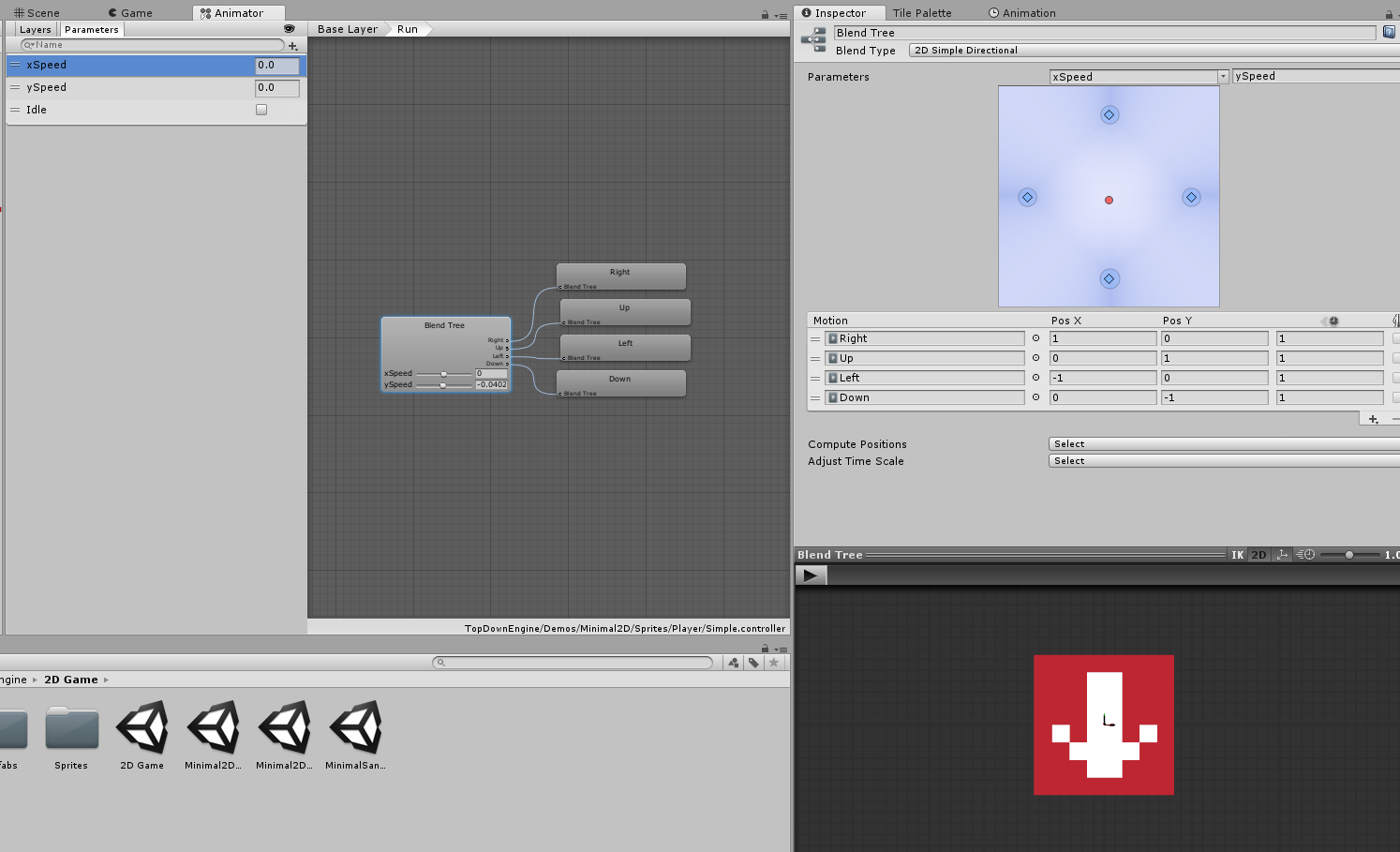
@jolijar > They should indeed work by default. Just tested on the Koala character in the Koala2D demo, and everything works fine :

Things seem fine on your screenshot, but maybe you didn’t bind your animator to your Character component as explained in the documentation? That’s the main reason I can think of why parameters wouldn’t update. If that’s not it, maybe compare with the demo characters for differences, and if that doesn’t cut it send me more details on the support email and we’ll figure it out
I’ve made good progress on the next major update of the engine!
A taste of things to come :

9 Likes
I got the animator working now thanks for the help. I rebound it and it started working. Looks great!