If anyone wants to see the work in progress (or submit pull requests), the repo is here.
We’re not guaranteeing stability or anything at this point - we’ll probably break the save format a couple of times in the comming weeks.
If anyone wants to see the work in progress (or submit pull requests), the repo is here.
We’re not guaranteeing stability or anything at this point - we’ll probably break the save format a couple of times in the comming weeks.
Exactly. I’m just about to submit the scale feature, so keep an eye on the repo;)
I’ve been following this thread and working through the videos and I have to say I’m super excited about this. This is a great collaboration! I’m curious though, if it were to be translated to a runtime (read: during gameplay) version, what would it take?
Keep up the awesome work!
Nice to hear there is interest in Node Editor! 
I already had the same idea and I’m planning to implement it at some point, after finishing features like multiple selection handling, node areas and loading seperate canvases as nodes (perhaps even directly editing them).
It’s not that of a trouble, though. If you look into the calculation code, the few functions responsible for calculation aren’t depending on anything editor related. You could probably just cut them out, paste them into a MonoBehaviour and use them at runtime:)
That’s the huge advantage of using ScriptableObjects as a format!
EDIT to RT:
Sorry, I misunderstood you:O
Calculation of preset canvases and thus feeding new values is pretty easy, described above. Regarding your real question: I’m not exactly sure. After a quick glance at the code, besides the saving/loading part into the AssetDatabase, everything should be portable, I guess. But that’s a thing I probably won’t do, if you ever were to port it, please put it up as a branch on your GitHub repo! 
An update on my progress:
Making immense code restructures, making every function as independant as possible.
Advantages? The system isn’t bound to the main canvas anymore, and multiple canvases opened at once in the same window, editing the same node canvas with different views (SplitScreen) and even nested node canvases will be possible!
Here’s a WIP screen showing nested node canvases in a so called ‘GroupNode’:
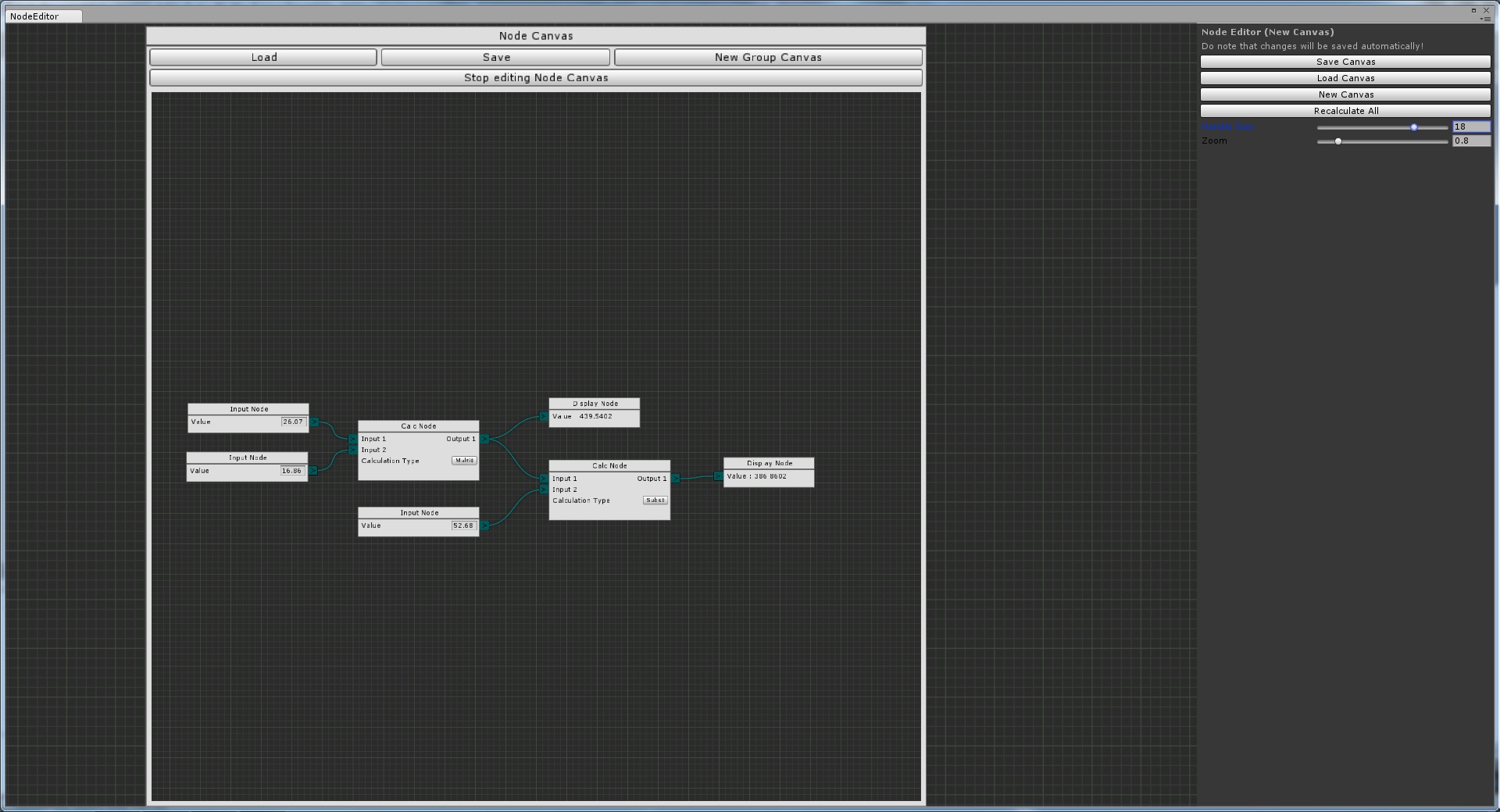
Procedural Inputs/Outputs of it is being worked on.
Do note that, though, what you see there is still WIP and not fully working yet. For example, the clipping rect of the nested canvas is still not correctly transformed.
Besides that, everything is working for now, the nested canvas behaves just like it’s parent.And i could add another group node inside that one and it would still work;)
Best regards,
Seneral
I think the part that frightened my the most was the rendering side. Drawing windows, drawing bezier curves, and other 2D things outside of the UnityEditor namespace seems a bit much. I’m not 100% why Unity didn’t expose the Handles and utilities outside of the editor…
I’m sure there’s an alternative bezier formula out there and I would be glad to use it xD But besides that, I see no obvious reasons why it shouldn’t work;)
So I’ve been looking at the code a bit, and I have a few observations:
[NodeType("Vector3", "Add Vector3 Node")]
[System.Serializable]
public class Vector3Node : Node {
    Create() { ... }
    NodeGUI() { ... }
    Calculate() { ... }
}
using reflection, we can scan the assembly, find all classes annotated with NodeType, and register them appropriately from within Node_Editor, without exposing the Node_Editor’s delicate underbelly to pesky programmers
The piece I’ve left out is the ability to add custom input/output types. I think we could use the same pattern for this in some way. I’m less confident about this design piece, so forgive if it seems silly:
interface TypeConfig {
    string InputKnob { get; }
    string OutputKnob { get; }
    Color ConnectionColor { get; }
}
[InputOutputType("Vector3")]
public class Vector3Type : TypeConfig {
...
   public string InputKnob {
       get {
           return "Textures/My_In_Knob.png";
       }
   }

   public string OutputKnob {
       get {
           return "Textures/My_Out_Knob.png";
       }
   }

   public Color ConnectionColor {
        get {
           return Color.cyan;
       }
   }
}
Again, on startup, the Node_Editor could scan the assembly and “register” each of these types so they can be used in custom nodes ala:
static Vector3Node Create(Rect NodeRect) {
     //...
     NodeOutput.Create(node, "Output Vector3", TypeOf("Vector3"));
}
This way, not only can programmers extend the capabilities, but share them as well with others.
[System.Serializable]
public class Pathway {
   List<Vector3> pathPoints;
}
This could be completely straightforward and I’m just being dense, I just wasn’t able to find it given 15 or so…
Other use cases of walking the graph could be AI behavior. First execute routine at starting node and continue in sequence.
Finally, and this is rather tangential to the implementation itself, but when can you use EditorGUI vs GUI and their respective Layout counterparts?
I hope this isn’t too much at once, I didn’t want to forget anything Again, this really is awesome stuff and I can’t wait to keep going!
Indeed alot, but no problem:)
These are possible alternatives that I’ll consider implementing at some point, but for now, registering it in the main calss has to suffice I guess. I don’t get your fist suggestion, though, as you are giving a Node a type in the attribute… Though, the second one seems to be very reasonable:)
In my point of view making the code modifyable without exposing it is pretty senseless, as it can be found open source here anyways;)
A faster alternative for now, if you really want to hide your code, is to move the Type/Typedata code and the context menu code outside into a seperate, exposed script.
It’s already possible to do something like a walking path, though it’s somehow a hack and not optimised. You can just assign the output you want to ‘walk along’ and leave every other output null in your calculate function, and presuming the following node checks whether any input isn’t null, it’ll continue there.
But implementing the ‘walking’ calculation isn’t hard. If you want, you can do that;) I’ll be busy with some other features in the next week…
Best regards,
Seneral
Do feel free to submit patches, Jagwire!
I’m working on figuring out a way to replicate the behaviour of the CustomInspector pattern in Unity. I kinda want to enable users to do this:
[CustomNodeEditor(typeof(MyComponent))]
public class MyComponentNodeEditor : NodeEditor {

    public override Node[] GetAllNodes() {
        //implement defining all of the nodes that should be drawn here
    }

    public override void OnNodeChange(Node node) {
        //implement reacting to a node changing here
    }

    public override void OnEdgeChange(Edge edge) {
        //implement reacting to an edge changing here
    }

}
Or something along those lines. This will probably be a seperate from the main setup - instead of saving and loading canvases, you use a canvas as a view for some other model. I’ll want this to work for both ScriptableObjects and MonoBehaviours, and draw the correct canvas for whatever you click on - as you do with the normal inspector. This will probably be a NodeInspector window, which is a different window from the NodeEditor window.
Nothing of this is written yet - as of now I’m looking into finding the correct implementation based on what the current selection is. I’ll also try to figure out some design on how the script should look and what features the inspector needs, so if you have any feedback before I really get going, that’d be great.
So to make it clearer, do you want to display something like an inspector for an object, just in a node? Or what do you mean with making a canvas to display a MonoBehaviour like the inspector?
What do you imagine where it could be used? And when it’s possible, try to make it useable for other, similar purposes too:)
Regarding your implementation, assuming you want to make an inspector-like node/Nodecanvas, you would have to iterate through the members and fields of the custom type using reflection, then swicthing their types and choose appropriate GUI representations for them. just the basic idea behind, hopefully:)
And what about the ‘Edge’? It’s like a connection changed at the edge of the node?
Say you have a MonoBehaviour wrapper around a road network in a game, looking something like this:
public class RoadNetwork : MonoBehaviour {

    public Transform[] cities;
    public Road[] roads;

    public Transform[] GetShortestPath(Transform fromTown, Transform toTown) {
        ....
    }

    [System.Serializeable]
    public class Roads {
        private int startCity;
        private int endCity;
    }

}
Each road simply holds the index in the cities-array of the endpoints of the road. This is simple enough stuff - it’s pretty much a graph with fancy names.
Anyways, the first part of the CustomNodeEditor script would look something along the lines of this:
[CustomNodeEditor(typeof(RoadNetwork)]
public class RoadNetworkNodeEditor : NodeEditor {

    public override void GetAllNodes() {
        RoadNetwork roadNetwork = (RoadNetwork) target; // as in customEditor,

        Node[] allNodes = new Node[roadNetwork.cities.Length];
        for(int i = 0; i < allNodes.Length; i++) {
            allNodes[i] = new RoadNetworkNode();
        }

        for(int i = 0; i < roadNetwork.roads.Length; i++) {
            Road r = roadNetwork.roads[i];
            allNodes[r.startCity].AddEdgeTo(allNodes[r.endCity]);
        }
    }

    public class RoadNetworkNode : Node {
         public void AddEdgeTo(RoadNetworkNode) {
             //Setup the input/output stuff
         }
    }
}
Now, the trick here is that if you have the NodeInspector window, and click a GameObject containing a RoadNetwork component, the window will:
Then, whenever you use the normal controls in the canvas to add or remove inputs and outputs, that would edit the roads array, through some callback mechanims I’m not quite sure about. If you have stuff like good/bad roads, and names for the cities, you could add that to the nodes and have changes to that reflect back to the RoadNetwork.
This is an example of something I think would be incredibly powerfull - the ability to create some kind of Node-based view for your components.
There’s some issues here - first of all the way this stuff works isn’t quite the same as how the Node Editor is set up now. What I’m thinking of here is more along the lines of a classical graph. The system we have now is a bit more advanced - instead of Edges, it has NodeInput and NodeOutput, which are special cases.
I think I’ll try to solve that by extracting some kind of edge concept from what the NodeInput and NodeOutput shares. Essentially, there’s a lower-level graph that lives somewhere inside the Input/Output canvas, and I’ll try to extract that to enable a lot more flexibility of the system.
Does that make sense?
I won’t be getting this done very quickly - we’re trying to crank out a playable demo to show off at shows and whatever - but I’ve got vacation comming up, so I should be able to do some real work on this soonish.
Makes more sense now:) And indeed, that would be useful for alot of cases and worth implementing.
Just one problem, which you already mentioned: The current Node Editor is specialized. I thought about modifying the NodeInput/NodeOutput, to make it fit for a new, seperate ‘walking’ calculation system.
But, to get the most out of it, we need a system that supports the ‘walking path’ - like calculation as well as the current calculation.
What about leaving the current system, because it needs little modification in order to be transformed into a walking path calculation system!
Basically, it’s the same concept. We just need a bool in the NodeOutput whether to go to the connected nodes. Additional data can still be passed through the NodeOutput.value. If we really want, we also can abandon the Drag’n’drop Knobs in order to connect, and go with a different approach previously posted in this thread (this post and the following one) to fit the usual style those systems have. But that would be everything we need to change, wouldn’t it?
I’ve vacances ahead, too, so I’ll have alot of time to invest into NodeEditor:)
Hi. I’m currently writing a (specialised, non-generic) node editor including a reflection based custom inspector for a project of mine, so i’m curious about what you guys are doing here and trying to achieve. One thing i didn’t understand is, what this ‘walking path’ thing is supposed to be.
How and in what order are nodes evaluated now and what is the difference in the model you guys are planning to implement?
I don’t want to speak for the others, but basically, given a Graph data structure, walking is exactly what your question is about–evaluating nodes in a particular order. I’m most interested in creating visual graphs such as these to populate data models such as a dialogue sequence or a game object with configurable components.
I think the idea here would be a Depth-first traversal which is to say, given a “root” or “main” node, find the nodes connected to it that are the furthest away from it, based on connections, with no child dependencies. Once they are found evaluate them, and then pass those values back up the chain toward the root.
I think i understood that part. Depth first is what i currently use for my editor. And judging by the function evaluation samples, it seems to be the way, it works in this editor right now. What Seneral wrote sounds more like a special kind of evaluation function inside the nodes, to determine, which node(s?) to visit next and which nodes to skip - which reminds of the behaviour trees i’ve seen around. Anyway … interesting project, keep it up.
Currently, nodes will be ‘calculated’ (or visited, whatever) when every ‘descendant’ has already been calculated. That’s suitable for plenty of editor systems related to Calculating/Processing (like substance’s node editor) and alot more.
Then, there’s the ‘walking’, how I call it, where nodes are only calculated/visited, when some other node has pointed to it, and if some conditions are met. Basically that’s what Jagwire explained, and that’s what I’ll implement next. And indeed, it’s somewhat a behaviour tree:)
Are there any methods I’m missing which will be worth implementing?
Wow, sounds cool! Will you consider sharing that reflection based inspector with us, so we might even implement that as a node? That would be amazing, mixed with a function-call node and procedural inputs/outputs to access the members of the objects in those inspector nodes!
I’m not sure, this would do you any good. Basically it’s only an extension of the ExposeProperties script from the wiki, that can handle submembers using recursion and some custom attributes. Nothing fancy there. More importantly, the overall structure is not very good and it can only support classes that have a certain member design. Which is ok for me, since i write those classes, but it is not open enough to handle other stuff people would want to put into these nodes.
You may want to take closer look at VFW. Its open source, on github and has support for a ton of things. There is an example showing his drawers in an editor window. It’s a bit overwhelming at first … but can do pretty cool things.
Ok then, but thanks for the hint to look at VFW, it’s indeed interesting to look how that would look like. Maybe I’m going further into this topic at some point…
Just updated the Github repo with a new update:
Major code restructures, seperation of the editor window and the core, MUCH easier implementation of custom Types and Nodes, etc.
Im fact, too much to even remember what I changed…
Also, saves are wiped (All wipes usually come when the way connection types are stored changes).
Sorry for not having updated the docs yet, you’ll probably have to take a look into the code if something’s not as usual. Maybe look into the example nodes!
I’ve waited long to publish the massive code restructure regarding NodeCanvases because I whished to finish nested NodeCanvases first, but well, I decided to first pick up Jagwire’s model which makes registration of Nodes/Types not necessary anymore! Yay! Thanks alot for that, Jagwire! When I implemented that, I figured that it wouldn’t harm to publish at all. GroupNode just behaves weird regarding the clipping Rect for now, but I’ll fix that soon.
Best regards,
Seneral
Edit: Do note that you additional Types/Nodes have to be in the Plugins folder, else they wont be found. That’s because of the current assembly, I’m working on a way to search the default one, too.
Cool. Glad I was able to help!