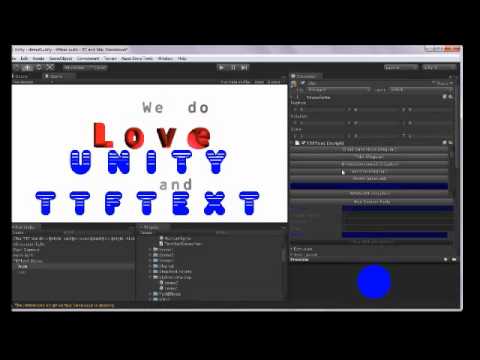
We’d like to present TTF Text package which allows you to easily create real 3d text meshes inside the Unity Editor.
Text meshes may be produced from any vectorial fonts installed on your system.
The mesh generation can be parameterized in many ways : extrusion, bevel, texture mappings, text justification, paragraph layouts. Fonts may be emboldened, slanted and simplified.
TTFText supports all major vectorial font formats such as TrueType, OpenType and Type 1 and has also been successfully tested with asiatic languages.
By embedding fonts in your application, you will be able to dynamically create new 3d texts during runtime on all platforms.
Main Features
Works with Unity 3d Free and Pro on all platforms
Support for all major vectorial fonts format : True Type, Type 1, OTF
Non-occidental / Asiatic Fonts are supported
Can embolden and slant your text freely
Run fast ! Mesh can be dynamically generated during playtime without large impact on the framerate
Mega-fiers compatibility
Paragraph layouts customization
Variety of extrusion, Bevel and UV map modes provided out-of-the-box
Can create different gameobjects for each line, word or character, thus allowing creation of custom effects
Creative coders have access to source code for text mesh generation and can tweak it to their own needs if necessary
TTF Text is now available for download at the Unity Asset Store as two packages :
TTF Text : The full version, which allows to create paragraphs, text animations and dynamic texts during runtime. It is well integrated with others extensions such as mega-fiers and includes plenty of other nice features. This version will continue to evolve and, within the next months, you should see more features added to it
TTF Text Lite: This is the free version. It allows you to create static text mesh from any fonts installed in your system and may be used for creating simple 3d text meshes you may require in your game. It is currently limited in features as we rely on your support to be able to build a really good text module for Unity.
im getting a bunch of crashes on Mountain Lion. Sent you an email to the email that you have listed on your website. Please get back to me, I bought your deluxe version thanks.
Is it possible to get TTfMesh Gameobjects at runtime using the Lite version or do we need to buy the pro version? I want to be able to do an AddComponent() to my gameobject.
Hi,
I have TTF Text ver.1.1. I used it to dynamically generate text objects (also used with megafiers for effects). When I change the text runtime, its not generating the mesh in only Windows Standalone (Win32) mode. It’s ok with Webplayer and Mac Standalone.
I tried with your sample, Web1. Its working for WebPlayer and Mac standalone but WINDOWS STANDALONE is not working
(NOTE: Not working means, Text mesh is not getting generated)
Can you look into the matter and elaborate if it’s a bug or what?
I have the same problem, for me it seems to loose the font which is why it can’t generate the mesh, unfortunately it seems the devs doesn’t read the forum nor reply to emails at the current moment.
I managed to fix this, you need a font store and make sure “somehow” that your styles actually uses it, they should be clients and the font needs to be embedded in the font store, it didn’t always work though.
You also need to place the freetype248.dll file next to your exe-file.
can you please explain how you make the currentstyle use the font store in the scene?
haven’t found anything.
i am creating ttfs at runtime.
i have a system font “Font (Normal)” which works for win standalone and in editor.
however there are 3 more fonts within the Font (Normal) “Font (Extended)”, “Font (Extended Bold)”, “Font (Bold)”.
those 3 work in the editor too, but in the build version it says that the fonts cannot be found.
I haven’t done any testing with the latest version and I’ve left ttf text behind, due to the lack of support (they don’t answer on mail or forums) and from a coders standpoint it was quite difficult to work with.
I’m trying out TTF Lite but it seems to kill the build process (for iOS). Am I missing something?
ArgumentException: The Assembly UnityEditor is referenced by ttftext_lite. But the dll is not allowed to be included or could not be found.
UnityEditor.AssemblyHelper.AddReferencedAssembliesRecurse (System.String assemblyPath, System.Collections.Generic.List1 alreadyFoundAssemblies, System.String[ ] allAssemblyPaths, System.String[ ] foldersToSearch, System.Collections.Generic.Dictionary2 cache)
UnityEditor.AssemblyHelper.AddReferencedAssembliesRecurse (System.String assemblyPath, System.Collections.Generic.List1 alreadyFoundAssemblies, System.String[ ] allAssemblyPaths, System.String[ ] foldersToSearch, System.Collections.Generic.Dictionary2 cache)
UnityEditor.AssemblyHelper.FindAssembliesReferencedBy (System.String[ ] paths, System.String[ ] foldersToSearch)
UnityEditor.HostView:OnGUI()