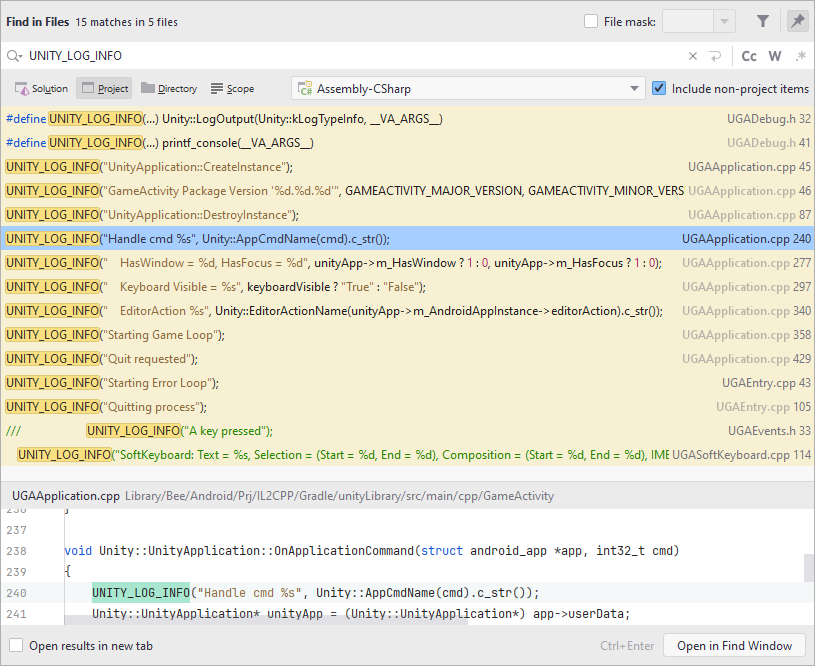
Hello everyone, I got a weird problem, while debugging my android app I saw that as soon as I upgraded to Unity 6 the horrible debugs started appearing.
They are horrible because they track every single action PER FRAME, so the game knows what’s happening and it’s “cool” but I want to hide them, they are making noise while I want to read other logs.
Here are some examples:
03-14 17:10:06.348 7649 7744 I Unity : Handle cmd APP_CMD_START(11)
03-14 17:10:06.356 7649 7744 I Unity : Handle cmd APP_CMD_RESUME(12)
03-14 17:10:06.369 7649 7744 I Unity : Handle cmd APP_CMD_WINDOW_INSETS_CHANGED(17)
03-14 17:10:06.380 7649 7744 I Unity : Handle cmd APP_CMD_WINDOW_INSETS_CHANGED(17)
03-14 17:10:06.381 7649 7744 I Unity : Handle cmd APP_CMD_WINDOW_INSETS_CHANGED(17)
03-14 17:10:06.381 7649 7744 I Unity : Handle cmd APP_CMD_WINDOW_INSETS_CHANGED(17)
03-14 17:10:06.381 7649 7744 I Unity : Handle cmd APP_CMD_CONTENT_RECT_CHANGED(5)
03-14 17:10:06.386 7649 7744 I Unity : Handle cmd APP_CMD_INIT_WINDOW(1)
03-14 17:10:06.817 7649 7744 I Unity : Handle cmd APP_CMD_WINDOW_RESIZED(3)
03-14 17:10:06.818 7649 7744 I Unity : Handle cmd APP_CMD_WINDOW_REDRAW_NEEDED(4)
03-14 17:10:06.818 7649 7744 I Unity : Handle cmd APP_CMD_WINDOW_INSETS_CHANGED(17)
03-14 17:10:06.818 7649 7744 I Unity : Handle cmd APP_CMD_WINDOW_INSETS_CHANGED(17)
03-14 17:10:06.818 7649 7744 I Unity : Handle cmd APP_CMD_WINDOW_INSETS_CHANGED(17)
03-14 17:10:06.818 7649 7744 I Unity : Handle cmd APP_CMD_WINDOW_INSETS_CHANGED(17)
03-14 17:10:06.818 7649 7744 I Unity : Handle cmd APP_CMD_GAINED_FOCUS(7)
03-14 17:10:06.818 7649 7744 I Unity : Handle cmd APP_CMD_WINDOW_INSETS_CHANGED(17)
03-14 17:10:06.818 7649 7744 I Unity : Handle cmd APP_CMD_WINDOW_RESIZED(3)
03-14 17:10:06.818 7649 7744 I Unity : Handle cmd APP_CMD_WINDOW_REDRAW_NEEDED(4)
03-14 17:10:06.818 7649 7744 I Unity : Handle cmd APP_CMD_WINDOW_INSETS_CHANGED(17)
03-14 17:10:06.818 7649 7744 I Unity : Handle cmd APP_CMD_WINDOW_INSETS_CHANGED(17)
03-14 17:10:06.819 7649 7744 I Unity : Handle cmd APP_CMD_CONTENT_RECT_CHANGED(5)
03-14 17:10:06.819 7649 7744 I Unity : Handle cmd APP_CMD_WINDOW_INSETS_CHANGED(17)
03-14 17:10:06.819 7649 7744 I Unity : Handle cmd APP_CMD_WINDOW_INSETS_CHANGED(17)
03-14 17:10:06.819 7649 7744 I Unity : Handle cmd APP_CMD_WINDOW_INSETS_CHANGED(17)
//Whenever I touch the screen (and does 1 every frame)
03-14 17:10:17.879 7649 7744 I Unity : Handle cmd APP_CMD_TOUCH_EVENT(20)
03-14 17:10:17.879 7649 7744 I Unity : Handle cmd APP_CMD_TOUCH_EVENT(20)
03-14 17:10:19.751 7649 7744 I Unity : Handle cmd APP_CMD_TOUCH_EVENT(20)
03-14 17:10:19.851 7649 7744 I Unity : Handle cmd APP_CMD_TOUCH_EVENT(20)
03-14 17:10:22.858 7649 7744 I Unity : Handle cmd APP_CMD_TOUCH_EVENT(20)
03-14 17:10:22.962 7649 7744 I Unity : Handle cmd APP_CMD_TOUCH_EVENT(20)
03-14 17:10:23.495 7649 7744 I Unity : Handle cmd APP_CMD_TOUCH_EVENT(20)
03-14 17:10:23.565 7649 7744 I Unity : Handle cmd APP_CMD_TOUCH_EVENT(20)
03-14 17:12:37.551 7649 7744 I Unity : Handle cmd APP_CMD_TERM_WINDOW(2)
03-14 17:12:37.581 7649 7744 I Unity : Handle cmd APP_CMD_STOP(15)
03-14 17:12:37.583 7649 7744 I Unity : Handle cmd APP_CMD_SAVE_STATE(13)
03-14 17:12:37.616 7649 7744 I Unity : Handle cmd APP_CMD_LOW_MEMORY(10)
03-14 17:12:37.617 7649 7744 I Unity : Handle cmd APP_CMD_LOST_FOCUS(8)
So, any way to hide only those logs? I don’t want to lose all the logs or all the “Information” logs since I actually need them from time to time