We have a facebook game running on Unity Web Player.
Today at around 10.30 AM GMT, we’ve realized that our CCU dropped dramatically pointing out a problem. We tested our game around 6 PC’s in the office and we found that after clearing cache of browser, Unity Web Player games just halt on white screen.
I suspect it could be related with new web player update today? Do you guys have any problem, are your games running smoothly on web player platform now? Or maybe can it be related with Unity Facebook SDK, Facebook-Unity problem?
This is the output of the console when trying to load the player:
151119 12:29:57 Instance 1fad524dbaa8e4f7a89894f9e2c7989b shutting down
151119 12:29:58 Instance starting, version 5.0.3f2_c28c7860811c, UNITY_WEB_ENABLE_AUTODOWNLOAD: 1, GetDisableAutoUpdates(): 0
151119 12:29:58 Datafile https://************/Unity/WebPlayer/WebPlayer.unity3d?20151119
151119 12:30:01 Timed out on global version info
151119 12:30:01 Requesting bundle 1 (3.x.x) update. Required revision range is 4698001 to 7fffffff, installed revision is 4668002
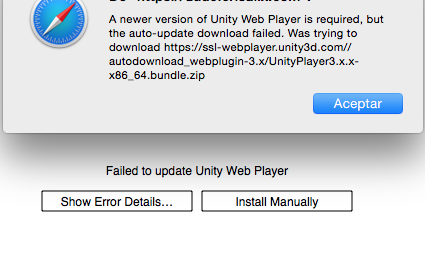
151119 12:30:37 Setting error display: ‘Failed to update Unity Web Player’, details: ‘A newer version of Unity Web Player is required, but the auto-update download failed.
Was trying to download https://ssl-webplayer.unity3d.com//autodownload_webplugin-3.x/UnityPlayer3.x.x-x86_64.bundle.zip’, link: 1
Yeah but we can’t expect every player/customer to troubleshoot their webplayer. It was working this morning, now it is not so certainly this is a Unity related problem. Please Unity take your action and at least answer the thread by saying:
“Yes we are following the issue now” or “We couldn’t reproduce the issue at our side now” !