Are there any tutorials on doing 2D aiming in the style of Contra/Metal Slug? I’m not sure if this is an animation problem, or a code problem. Any insight would be awesome.
In those games, the aiming is done via the Directional pad. The character aims, and the bullet is instantiated based on the direction that the character is pointed in.
Here’s the effect I want:
Player presses up,left,right,right/up, left/up
The player character sprite moves in that direction
If the player presses the shoot key, the bullet moves in that direction
How do I limit rotation to a 180 degree radius (either left,right,right/up,left/up)
-Do I need to break down the character into two parts? (One body part for the aiming, one for the rest of the model that handles animations, collisions, etc)
-If the aiming ‘arm’ is parented to the main body, how would i make it face in the same direction that the player’s body is facing (IE left or right?)
I found a this forum, one of the forum commentaters breaks down the technique, but how do i implement it in code?
So i did that. I was able to limit it between 90 and 180. It stops at 180 which is it's maximum. But when I get close to it's minimum (90) the whole object seems to loop on itself. It does not stop at 90 which was the desired effect. Why does this happen?
Your question is too fuzzy. It potentially involves multiple issues, and you’ve not defined how you are going to do things like change the texture of the character or how you are going to move the character.
For setting the texture you can do:
Use a Quad and an array of textures
Use a Quad and a sprite sheet. Manipulate the material offset and scale.
Use a Quad and a texture atlas and manipulate the uv coordinates of the quad.
Use Unity’s new Sprite
Use a third-party tool like NGUI or EZGUI
For movement you can:
Direct movement through the use of the transform
Use Rigidbody and 3D physics
Use Rigidbody and 2D physics
Use a character controller
I’m assuming from your sprite sheet, that you don’t really want the character to rotate, but instead want to change the texture of the character. Here is a bit of code to get you started. Based on the use of ‘Horizontal’ and ‘Vertical’ in the Input manager, it sets the direction. In a new project, ‘Horizontal’ and ‘Vertical’ are setup to use the ASDF and arrow keys. Per you question, it limits the direction. to Right, UpRight, Up, UpLeft, and Left. It reports ‘None’ for other directions or no input. Put it on a game object, hit play, and use the ASDF or Arrow keys:
using UnityEngine;
using System.Collections;

public class Directions: MonoBehaviour {

	enum Facing {Right, UpRight, Up, UpLeft, Left, None};

	void Update () {
		Vector3 direction = new Vector3(Input.GetAxis("Horizontal"), Input.GetAxis("Vertical"),0.0f );

		Debug.Log (FindFacing(direction));
	}

	Facing FindFacing(Vector3 direction) {
		if (direction == Vector3.zero)
			return Facing.None;

		float angle = Mathf.Atan2(direction.y, direction.x) * Mathf.Rad2Deg;
		Debug.Log ("Angle: "+angle);
		if (angle < 0.0f)
			angle = 360.0f + angle;

		angle += 22.5f;

		int i = (int)(angle / 45.0f);
		i = i % 8;

		if (i > 4)
			return Facing.None;

		return (Facing)i;
	}
}
Thanks Alot! I'm going to try this out, but this really helped clear up my thinking. I appreciate it.
At the top of the class, you will declare 'currentFacing': private Facing currentFacing = Facing.Right; Then in Update() you might do something like: Facing facing = FindFacing(direction); if (facing != Facing.None) currentFacing = facing; This way 'currentFacing' will always be equal to the last valid direction (i.e. never Facing.None). 'currentFacing' can then be used for both setting the texture used by the character and by calculating the direction to fire.
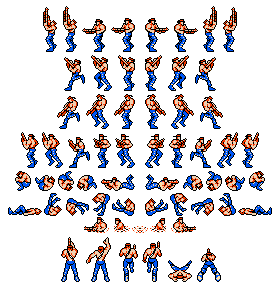
Is this question too complex?
– MarvinHTry [
– cmpgk1024Mathf.Clamp()][1] for limiting the rotation. [1]: http://docs.unity3d.com/Documentation/ScriptReference/Mathf.Clamp.htmlSo i did that. I was able to limit it between 90 and 180. It stops at 180 which is it's maximum. But when I get close to it's minimum (90) the whole object seems to loop on itself. It does not stop at 90 which was the desired effect. Why does this happen?
– MarvinH