Hello,
so I have been looking at a couple of videos on 2d player selection sprite sheets:
and
both are good, but not sure on the first one, because how about i do that, if I have several sprites sheets with the same player skin, example
Red guy run, jump, die etc…
Blue guy, run jump die, etc… on the first video, he is only showing the AninmatorOverrideController with 1 set of sprite sheet for 3 different skins… but how about I accomplish this with several sprite sheet actions for 3 different sprite sheet types/characters/colors?
for the 2nd video… its a good idea, but coding it all, is that even good? and it says making an array… i would have to make several arrays, and making sure to call the correct array depending on what skin/color the player chooses, is that a good idea? thoughts, input etc.?
what is a good idea anyone did or found maybe online to try?
thank you all
Sp[quote=“xeonheart, post:1, topic: 913930, username:xeonheart”]
but how about I accomplish this with several sprite sheet actions for 3 different
[/quote]
Exactly the same way you would set up multiple animations for single animation controller without skins. If that’s unclear you might need to look at some animation controller tutorials first.
The good part of animation override controller swapping, is that it doesn’t care how many animations your character has and how the sprites for them are organized. You can easily customize a lot more than you can with other techniques. You can even have different amount of frames in different skins, or completely unique changes other than base sprite animation.
Downside to override controller approach that if you have large amount of skins, all structured the same way and not using possibility to create something more unique, then creating each of them becomes a chore.
There were at most 10 meaningful lines of code in that video. Any real game can easily have tens of thousands lines of code if not few hundred thousand. Just presenting a polished UI to player for choosing the skin and remembering the choice can easily take more code than that and that’s something you would have to do for any kind of skinning system.
Those were only 2 of the countless different approaches that could be used for changing skins, each with it’s own tradeoffs, limitations, and significant impact on workflow.
Just to name a few :
-
override controller (1st video)
-
reading current sprite and swapping it in late update (2nd video)
-
Making your own animation system. Not that difficult to do if you only need sprite swapping based animations. Gives you a lot more freedom how you organize the various sprites without having to fight against Unity.
-
bones based animations - not exactly sprite based animation, but worth mentioning and considering in the context of 2d games if skinning is important part of your game.
-
swapping the whole prefab → similar to swapping override controller but allows even more customization. Worth considering if skinning is for different player gameplay states, and not just visual.
-
shader based recoloring of some of the sprite parts → useful if you are only changing some colored accents based on team like in many strategy games
-
there was an interesting video ~year ago. Which suggested a technique which is somwhat closer to how UV mapping and texture swapping works but doing it for 2d sprites. Mapping a single skin image onto animated frames. The benefit is that you can very easily make a new skin by creating only single image, you could even allow players to draw new skins. Downside is that there is no off the shelf tooling that would nicely integrate it in rest of the workflow. Unless you are both artist and programmer yourself doing everything, you will probably have a tough choice convincing existing artists switching to this completely new workflow, which doesn’t even have good tools.
-
Using the Unity Sprite swap functionality to change skins. https://docs.unity3d.com/Packages/com.unity.2d.animation@6.0/manual/SpriteSwapIntro.html It’s a bit similar to approach 2, but with less custom code. Downside is that you are more limited with regards to how the sprites need to be organized and integration with the animation editing timeline is worse.
-
Swapping materials/shaders where each material represents a unique skin. You need to be good at making shaders, to create something which looks sufficiently unique even though base sprite is the same.
gotya k, Yes i know how to use the Animated controller… however the other thing about the Animator override controller… can you use other animations to override, or just 1 override only?
my 1 Animated controller uses 7 different animations… for each part (run jump etc.), can I have multiple parts? see pics hope this explains or makes sense… but not sure how to add more to override the others.

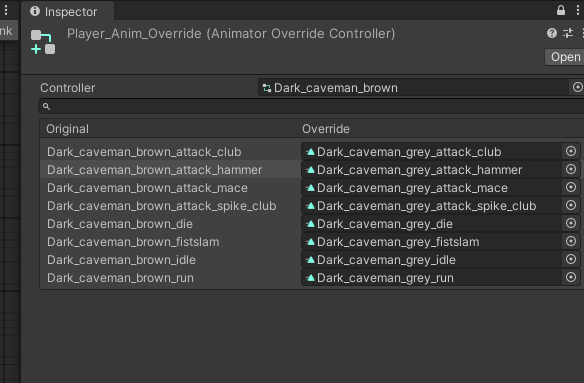
I am not sure I understood what you are asking. Looking at the screenshots you have correctly setup overrides for gray color. If you want more colors you will need to create more override controllers. One override controller per color.
If you are asking how to add more animations within base controller. That can be done from animation tab either the one with timeline, or the one with graph, after you have selected object with corresponding animation controller currently assigned. After you have added new animation to base controller, you will also have to update all override controllers, unless you want the base animation to be seen.
ahhh I see now, so for each per color, i would setup a Animated Override controller, and call that if the player selects THAT COLOR, so i would need one for yellow, or blue etc. correct? and on the script, I would just select the Animated Override color the player chooses?

