I have a base prefab for a bug class. This contains flying patterns, sound effects, speeds, and references to the Animator and AudioSource. However, I have made an inherited version of this Bug script, which overrides one of the functions, and I want to change the script over to this new inherited one.
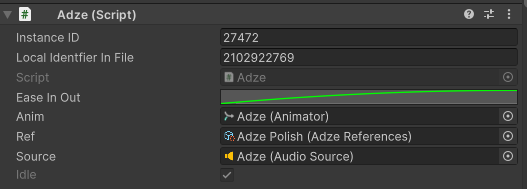
Previously, what I’d do is select the Script field (shown above) and change it to the other file - the inherited file - to keep the properties but change the functionality, as per the inheritance. However, this seems to have been “patched” in some capacity, and is no longer an option. I can understand that this was not really an intended exposure and can cause corruption when changing to an invalid class where properties do not carry over, but is there a new, better way of doing this? Manually copying is an option of course, but I would love to know if this time saving trick still exists.
1 Answer
1
Which Unity version do you actually use? The newest version I currently have on my machine is Unity 2022.1.0a13 and when I switch the Inspector to “debug mode” I can still replace the script there. In the case they really disabled this feature and you need to change many objects in your scene, one option is to simply edit the scene in a text editor manually and replace the script GUID. For this you should figure out the GUID of the base / old class type. This can be done by either looking at the .meta file of the script file which should contain the GUID, or just search through the scene file, look for script instances
MonoBehaviour:
which have a “m_Script” field that contains the old GUID
    // example
    m_Script: {fileID: 11500000, guid: d4d92ff76f40b124d968a54c78f41845, type: 3}
So all you have to do is replace that GUID of all instances in the scene file. A simple search-and-replace should work here. I would recommend to close the Unity editor (or at least the scene file you’re editing) while editing the file in a text editor.
If you are forced to do it manually, you might be able to use macro software to repeat your actions..
– logicandchaos