How do I force a child object to always stay upright and follow the parent’s y and z rotation?
I’ve created an object that resembles to this:
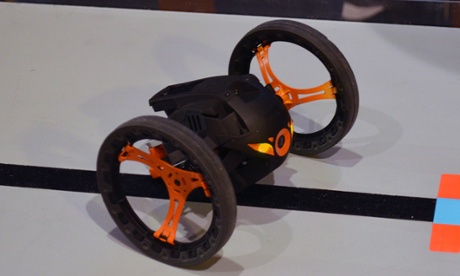
I’m using rigidbody on the parent with two child objects containing wheel collider in each. I was able to move it and turn. All okay, but I just wanted the main body to stay up-right. When moving and hitting rocks on ground, I need the whole object to freely rotate in any direction as it is driven by physics. When the object is flipped upside down, the main body is to rotate back to its upright position.
I added this to the parent:
void Update()
{
    transform.Rotate(new Vector3(0.5f, 0, 0));
}
I added this on a child:
void Update()
{
    transform.LookAt(Vector3.up);
}
But that causes the child to always face up and cannot rotate in x and z axis when the parent rotates in all axis.
To ensure the child follows the parent’s y and z axis, I tried this:
void Update()
{
    transform.LookAt(Vector3.up);
    transform.localEulerAngles = new Vector3(transform.localEulerAngles.x, 0, 0);
}
When you start the game, the child rotates, but wait until the parent finishes its revolution, then the child will remain facing upright. Another full revolution of parent, the child then rotates.
I’ve included an [45667-spintest.zip|45667] to demonstrate what I’m trying to do.
How do I force a child object to always stay upright and follow the parent’s y and z rotation?
EDIT:
After reading Eno Khaon’s answer, I realize that the attached demo I provided was not clear. I’ve updated the file to explain the demo better.
[45698-twowheelsobject.zip|45698].
I need the whole object to freely rotate in any direction as it is driven by physics. Let's suppose I threw a grenade at it. Boom. If I had the rigidbody freeze rotation in any axis, the object wouldn't move in a natural motion while flying off the ground from an explosion. I want it to be able to flip upside down. Once it is upside down, the main body would also be upside down. Freezing the rotation does not rotate the main body back to its upright position and is not the solution I am looking for.
– Irish-Merlin