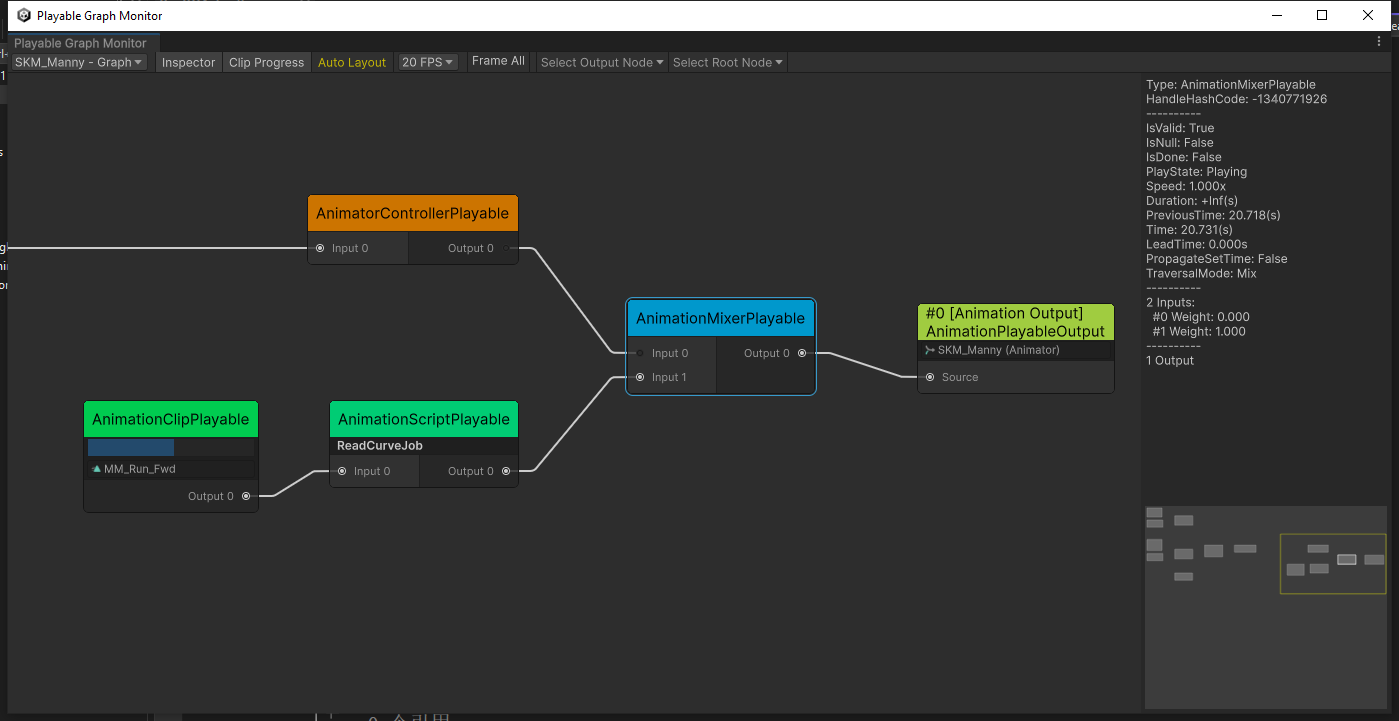
I have an Animator and a custom class that uses the Playables API that allows me to mix an AnimationClip over the Animator. Think a game like Dark Souls where I can play an Emote over the character and there can potentially be hundreds of them. Instead of using an Animator Override Controller or defining all the different emote in different states, I decided to try using the Playables API and would prefer answers that help with this.
My problem is I have a custom curve called “LimitRotation” that’s used by the animations in my Animator Controller, but when I play an emote that also defines that curve, the Animator property isn’t getting updated like it would if I was using a state in the Animator Controller for this.
I read a bunch of forum posts that suggested using AnimationJobs and Animator.BindStreamProperty to get this value out of the clip and readable by my CharacterController, however I haven’t been able to get this working. I either get errors about binding errors, or saying the property is already defined, or when calling GetFloat from the ProcessAnimation function, the value just comes back as 0. I haven’t been able to get this working yet.
Here’s my basic code for mixing the controller and animation clip without the job stuff injected in since I haven’t gotten that working yet. I would really appreciate some help either getting the AnimationClipPlayable to update the Animator’s “LimitRotation” float, or even some other way of having a second LimitRotation float just from the Playable side of things that I can also check from my CharacterController.
using UnityEngine;
using UnityEngine.Animations;
using UnityEngine.Playables;

namespace EricF.Animation
{
    [RequireComponent(typeof(Animator))]
    public class OneOffAnimation : MonoBehaviour
    {
        public Animator Animator;

        private PlayableGraph _graph;
        private AnimationMixerPlayable _mixer;
        private AnimationClipPlayable _clip;

        private void OnValidate()
        {
            if (!Animator) Animator = GetComponent<Animator>();
        }

        private void Start()
        {
            _graph = PlayableGraph.Create($"{gameObject.name} - Graph");
            var playableOutput = AnimationPlayableOutput.Create(_graph, "Animation Output", Animator);
            _mixer = AnimationMixerPlayable.Create(_graph, 1);
            playableOutput.SetSourcePlayable(_mixer);

            var controllerPlayable = AnimatorControllerPlayable.Create(_graph, Animator.runtimeAnimatorController);
            _mixer.ConnectInput(0, controllerPlayable, 0);

            _graph.Play();
        }

        private void Update()
        {
            if (_mixer.GetInputCount() == 2)
            {
                var time = _clip.GetTime();
                var normalizedTime = time / _clip.GetDuration();
                var weight = 1d;
                var fadeInNormalizedTime = .1f;
                var fadeOutNormalizedTime = .1f;

                if (normalizedTime < fadeInNormalizedTime)
                {
                    weight = normalizedTime / fadeInNormalizedTime;
                }
                else if (normalizedTime > (1 - fadeOutNormalizedTime))
                {
                    weight = (1 - normalizedTime) / fadeOutNormalizedTime;
                }

                _mixer.SetInputWeight(0, 1 - (float)weight);
                _mixer.SetInputWeight(1, (float)weight);

                if (_clip.IsDone())
                {
                    _mixer.DisconnectInput(1);
                    _mixer.SetInputCount(1);
                    _clip.Destroy();
                }
            }
            else
            {
                _mixer.SetInputWeight(0, 1);
            }
        }

        public void Play(AnimationClip clip)
        {
            _clip = AnimationClipPlayable.Create(_graph, clip);
            _clip.SetDuration(clip.length);
            _clip.SetTime(0);

            _mixer.SetInputCount(2);
            _mixer.DisconnectInput(1);
            _mixer.ConnectInput(1, _clip, 0);
        }
    }
}
Thank you so much! I haven’t had a chance to test yet, but I think this is the line I had messed up in my original attempts. I was calling BindStreamPorperty with animator.transform, not animator.avatarRoot, because this was the only example I could find at the time: Animated Custom Properties on Playables streams I didn’t realize it needed the root of the avatar (which was in a child object from where the Animator was located).
Another thing that I ran into was if I had an Event on an AnimationClip playing on the regular Animator (not Animation Clip Playable), it was being called twice after I hooked up the Playable Graph. It worked fine only getting called once before I added my OneOffAnimation script, but got called twice after. Am I doing something wrong for that to happen?
Not on the first frame, no. It’s a throw grenade animation so the event was about 20% of the way through. I also tried messing around with the SetTime calls based on this thread but that didn’t help.
One thing I just noticed is that by default when the AnimationMixer only has the one input of the Animator Controller, it throws two grenades. However when I start overriding it with a random animation using the Animation Clip Playable and then press throw grenade midway through that overriding animation, it only throws one grenade! I’m still not familiar enough with Playables to know exactly what this means, but hopefully this clue help?
Also, I wanted to say thanks for helping me out. Trying to learn about Playables has been an uphill battle with disparate forum threads being the only places I can find information, so I really appreciate you taking the time to help.
After creating the PlayableGraph, do you call “Animator.runtimeAnimatorController = null”?
I found that if you don’t clear the Animator.runtimeAnimatorController, even if you manually create the playableGraph, the Animator will continue to run the original AnimatorController.
You’re welcome. I’ve spent a lot of time dealing with numerous bugs related to Playables, and I haven’t found many helpful reference materials either. I’m glad to share my experience with you now.
That was it! At first when I nulled it out I was getting an error saying Animator does not have an AnimatorController but I was able to fix that by exposing the AnimatorControllerPlayable in my OneOffAnimation script and then calling OneOffAnimator.AnimatorControllerPlayable.Play() or .CrossFade() instead of calling those methods on the original Animator. I also no longer see the old Player.Animator show up in the PlayableGraph Visualizer anymore.
Just curious, do you know why the Animator.SetFloat calls still work, but Animator.CrossFade broke after nulling out the Animator’s runtimeAnimatorController? I would have thought either both would work or both would break.
I remember that the process of handling parameters in Animator and AnimationPlayables is the same. They both use the same C++ memory objects in the engine’s animation system, so regardless of where the parameters are accessed from, the memory objects can be correctly found (although I’m not entirely sure if this is the case). However, CrossFade uses different C++ memory objects, so Animator.CrossFade may not be able to find the object.
Thank you for the insights. I recreated the graph with some modifications. Instead of the regular mixer, I replaced it with AnimationLayerMixerPlayable. This is to properly use avatar mask so the one shot playable can use mask to only play animation on only some parts.
I then also introduced the regular mixer again, placed after the layer mixer and before the one shot playable. This one has two inputs (3 in the screenshot as I try some things) to blend between one shot animations. This all works well so far, but the blendings are off.
The problem is now, as I see, the layer mixer does not really mix like the regular mixer does. In my case, the layer 0 (the animator layer) is just completely overridden by layer 1 (one shot mixer). So when the blending occurs, the layer mixer (input 1) stays at weight 1 and the one shot mixer starts with weight 0, gradually moving to 1. Problem: As the layer mixer input 1 just overrides the animator layer 0, the character starts at a weird crumbled T Pose position. Just because there is literally nothing to blend between here (animator is overrridden instead of used in blending). I tried to then blend layer input 1’s weight as well, and this alleviates it a little. Unfortunately, you can see still a little “hop”, as at very beginning there is still no animations to blend between.
What I noticed though in the Graph Visualizer, there is this special AnimationPosePlayable attached to the regular mixers for the animator. So I think this one is what could help here, unfortunately this is an internal playable.
Or maybe this can be implemented differently, but I cannot quite get the result.