Animator Set Integer Not working

Hi everyone, i have this problem and i need help.

I have this function that recives a integer and then changes a parameter in the animator

public void SetSkill(int index)
{
    Debug.Log("Setting skill of " +gameObject.name + " with index "+index);
    animator.SetInteger("Skill", index);
    auxSkill = animator.GetInteger("Skill");
    Debug.Log("Skill of " + gameObject.name +" is index "+animator.GetInteger("Skill"));
}

I created the variable ausxSkill just to see its value in the debugger. The problem is that inmediatly after changing the value of Skill it’s still 0.
If its’ helps, this is the function that calls SetSkills. I also added two logs before and after i call the function, so i’m sure that nothing happend after i use animator.SetInteger

 public void GetRandomSkills()
{   // Debug.Log("start of fuinction, available skills: " + skills.Length);
    int newSkill = Random.Range(1, skills.Length);
    int newSkill2 = Random.Range(1, skills.Length);
    SkillInfo newSkillInfo = new SkillInfo();
    SkillInfo newSkillInfo2 = new SkillInfo();
    newSkillInfo.skillBehaviour = skills[newSkill];
    newSkillInfo.index = newSkill;
    if (!turn)
    {
        availableSkillsPlayerOne[1] = newSkillInfo;
        Debug.Log("setting skill 1");
        skillImagesPlayerOne[1].SetSkill(availableSkillsPlayerOne[1].index);
        Debug.Log("setting skill 1 ended");
        newSkillInfo2.skillBehaviour = skills[newSkill2];
        newSkillInfo2.index = newSkill2;
        availableSkillsPlayerOne[2] = newSkillInfo;
        skillImagesPlayerOne[2].SetSkill(availableSkillsPlayerOne[2].index);
    }
}

This is the function SetSkill paused in the debugger, showing that animator.GetIntereger(“Skill”) although index value is 1.

This is the function where i call SetSkill()

And this are the logs showed in order.
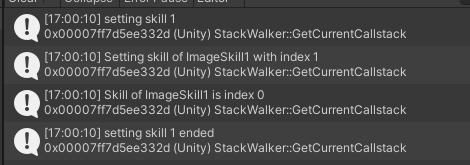
9894975--1428636--Captura3.PNG

The weird thing is, i created a button to call SetSkill directly instead of trhough another function and it works correctly, is only when is called in GetRandomSkills() that it fails.
Does anyone have any idea of what i may be doing wrong o what is going on? I apreciate any help i can get.

Edit: this is the code from the function called in the button. Is pretty simple, auxSkill it starts withe the value 0 and the idea is that every time i push the button it increases the value and call SetSkill(). Strangely, this way it works with no problem

public void ChangeSkill()
        {
            Debug.Log("calling from button");
            auxSkill++;
            SetSkill(auxSkill);
        }

Here are the logs when i use the button. It gets the expected behaviour

9894975--1428723--Captura4.PNG

There must be some code changing it. Try renaming the property, see who throws errors.

Also, you shouldn’t store state (values in your game) in an animator with the expectation you can get it back reliably.

Just store your own notion of it in a variable and do write-only to the animator.

That is very bizarre. Just to doublecheck, are you getting any warnings in the console? (I know you showed a snippet of the console in your post, but it is possible that you have hidden the warnings with the little yellow triangle button.)

If the named integer does not exist in the animator then you’ll always get 0 from GetInteger. There will be a warning, but the program won’t halt.

Ok, i few hours back i tried to reply but i did it wrong by being my first time using this forum, but here i go again.
First of all, thank you for responding. I tried renaming the properties but it didn’t work.
And about the stored states, i’m using animator.GetInteger just for debugging reasons, because i wanted to know what was happening that the state wasn’t changing. That is what is weird actually, in one line i set the value of Skill to 1 and in the very next line when i tried to get its value it is 0. But when i called it through a button it actually changes.

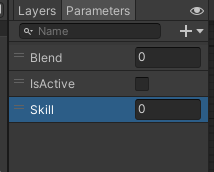
Hi, thanks for responding. I double checked and there are no warnings. And here is a screenshot of the parameters i use in the animator. I tried to changing the names of the parameters and copy-pasting the name just to be sure there were no typos.
I will add the code of the function called in the button to main post just to see if it helps.
9895320--1428711--upload_2024-6-17_23-36-21.png

The only thing I can think of is that skillImagesPlayerOne[1] is somehow not pointing to what you think it is pointing to. The console prints for the working and non-working case both print the name “ImageSkill1”, so it seems unlikely. And even in that case I don’t see why the integer change wouldn’t take effect.

I ran a quick test with an animator state behavior script to see if it could somehow reset the integer, but those scripts aren’t going to run between two lines of the currently running script.

Sorry, this is a mystery to me, I wish I should be of more help.

I finally kind of fixed, it looked like the problem was that i was trying to setting the Skill value right after enabling the gameobject i think was related to that? So i made an another animation as a default and i kept the gameobject enabled since the beginning and now it works perfectly.

It was a weird error, thanks for the help! i apreciate it.