Can the ECS/DOTS be the solution to my framerate problem? If so, how to approach it? Where to start?

Hi all,
I am new to game development, but I like it very much as a hobby. I like learning by doing and solving hurdles on the way.
I am prototyping a VR game for the Oculus Go, so high requirements for min 60fps in stereo, on a very modest hardware. Here is a very early version of my prototype from August last year

I stopped developing for 4-5 months, but since 2-3 weeks I am back on the project. My main goal now is to optimise the game to run on very large grids.
As you can see, the game consists of a large amount of “nodes” and “links” between them that are procedurally generated each time you start a new game. You will find a summary of the game logic at the end of this post.
I have taken down the drawcalls to a very low number, because I use Graphics.DrawMeshInstanced for the “links” and Renderer.SetPropertyBlock for changing the color of the “nodes”. The Text Mesh Pro elements also batch well, apparently.
For a grid of 1093 “nodes” and 3-4 times more “links”, the Stats window shows 22 batches and 4782 saved by batching: https://i.imgur.com/NRROtd2.jpg


The Stats window shows 229 fps, but that is on my PC.
In the Oculus Go initially, when the Text Mesh Pro components are not enabled, things look OK at 60 fps
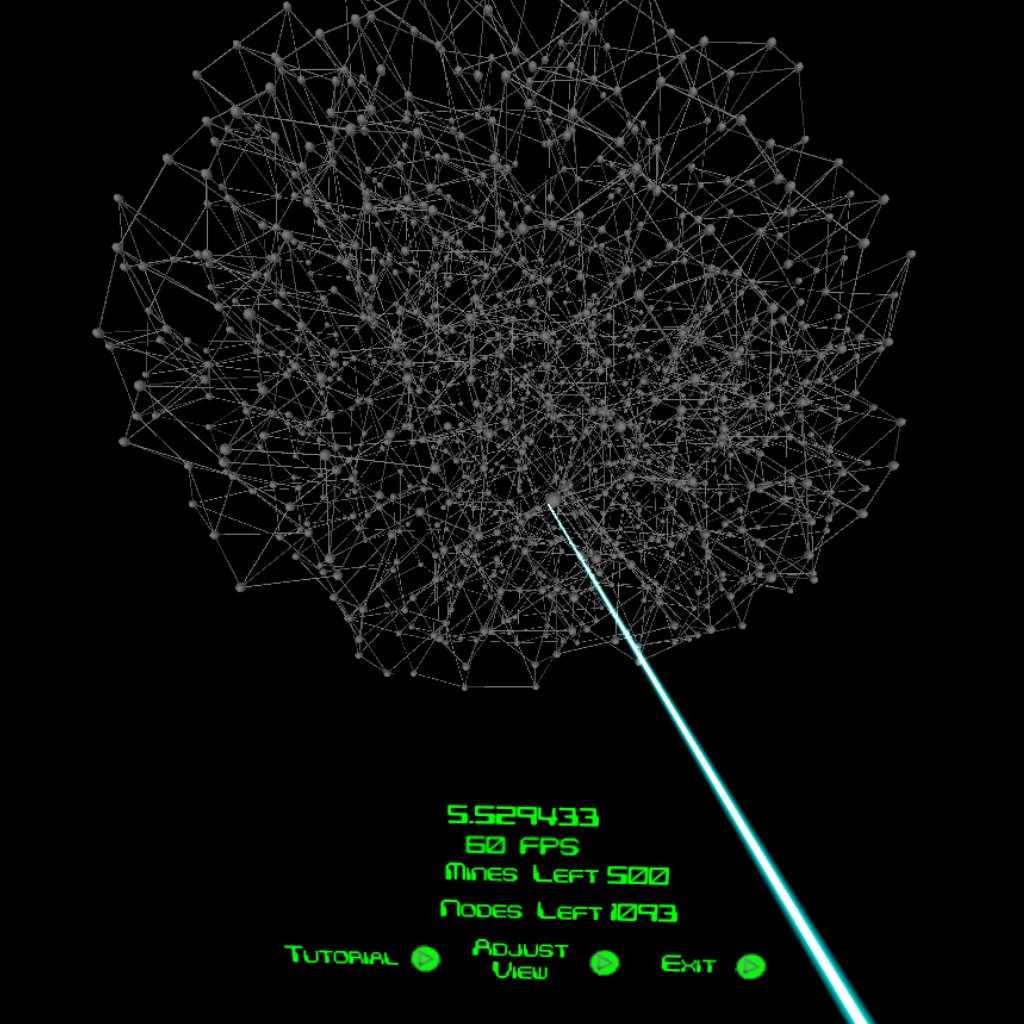

However, once the Text Mesh Pro elements show up too, the framerate drops to around 50 fps (on a monitor that’s not bad, but in VR it creates stuttering):


It is even worse when I rotate the camera around the grid, at 40 fps it is simply unacceptable as a VR experience:


I guess that the framerate drop is due to many GameObjects being drawn at the same time (that is 1093 icospheres and 1093 GameObjects with a Text Mesh Pro component). I think it gets even worse when I rotate the camera around the grid, because I have a method that goes through the array of transforms for each GameObject that has a Text Mesh Pro component and orients it towards the camera. It looks like that:

void OrientNodes(){
    Vector3 camPos=camContainer.position;
    Vector3 camUp=camContainer.up;
    for (int i = 0; i < allLvlArrayNum; i++) {
        AllLvlArrayCenter [i].LookAt (camPos, camUp);
    }
}

So I think I am out of ideas as to how to increase the performance with the classic Unity framework. Am I right in my assumption?
I read a little about ECS/DOTS and watched this introduction by Mike Geig

, but did not understand all of it. So, having looked at this scenario and the summary of the game logic below, do you think ECS/DOTS could be a solution for my performance problems? If so, where can I start from? How do I even plan what part will be in ECS/DOTS and how to combine the two parts? Does ECS/DOTS even support sphere colliders and does it interact with the Unity physics raycasting (I use raycasts for selecting and operating on the “nodes”)? I guess there is no “one-click” conversion to DOTS (I wish there was), but I would prefer to get the full (potential?) benefits without too much change.

Thanks in advance to all. I realise it is a long post, but I needed to explain how things work in order to give you a better idea what issues I am facing.

Summary of the game logic:
I wrote my own very simple instanced shaders that support an instanced color, simple diffuse effect, vertice collapse (for disabling the rendering when I change the alpha of the material to 0) and recently (as an option in some of the shaders) dimming based on the distance from the camera.
The “links” between the nodes are not GameObjects and I render them in batches of 1024 with instanced rendering Graphics.DrawMeshInstanced from the script.
The nodes are simple icospheres that I created in Blender. The nodes also use an instanced material with instanced color, simple diffuse effect, etc. The “nodes”, however, are GameObjects that I instantiate at the start of each game, because they have a sphere collider that enables me to interact with them (select, open, mark as mine, etc.). Each “node” also has an empty child object (“center”) at the center of each node and a Text Mesh Pro element as a child object of the “center” that is offset towards the front of the icosphere. That enables me to rotate the Text Mesh Pro element to always face the camera when you are moving around the grid, while the parent icosphere does not rotate.
I am running all the game logic on a main GameManager.cs script and apart from the procedural generation of the grid, which happens only at the start of the game, the code is not that heavy, I think. The only heavy part might be the constant reorientation of all “nodes” towards the camera when you rotate the camera around the grid.
While creating the grid, I keep a number of 1 or 2-dimensional arrays. Most of the arrays consist of integers that describe the structure of the grid, i.e. how many “links” each “node” has, to which other “nodes” does each “node” link, how many adjacent “mine-nodes” each “node” has and then from the perspective of each “link”, which 2 “nodes” that “link” connects to. I keep an array with the the Vector3 position of each “node”. For the instanced rendering of the “links”, I keep 2 arrays of Vector3 (for the position and localscale) and 1 array of Quaternions (for the rotation). I also have some bool arrays that contain the state of each node (is it selected or not, is it a mine or not, is it already revealed or not, does it show text or not etc.). I also have arrays of the transforms of the “nodes”, of the “centers” and an array of the Text Mesh Pro elements.

Depending on how your game is set up, you might want to just stick to MonoBehaviours, but run a job for specific parts (like your billboarding), to prevent you from having to re-write a lot of your code to support ECS.
Take a look at e.g. GitHub - stella3d/job-system-cookbook: Unity Technologies management has fucked everything up. this is a guide to the job system circa 2019 for some examples of how to use jobs

Thanks. I have read that the jobs system scales with core counts and on the Snapdragon 821 (found in Oculus Go) there are 4 cores on the CPU, so that might already be enough.
What difference in performance can I generally expect between going only with the jobs system vs pure ECS/DOTS (that might sound like a stupid question…)?
If I go only with the Jobs system, would it be easier or harder after to transfer to ECS/DOTS if I want to?
I am afraid that if I go only with implementing the billboarding with the Unity’s jobs system, I will still be stuck at around 50 fps (the framerate when the OrientNodes() method is not called)
Also, if I want to go the ECS/DOTS route, would I have to re-write a lot? I have no idea how much that would involve, but I am also tentatively looking at it as a learning experience and a challenge to learn something new (it’s all a hobby for me).
I am mostly worried whether the ECS has straightforward support for colliders and the Unity’s raycasting, because the gameplay is dependent on selecting and marking things with the Go controller, which uses a Physics.Raycast to determine on which node you are operating.

It not about how much you have to rewrite, it’s about time when shifting your code/solution thinking from OOP to DOTS. (you are looking at 2-8 weeks learning curve here)

And new ECS physics support raycast and collider. Also your problem might bump into here will be shared material instance not use GPU indirect instance + runtime - mesh while you can just use billboard instead of pipe mesh (it just a stick connection).

1 Like

Also, instead spheres, you can also use billboards. LOD may be your friend here.

You can apply mesh instancing with Classic OOP as well. See how that result with performance.

As already mentioned, moving to ECS may cost precious time. A lot of it. Instead of focusing on game dev. But yes you could potential gain quite a bit o performance, just on rendering itself.

Pardon me, but I did not get that part at all…
Thanks a lot for answering that the ECS supports colliders and physics raycasting. Where can I see an example of colliders and raycasts implemented in ECS? I would like to start with a simple example, like a sphere with a sphere collider where upon a mouse click I check if the raycast intersects with the sphere collider and I change that sphere’s color with Renderer.SetPropertyBlock? If I know how that looks like, I think I would have an idea how much it would take me to transfer to ECS.

https://github.com/Unity-Technologies/EntityComponentSystemSamples/tree/master/UnityPhysicsExamples

I do not think the polycount is an issue here. The game works at 60 fps when the icospheres are on the scene only. It slows down when the Text Mesh Pro elements are enabled. As I wrote, I do apply mesh instancing with Graphics.DrawMeshInstanced for all the “links”. They are not GameObjects. I cannot apply the same approach to the spheres since I have sphere colliders on them.

I actually did come with a solution that does not go under 60 fps and that is by using a texture atlas with instancing for the different combinations of colors and numbers 0-9
https://i.imgur.com/eDHInWt.jpg

However, while performing at 60 fps, the whole sphere has to face you all the time, which does not let the light travel along its surface as you are rotating around it and ultimately makes the sphere look flat due to that, especially in VR.

Cool, thanks a lot, I will dig into those. One more question on the abilities of ECS: would I be able to change the text of a Text Mesh Pro element? Or is Text Mesh Pro not convertible to an entity at the moment?

Can you test, when you hide halve of text meshes, if you gain FPS during camera rotation?

You would need keep it as ECS Hybrid or just on OOP side atm.

Gameobject is convertable to ECS entity. And for number on cube, I would go bake it to sprite then show it like a billboard always face camera. If you understand how shader work. You could make the number always see through object too. Like in sample of AmplifyShaderEditor

You know what, your comment gave me an idea to dynamically disable each “center” GameObject (the parent of each Text Mesh Pro element) if it is further than 6 units from the camera.
Here is the code:

void OrientNodes(){
    Vector3 camPos=camContainer.position;
    Vector3 camUp=camContainer.up;
    for (int i = 0; i < allLvlArrayNum; i++) {
        if (isShowingText [i]) {
            if (Vector3.Distance (NodePositions [i], camPos) > fogLength) {
                if (isBehindFog [i] == false) {
                    isBehindFog [i] = true;
                    if (textFieldsOn) {
                        AllLvlArrayCenterGO [i].SetActive(false);
                    }
                }
            } else {
                if (isBehindFog [i]) {
                    isBehindFog [i] = false;
                    if (textFieldsOn) {
                        AllLvlArrayCenterGO [i].SetActive (true);
                    }
                } else {
                    if (textFieldsOn) {
                        AllLvlArrayCenter [i].LookAt (camPos, camUp);
                    } else {
                        AllLvlArray [i].transform.LookAt (camPos, camUp);
                    }
                }
            }
        }
    }
}

Now I get 60 fps when I am not rotating around the grid:
https://i.imgur.com/aqWKJKN.jpg

I still get into mid-50s fps when rotating, but it’s a big improvement:
https://i.imgur.com/Si84N3g.jpg

Thanks again :slight_smile:

Good.
But now out of interest, I would do similar test, but with halve (or after n distance) disabled spheres and links.
If you get more than 60 FPS when rotating, that will be at least known, that you need cut down on something.
If that would be the case, LOD could help. Otherwise, you will need look in other form of improvement.

I simply chose to disable the nodes at the same distance of 6 units and I did get almost to 60 fps when rotating around the grid:

void OrientNodes(){
    Vector3 camPos=camContainer.position;
    Vector3 camUp=camContainer.up;
    for (int i = 0; i < allLvlArrayNum; i++) {
        if (isShowingText [i]) {
            if (Vector3.Distance (NodePositions [i], camPos) > fogLength) {
                if (isBehindFog [i] == false) {
                    isBehindFog [i] = true;
                    if (textFieldsOn) {
                        AllLvlArray [i].SetActive (false);
                        AllLvlArrayCenterGO [i].SetActive(false);
                    }
                }
            } else {
                if (isBehindFog [i]) {
                    isBehindFog [i] = false;
                    if (textFieldsOn) {
                        AllLvlArrayCenterGO [i].SetActive (true);
                        AllLvlArray [i].SetActive (true);
                    }
                } else {
                    if (textFieldsOn) {
                        AllLvlArrayCenter [i].LookAt (camPos, camUp);
                    } else {
                        AllLvlArray [i].transform.LookAt (camPos, camUp);
                    }
                }
            }
        }
    }
}

and I got this
https://i.imgur.com/V551TQw.jpg

This is only for testing however, it breaks the gameplay quite a bit.
How would LOD work? Do I simply have 2 renderers on the same object and stitch them on/off alternating depending on the distance from the camera? Or is this something built in?
As I said, I am new to game development, so all this is quite new to me.
Also, I just read of frustum culling. Is it on by default? It might be useful when you are in the middle of the grid not to render nodes that are behind your back.
Sorry, I know we are moving away from the topic of this section of the forum…
For the time being I will not switch to ECS, but will have a look at it in a few months, hopefully by then there might be some progress in allowing to have Text Mesh Pro to be integrates with ECS.

LOD, functionality is available in Unity as feature. But also you can code own.
LOD simply swaps between objects of higher poly count, to lower poly count, based on distance.
Camera culling by default does not renders outside frustum. That includes behind camera as well.

Would it not be more efficient to have 2 renderers on the same GameObject and to swap them?

Well, saying more correctly, you swap meshes.

Ah, I think I overestimated the Oculus Go hardware. Under the Oculus’s own guidelines you have to be under 100,000 vertices https://developer.oculus.com/documentation/unity/latest/concepts/unity-perf/#unity-perf-targets and with the 1093-node grid I am at 332.600 vertices :frowning:
https://i.imgur.com/NRROtd2.jpg

I will definitely be looking into LOD then… ECS won’t help with that.

Potentially could. But generally is good to keep as few number of polys, as possible. That is irrelevant of the tech you are using.

Edit: if you can, don’t use text mesh object on your nodes. Use texture when possible on the node, with a number. You will cut by one object per node.