I have successfully built and deployed many of the examples scenes from visionOSTemplate-1.2.3.zip. I am especially interested in the MixedReality sample, which works great.
In an effort to understand the project setup, I then tried to create a project that just implements hand tracking as shown in the MixedReality example. So I followed the “Create a Project from Scratch/Mixed Reality” instructions, then added in the things that I thought were relevant from the MixedReality sample.
Here’s what I did. (I’m on a 2020 Macbook Air M1 running Sonoma 14.4.1)
Create a new project in the hub using Universal 3D template and Unity 2022.3.26f1
Go to Project Settings > XR Plug-in Management and click “Install XR Plug-in Management”
Enable “Apple visionOS” Plug-in Provider in the VisionOS tab, wait for it to be installed
When I get the popup warning about “This project uses the new input system package, but the native platform backends for the new input system are not enabled in the player settings… Do you want to enable the backends?” I click “Yes”
In the “Apple visionOS” section of “XR Plug-in Management”, set the App Mode to “Virtual Reality - Fully Immersive Space” and when I am prompted to “Install PolySpatial”, I click “Yes”
Add “Hand Tracking Usage Description” and “World Sensing Usage Description”
Under “Project Validation”, i choose “visionOS MR - Volume”, and then “Fix All”. This adds an AR Session to the default SampleScene and disables Splash Screen
While in Player Settings, go to “Player” section and change CompanyName so that it will build properly
Go to Build Settings and change the Build Target to visionOS [NOTE: this is where the “Create a visionOS Project from Scratch” instructions end, so the rest I am just guessing or copying from visionOSTemplate-1.2.3.zip]
I noticed that “Input Settings Package” in the visionOSTemplate-1.2.3.zip looks different than mine, so I copied “InputSystem.inputsettings.asset” over from visionOSTemplate-1.2.3.zip
Double-check that the following packages have been installed: com.unity.polyspatial, com.unity.polyspatial.visionos, com.unity.polyspatial.xr, com.unity.xr.hands
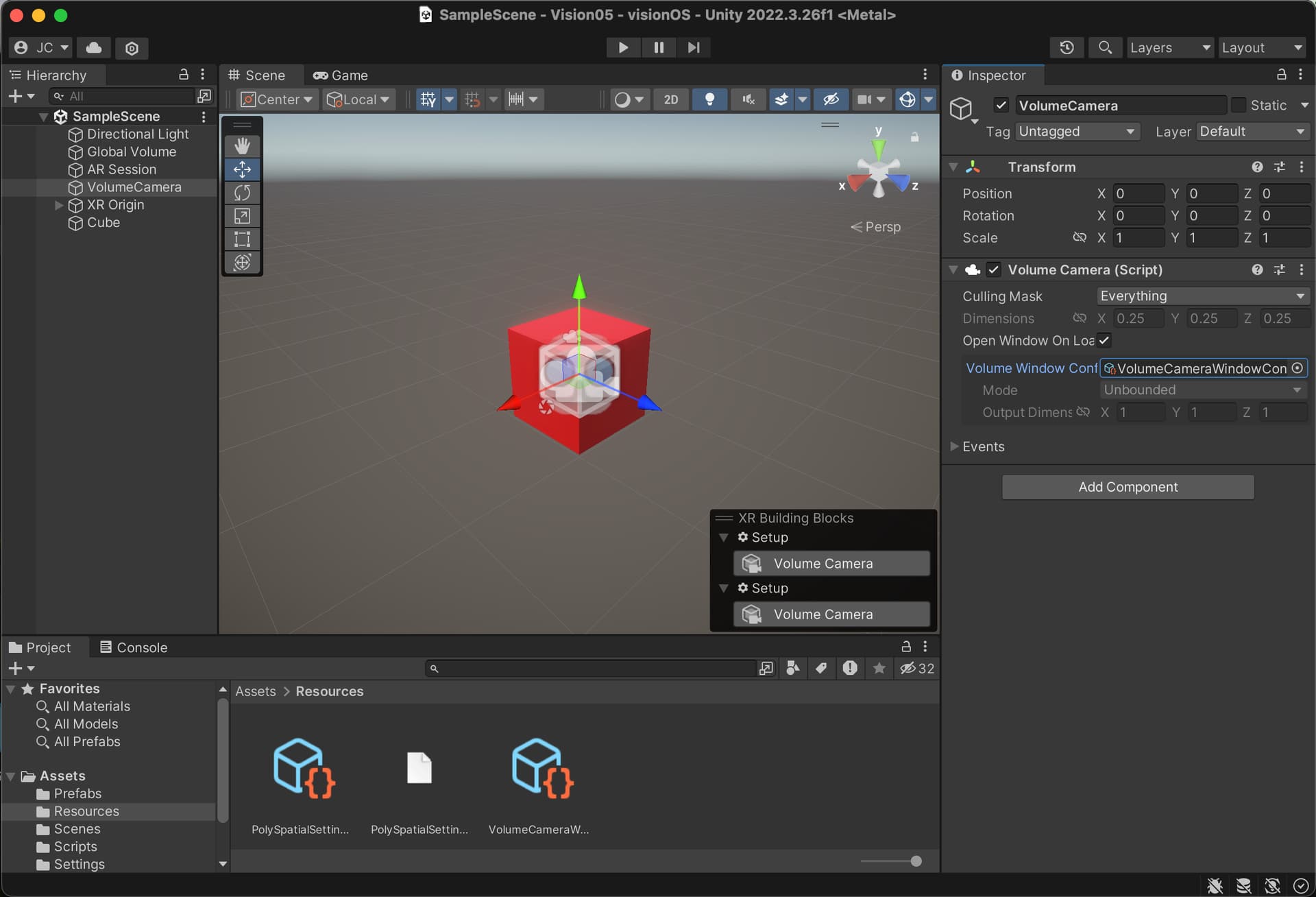
I add a VolumeCamera to the scene and create a Volume Camera Window Configuration (in the Resources folder), and assign it to the VolumeCamera
I replicate the “XR Origin” setup from the Mixed Reality sample:
Empty Game Object called "XR Origin
Main camera becomes a child of XR Origin. Reset Transform and change clipping planes to 0.1/20
Add a “Tracked Pose Driver (Input System)” to the Main Camera and replicate the “centerEyePosition” and “devicePosition” actions in Position Input and Rotation Input. [Side Note: Is this necessary for hand tracking in visionOS?]
Also add the “HandManager” object as a child of XR Origin
Copy over the “Hand Visualizer” script and assign it to HandManager
Copy over the Joint Prefab and assign it to Hand Visualizer > Joint Prefab
Add a cube to the scene, just to make sure it’s actually rendering something
Build and deploy to Vision Pro
The app builds and deploys, but all I can see is a red cube in my room, and my hands aren’t being tracked like they are in the MixedReality sample. What am I doing wrong?
Could I just start with the visionOSTemplate? Of course. But I’m worried that whatever I am missing will come back to haunt me somehow. So I want to understand how to create the project from scratch.
When you create a default volume camera configuration is it set to bounded or unbounded? Hand tracking is a part of ARKit which is only available in unbounded scenes.
Other than that I can’t see anything wrong with your setup / steps. If you’re able to share the project or create a bug report I can take a look at it on my side to see you might have missed.
Hey sorry for the delay, I took a quick look the other day and couldn’t find anything obviously missing.
Took a longer look today and figured out the issue.
Make sure your XR Origin has and XROrigin Script
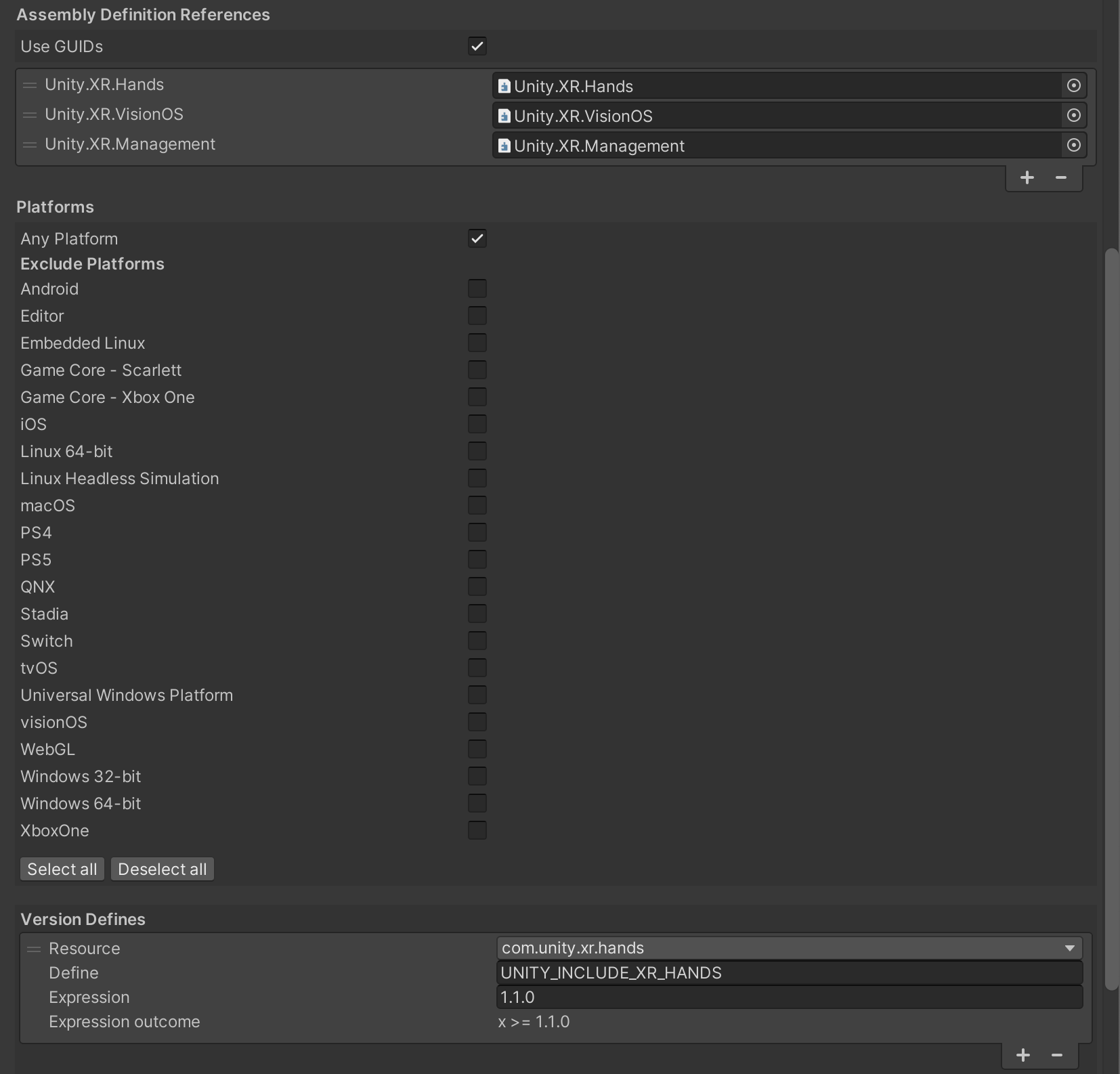
The Hand Visualizer script uses a custom define UNITY_INCLUDE_XR_HANDS that is referenced in the PolySpatial.Samples.asmdef it’s used in the HandVisualizer.cs to limit what platforms the code is run on. You need to either setup a new asmdef and define that or copy the one from the PolySpatial package samples.
I am also having trouble with hand tracking, but only under Unity 6000.0.2f1/3f1 and Vision OS template 2.0.0-pre3.
I’ve had no troubles under Unity 2022.3.x and The 1.x Vision Pro templates.
Here’s what I see. The first indication that something is wrong is when I run the template project which starts in SampleScene, and then I switch to SampleSceneUnbounded. The bounded scene works as usual, but when I exit the bounded scene and enter the unbounded scene, this is what I see:
-Room surface detection does not work at all
-The GoalManager UI is under the floor
-If I have enabled “Show fingertips” on Goal Manager, I see the finger tip spheres sitting on the floor instead of tracking my fingers.
Also, if I build the included XR Hands Hand Visualizer sample, it does not work at all. I get an empty scene. Likewise, when I use a custom OpenXR hand tracking system that works properly in Unity 2022/1.x Template, it does not work at all under Unity 6000.x/2.0.0.pre-3.
Gaze-Pinch interaction does work in the included sample scenes. It’s just hand tracking that does not seem to work at all.
I find it hard to believe that this is broken for everyone and no one has noticed, so I am hoping to discover there is some setting(s) that I have not enabled. Is it possible that everyone here is using gaze-pinch interaction, such that no one has noticed that hand tracking is broken? I have confirmed that “Initialize Hand Tracking on Startup” is checked in the XR Plugin Management->Apple Vision OS settings.
What am I missing here? Does anyone else have hand tracking working under Unity 6000.x/2.0.0-pre3 template?
I just grabbed the template and built it and things were working as expected (hand tracking and plane tracking). Can you try uninstalling and reinstalling the app and making sure you accept the permissions? Hand tracking and world tracking are two separate permissions.
You can also check the XCode logs to see if there are any errors while connected to a build.
Yep, that’s the problem! It’s a permissions problem. For some reason, my project, which started out as template-2.0.0-pre3, will not ask for permissions when entering into the unbounded scene. I uninstalled it completely, rebuilt it and redeployed it, and it still will not ask for the hand/scene permissions.
I did a fresh download of the 2.0.0-pre3 template and built it in Unity 6000.0.3f1, and it did ask for permissions when entering into the unbounded scene, and all was well. Surface detection and hand tracking work.
What is the mechanism by which we ask that these permissions are granted? I have no idea why it’s not working in the other project. Is there somewhere either in Unity or XCode settings that I can look to figure out why the permission request is not occurring in my project? I can probably figure out a way to transplant my custom code into the working template, but I’d really like to understand this if possible.
UPDATE : I learned more about these permissions. From what I see, the permissions requests happen based on two keys in the XCode project’s Info.plist.
Both my working and broken projects have these entries:
NSHandsTrackingUsageDescription : “Hand Tracking required for interaction”
NSWorldSensingUsageDescription : “World sensing required for plane detection”
You’re correct it’s the usage description that then gets prompted via request authorization in our package code. If both the project’s have the keys then they’re both probably set in the apple visionOS settings.
You should be able to see the app that isn’t working under the Hands section of the settings on device. You can enable both the permissions and then rerun the app and things should work. Unfortunately we don’t really support re-prompting permissions if they’ve been declined at this time.
Hope this helps, let me know if you have more questions.
Thanks again Dan. I ended up fixing the problem by copying the working template project into my own project. Whatever I accidently broke, or whatever reason it was that my project was not asking for permissions, is now fixed.
Hey,
I have a strange problem, I followed the tutorial to make a hand control under 2.0.0-pre.9 (Metal Rendering), I can see my hand in the scene, but my hand can’t interact with any object in the scene, I’ve bound a Collider to my hand and added XR Grab interactable to the box, and I’ve bound Collider to my hand and added XR Grab interactable to the box, and also specified the interaction manager, but my hand can’t grab or even react to the box. Is there something here that I’m missing?
Did you import the Metal Sample from the Apple visionOS XR Plugin package? that should have a simple setup with XRI and hand tracking for metal based apps.
Thanks for the quick reply, I tried the simple setup of visionOS XR Plugin and he had no problem taking to the object, but my demo is using the XRI grab to open the door, and I found that the collision detection works in Reality mode, but not in VR (mental) mode, I don’t think that VR mode should be better supported?