So, first of all, my image moves with animator component; after this, I disable Animator and move image from script. No problem so far.
But when I enable Animator component on image again, it come back to its “end-animation” position, and I can’t move it anymore.
I hope I explained myself well.
I’m currently using Unity 5.4.1, but I used to have this issue also with previous versions.
Thank you in advance for any help you can provide.
Hi CloudKid,
thank you very much for your reply.
I did as you said - which is:
to create a new empty GameObject in which I animate the child Image
(since I want to keep moving Image after the parent animation is completed) I try to set the position of GameObject where its child’s position is, and move Image in the center of the parent [0,0]; so let’s say I’m into function OnAnimationComplete() of GameObjects’ script:
transform.position = transform.GetChild(0).position; // this actually works
transform.GetChild(0).GetComponent().anchoredPosition = Vector2.zero; // but this not
The Image still won’t move.
Maybe I’m doing something stupidly wrong here? (I’m not an expert user :))
Thanks again.
Actually, if I only change the position of the parent, the child Image will position itself in it’s “new” relative position, and it would be ok for me, if only I could change back it’s anchored position to [0,0].
(Maybe I should specify that also my GameObject with Animator is a child of a UI game object, so it’s part of my UI hierarchy.)
Sorry to bother but I feel I’m really missing something here.
I can’t show some visualization right now, but I’ll try to put it down schematically:
I have a canvas with a “Start” button. Outside the canvas, I have my Image inside an empty GameObject parent, that contains the Animator.
I click on a “Start” button → that generates the animation. This animation takes Image from a point A to point B. Both point A and point B are inside the canvas. So Image moves away from its parent, which remains outside the canvas.
When Image has reached point B, I want to take it to point C with Lerp function from script.
In this way I can re-use the same animation for different images, and then make everyone of them arrive to a different “final” spot (which would be point C, different for every image) with Lerp function.
So, as you rightly said before, I should have tried using an empty gameobject, and I did. It has Animator component, which animates only the child Image.
When animation (point 1) is completed, I have to move the Image to its final spot C. Since I can’t, I have to move its parent, which in fact is placed somewhere else because it did not move at all from its initial position. I should move it where it’s child is. But when I do this (with transform.position = transform.GetChild(0).position; ) actually Image goes through a change of position, being child of something that is moving (totally reasonable behaviour, if I could just move directly the anchored position of Image).
I hope I explained myself more clearly this time. Otherwise, just tell me.
disable the animator when your object has reached the destination, and move it from code
make another animation, something called like ReachedDestinationIdle, This animations should not change the current child position (no keyframes defining any position, or even no motion at all, just create a new state without defining any animation). Then disable Write Defaults for that animation. Make a transition from moving animation to ReachedDestinationIdle. When the animator is in ReachedDestinationIdle, you can move your object from code
move the parent with lerp taking into acount the child offset (localPosition of child). Just add to destination local position of your child
already tried this one; but when I re-enable the animator the Image still suffers of the same issues (I expect to animate images also later)
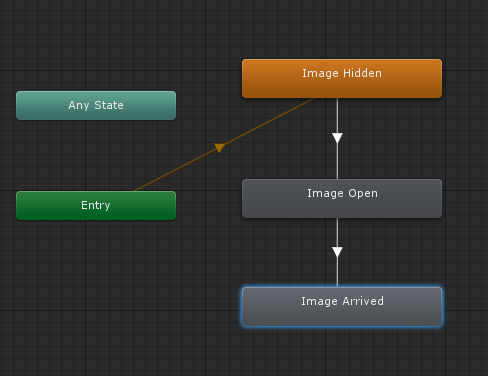
my animator already works like you can see in the attached pic.
“Image Arrived” is an empty state, in which “Image Open” passes without any condition after the animation is completed.
This state has no animation and “Write defaults” is not checked. Still, no luck.
still have not tried this one, but it seems a little intricate on the long way.
Is this a kind of bug? I thought this task would have been easier to accomplish.
Apparently, animator.Rebind() did the trick! I didn’t know about its existance.
I’m using it after my “manual” changes via script, right before re-enable the animator.
Thank you SO much!
Yeah. no probs! Sometimes its hard to understand a problem without actually seeing the project.
In older versions of Unity the animator was automatically rebinding on disable/enable. Now you have to call Rebind when you want to reset the animator to it’s starting state. This is actually a good thing because it gives you more control over the mecanim.
Hi @CloudKid ,
I’m running some test to “fully” understand what’s going on here starting a new project from scratch, with only one image moving with Animator and dropped around with mouse.
It’s happening that actually animator AND script are working on the same object at the same time. The only thing I have to do is to:
make sure to call Rebind() when re-enable Animator,
make sure that, after moving the object via script with Animator not enabled, the new Animator’s state (from which it starts after being re-enabled) has “write default” unchecked.
I’m starting to think that it could be a good idea to use Lerp function instead for this kind of stuff. Guess I’m missing something obvious… again.