CanvasHelper resizes a RectTransform to iPhone X's safe area

Hey everyone,

I though it would be nice to share this script I wrote called CanvasHelper! The script helps your UI adhere to the safe areas of any device using Unity’s built-in Screen.safeArea. Properly integrating safe areas in your UI makes your game feel native to the hardware, so I recommend using CanvasHelper for all your games.

Even though this post’s title says ‘iPhone X’, CanvasHelper will work on iOS and Android (plenty of Android phones now have safe areas too!) and will work on multiple platforms like phones, tablets (eg. iPad and Android Tablets), and even TV’s (eg. Apple TV).

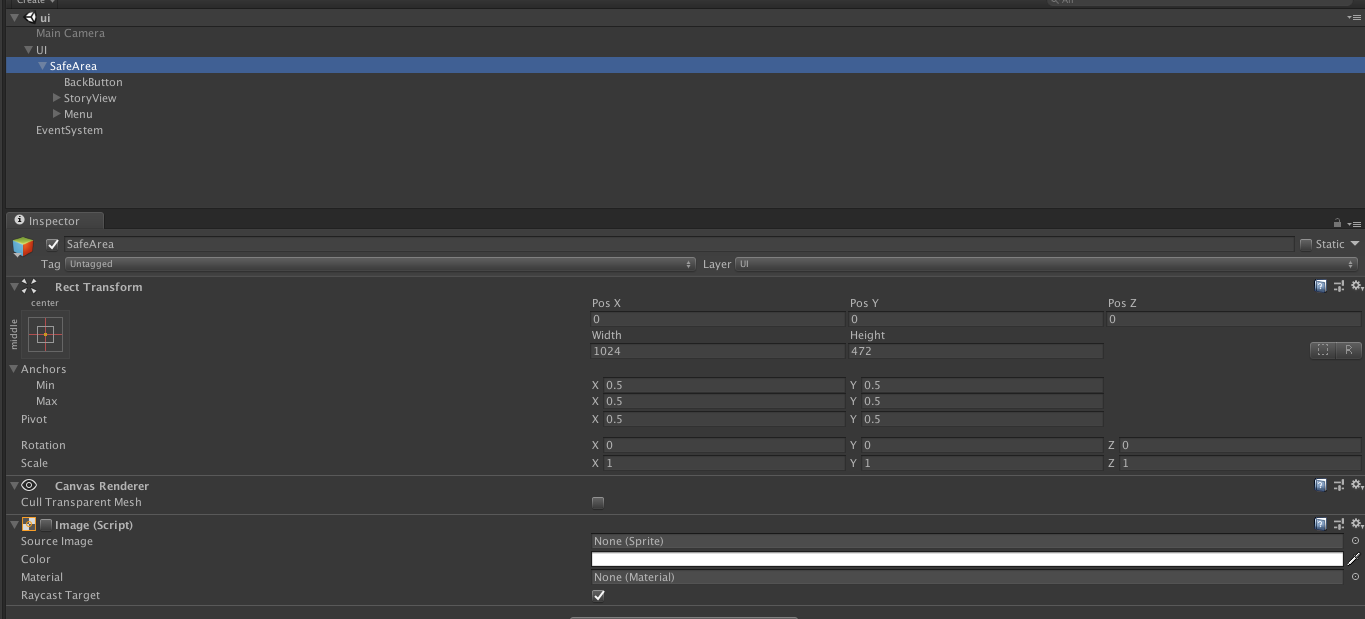
CanvasHelper needs to be added to every Canvas GameObject in your game, and the script will resize a child RectTransform named “SafeArea” (no space!) to fit Screen.safeArea.

Make sure to set the SafeArea’s anchors to Min(0,0) and Max(1,1)!

You may also register events to CanvasHelper.OnResolutionOrOrientationChanged, as Unity itself doesn’t have a way for you register to those events.

//source: https://forum.unity.com/threads/canvashelper-resizes-a-recttransform-to-iphone-xs-safe-area.521107

using System.Collections.Generic;
using UnityEngine;
using UnityEngine.Events;

[RequireComponent(typeof(Canvas))]
public class CanvasHelper : MonoBehaviour
{
    private static List<CanvasHelper> helpers = new List<CanvasHelper>();
 
    public static UnityEvent OnResolutionOrOrientationChanged = new UnityEvent();
 
    private static bool screenChangeVarsInitialized = false;
    private static ScreenOrientation lastOrientation = ScreenOrientation.Landscape;
    private static Vector2 lastResolution = Vector2.zero;
    private static Rect lastSafeArea = Rect.zero;
 
    private Canvas canvas;
    private RectTransform rectTransform;
    private RectTransform safeAreaTransform;
 
    void Awake()
    {
        if(!helpers.Contains(this))
            helpers.Add(this);
 
        canvas = GetComponent<Canvas>();
        rectTransform = GetComponent<RectTransform>();
 
        safeAreaTransform = transform.Find("SafeArea") as RectTransform;
 
        if(!screenChangeVarsInitialized)
        {
            lastOrientation = Screen.orientation;
            lastResolution.x = Screen.width;
            lastResolution.y = Screen.height;
            lastSafeArea = Screen.safeArea;
 
            screenChangeVarsInitialized = true;
        }
  
        ApplySafeArea();
    }
 
    void Update()
    {
        if(helpers[0] != this)
            return;
 
        if(Application.isMobilePlatform && Screen.orientation != lastOrientation)
            OrientationChanged();
 
        if(Screen.safeArea != lastSafeArea)
            SafeAreaChanged();
 
        if(Screen.width != lastResolution.x || Screen.height != lastResolution.y)
            ResolutionChanged();
    }
 
    void ApplySafeArea()
    {
        if(safeAreaTransform == null)
            return;
 
        var safeArea = Screen.safeArea;
 
        var anchorMin = safeArea.position;
        var anchorMax = safeArea.position + safeArea.size;
        anchorMin.x /= canvas.pixelRect.width;
        anchorMin.y /= canvas.pixelRect.height;
        anchorMax.x /= canvas.pixelRect.width;
        anchorMax.y /= canvas.pixelRect.height;
 
        safeAreaTransform.anchorMin = anchorMin;
        safeAreaTransform.anchorMax = anchorMax;
    }
 
    void OnDestroy()
    {
        if(helpers != null && helpers.Contains(this))
            helpers.Remove(this);
    }
 
    private static void OrientationChanged()
    {
        //Debug.Log("Orientation changed from " + lastOrientation + " to " + Screen.orientation + " at " + Time.time);
 
        lastOrientation = Screen.orientation;
        lastResolution.x = Screen.width;
        lastResolution.y = Screen.height;

        OnResolutionOrOrientationChanged.Invoke();
    }
 
    private static void ResolutionChanged()
    {
        //Debug.Log("Resolution changed from " + lastResolution + " to (" + Screen.width + ", " + Screen.height + ") at " + Time.time);
 
        lastResolution.x = Screen.width;
        lastResolution.y = Screen.height;

        OnResolutionOrOrientationChanged.Invoke();
    }
 
    private static void SafeAreaChanged()
    {
        // Debug.Log("Safe Area changed from " + lastSafeArea + " to " + Screen.safeArea.size + " at " + Time.time);
 
        lastSafeArea = Screen.safeArea;
 
        for (int i = 0; i < helpers.Count; i++)
        {
            helpers[i].ApplySafeArea();
        }
    }
}
57 Likes

yeahhhhh boiiiii, you just saved me some hours, thanks!

My unity not recognized screen.safeArea.

Please… Help me

Your version of Unity is too old. You need at least 2017.3 I believe.

1 Like

(I just updated the script to be much more elaborate! Enjoy, everyone.)

4 Likes

Hey,

I want to run my game on full screen of IphoneX, by default it is running in safe area. Can you help me with this?

Thanks

1 Like

Anything you put in under the SafeArea transform will adhere to the safearea. Anything under the root of the Canvas will still be fullscreen!

2 Likes

you need to update xcode so that you have the latest ios sdk, that will run unity at full screen on the iphone x

hey ,
Adriaan
i implemented the script in the game object i am using unity 2017.3 version and xcode 9.2 . but the still getting the same result of full screen not in safe area

  • put the script on the GameObject called ‘Canvas’ (or the GameObject with the Canvas script)
  • add a child RectTransform to that Canvas that is called ‘SafeArea’, and exactly that.
  • add anything you want to adhere to the safe area as a child to the SafeArea object
1 Like

Can you explain why wantedReferenceResolution is set to 2048x2048 and what is used for? Also, how can we implement margins for portrait mode? I don’t think your script accounts for the pixel insets needed for the iPhone X UI Design. Reference: https://developer.apple.com/design/human-interface-guidelines/ios/overview/iphone-x/

@ATMEthan I use wantedReferenceResolution to scale my interface (depending on the screen size, in other code). You can remove it from the code if you don’t want it.

As for your second comment; the whole purpose of this script is to account for those pixel insets. Unity added Screen.safeArea to their API, and this script sets the size and position of a child object named ‘SafeArea’ to that safe area.

1 Like

Thanks for the explanation on the reference resolution. That makes sense. And I figured out how to add margins to the SafeArea; during the anchor min and max calculations. I find it strange that the SafeArea for the iPhone X doesn’t include the left and right margins but the layout guidelines warn you not to put content in the margins.(At least content that’s meaningful)

What Unity’s API returns for Screen.safeArea is exactly the safe area (or ‘margin’ in your words) you must adhere to according to Apple. No need to add more margins. Just don’t put any buttons and whatnot outside the SafeArea rect.

1 Like

Works like a charm, thanks _Adriaan!

Super bad ass! thanks for this.

I was running into a small issue where the UI out of the SafeArea was getting scaled down, but that was fixed by updating wantedReferenceResolution to match our UI Resolution (we’ve been working in 1080 x 1920).

Yes, you are right. My iPhone X simulator was giving me incorrect safe area values which is why I asked about the margins. Now that I have a physical iPhone X out of the box this scrip worked. Thanks for it!

Great work Adriaan, annoyingly seems script is not working for me.

I added the child RectTransform and added my controls to it ran it up, all good controls appear as they should (albiet with iPhoneX cutout still in the way), but just wanted to make sure i had added them correctly.

Added the script into base ui canvas. run the app, the controls disappear completely. I renabled your debug line and got the following :-

ApplySafeArea:

Screen.orientation: Landscape
Device.generation: iPhoneX
Screen.safeArea.position: (132.0, 63.0)
Screen.safeArea.size: (2172.0, 1062.0)
Screen.width / height: (2436, 1125)
canvas.pixelRect.size: (2436.0, 1125.0)
anchorMin: (0.1, 0.1)
anchorMax: (0.9, 1.0)
CanvasHelper:ApplySafeArea()

Quite new to unity am just trying to fix an existing app to allow for iPhoneX.

Any ideas ?

thanks

Neil

This looks promising, but can I combine it with a Canvas Scaler? When I add it, I get a message:

“Non-root Canvases won’t be scaled.”

@mannyvw Make your SafeArea rect transform set to “Stretch” in both directions, and make sure the top, left, right and bottom values are all 0… (screenshot attached)

3636448--296647--safe area correct.PNG