I’m both interested in knowing how the character controller works internally (i.e. how can IsGrounded be false after a call to Move() that clearly had to adjust the position b/c of ground collision) and in hearing how others avoided the problem.
Normally I’d just look at the source via ILspy, but the CharacterController is just a thin wrapper around a native implementation of its functionality.
I can use my own raycasts with a bit of extra tolerance, but I’m still wondering why Unity’s implementation of the CharacterController shows such unreliability. I found many reports of similar issues (sometimes caused by user error, but leaving enough cases were the CharacterController is actually at fault):
- “controller.isgrounded” doesn’t work reliably.
- CharacterController.isGrounded not working after Unity 5
- CharacterController.isGrounded - unreliable or bad code?
- is grounded not working as intended (C#)
I could understand if the CharacterController simply checked if the last call to Move() resulted in ground contact and moving exactly parallel to the ground (like, {1, 0, 0} along a flat surface) would result in random flip-flopping of the isGrounded property since, depending on rounding errors, the character could as well be hovering at a tiny distance above the ground (and indeed, aforementioned user error generally comes from not applying gravity when grounded), but in my case, I apply always gravity, yet all bets are off on slopes - even if the movement vector is pointing slightly into the slope:
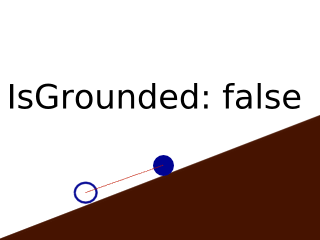
If I do the same movement in two steps (first up, then horizontal) to increase the angle at which the CharacterController is driven into the ground, it will report IsGrounded as true:

The Unity example projects seem to suffer the same issues, so likely the CharacterController’s implementation is not robust here.