Hi guys,
this is my second post on this forum, I’m relatively new to Unity and did a course in Udemy which has brought me kindaaa upto scratch but not just yet… lol
I’m working on creating a checkpoint, the sprite has an on and off image respectively. It also triggers a sound when a checkpoint is activated. If there is more than one checkpoint in a level then the lastest checkpoint becomes active and the previous one inactive. So far, so good.
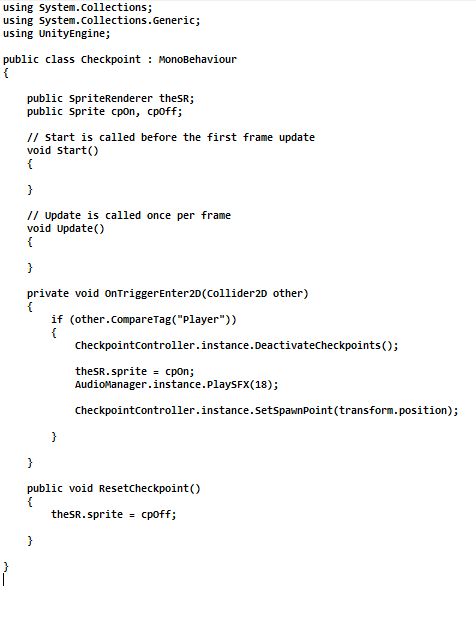
My problem is that when you activate a checkpoint, I can’t for the life of me figure out how to disable the sound. I just want the sound to happen once when you first go over the Collider trigger and the checkpoint is activated… then the sound should not occur again if you so happen to go over the checkpoint again…
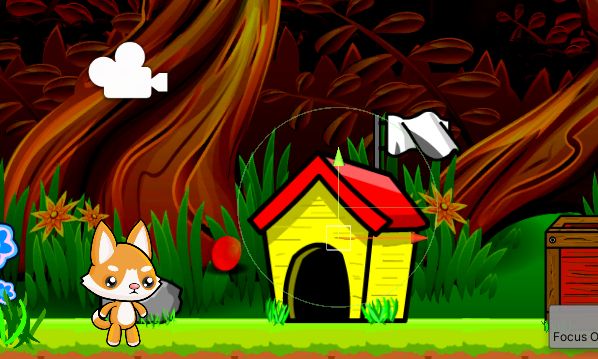
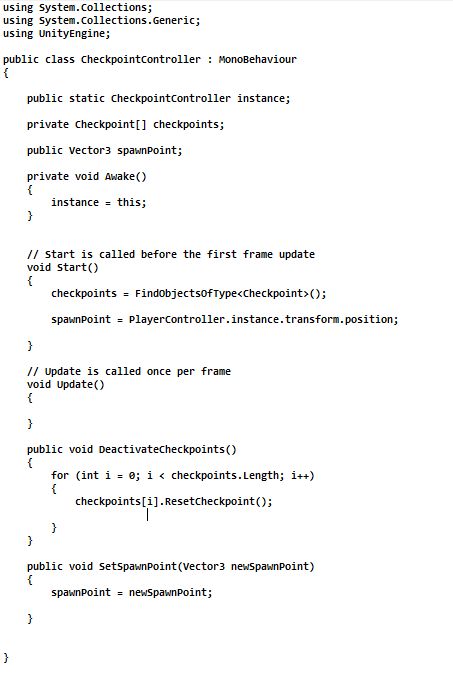
I’m probably missing something simple due to my inexperience… I’m attaching images of the checkpoint non active and active states as well as the Checkpoint Script (Checkpoint object in the Hierarchy) which is attached to the onTrigger Collider2D object and the Checkpoint Controller script which is a parent of the Checkpoint object.
I hope someone can help out, i’ve tried several scripts but they all either end up making all checkpoints inactive and not able to be activated or they disappear altogether (which is an option) however, the sound still plays when you roll over the area in which the checkpoint originally was… what a friggin kerfuffle… lol
Please help!