I have a 2D game where the player can throw multiple projectiles. Imagine a character throwing 5 shurikens at the same time or a shotgun shooting multiple bullets. I noticed that I have fps drop when the projectiles are spawned and are still overlapping, later when they spread out everything is fine. I have ignored the collision between these projectiles with Physics2D.IgnoreCollision(Collider2D collider1, Collider2D collider2), but this is still not enough.
For testing purposes I made a simple project to find what exactly is the problem.
Here is my projectile: it is a SpriteRenderer, RigidBody2D and a trigger PolygonCollider2D. GameObject is in Layer Projectiles.
Here is my collision matrix:
And this is what I do: I spawn 20 of these projectiles by Instantiate and AddForce. I am adding the same force to all of them to keep them together not spread them out like I would normally do.
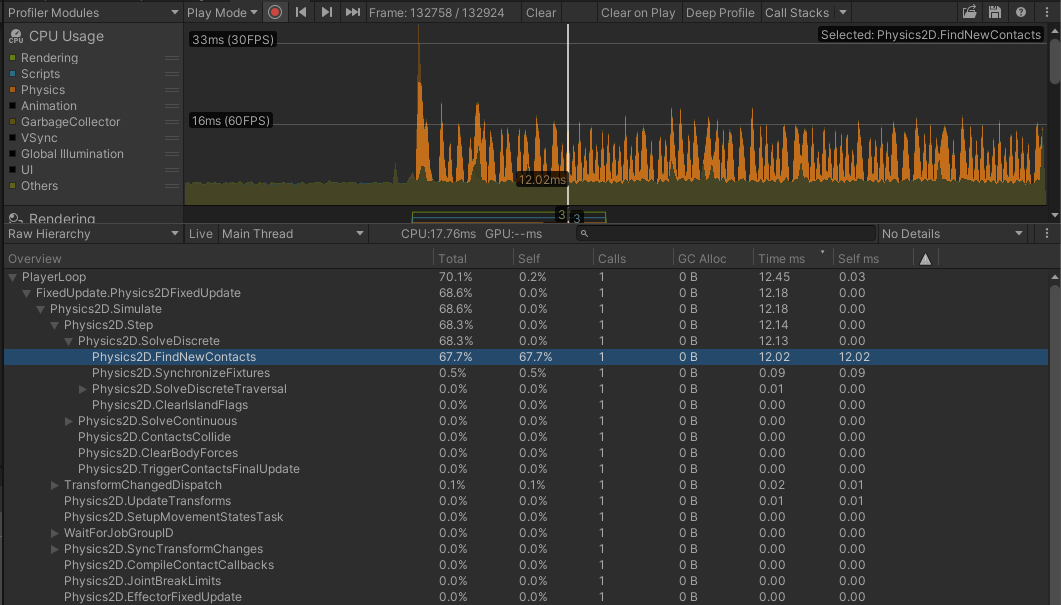
Here is how the Profiler looks after I spawn them. You can see what happens even though these colliders have disabled collision from collision matrix.
If I enable the collision in the matrix it is multiple times worse but that is to be expected.
If I disable the colliders of the projectiles, I have no issues.
I have other scenarios in my game where some colliders that don’t collide with each others, just because they are overlapping there is a fps drop.
My question is what can I optimise here. I don’t want to have any collision between them but I need their colliders to be enabled so they can still collide with other objects. Any tips will be appreciated.
Something else is going on there because if 5 of these overlapping was taking 12ms then 2D physics would be useless.
Is there any chance you could create a simple reproduction project and share it so I can take a quick look? If you want to do that privately then DM me. If you need me to set-up somewhere for you to host it then again, DM me with your email address.
also, do they need to be so pixel perfect colliders?
If its fast moving object, probably simple circle collider or even box would work?
(or even the polygon collider shape could be optimized, remove inner path, reduce points)
here’s free coupons for my asset:
ASV-WMHA-VKJG-P67N-HKCJ-XJVT
ASV-3TTN-NEL4-P6MN-KYDY-9YM9
ASV-Y7U3-YT4W-6APQ-N3EH-FPAR
ASV-WRG3-RF7W-CFQG-7F3H-QDN3
(ask more if already used)
@mgear
Thanks for your offer. Really appreciate it. I am already using a similar script that optimizes the polygon colliders. Left it unoptimised in this example on purpose to better demonstrate the problem. Optimizing the collider definitely helps and thats is why this was not a critical issue for my game up until now. But as the different cases increase where I happen to have this issue, now I just want to fix it from its roots.
@MelvMay
Yes It is the same problem from before but I had to leave it as it is and focus on different stuff. Now that I can again focus on this problem, instead of continuing the old thread I wanted to try and make more clear example of what the issue is and what exactly am I doing. I am sorry if was not the correct thing to do.
For your question about the performance. They are actually spawned 20 projectiles for this example. Normally I don’t spawn that many but I wanted to make the issue more visible. Yes I can send you the test project later.