Hey everyone!
I’m having somewhat strange issues with the Confiner 2D component, which I’m going to try to descirbe as thoroughly as possible.
First, the way I’m generally using the Confiner 2D Component and Vcams: In a scene I have different Vcams setup with different Confiners. These are activated and deactivated by triggers, once the player enters the respective areas. This generally works perfetly, and as far as I’m aware, is about the inteneded use of Vcams, right?
Also I’m currently using Unity 2020.3.11f1.
So, up until recently I used a pretty old Version of CM, that did not yet have the specific Confiner 2D component, but the general Confiner witht the 2D option. This worked well and as expected, with the annoying, known issue of the camera damping “beyond” screen edges when using a perspective camera (which I am). So, as far as I understand, to handle this exact issue, Confiner 2D was created in newer Versions, so I updated. Now generally, this component seems fantastic, and if I can get it to work as expected it’s exactly what I want and need. However there often times seem to be, somewhat strange, issues that, from as far as I can tell, mostly have to do with the calculation of the “inner polygon” that the component generates from the Polygon Collider. I’ve tried different version of the CM package, and across different versions I seem to run into different variations of the issues, which I’m going to try to describe as best as I can further below:
-
Version 2.7.1
-
In this version, the component works closest to the way I would expect it to but there seems to be one major issue: sometimes the camera would still damp beyond the defined screen edges the way it would with the old non-2D specific confiner. Strangley enough, this seems to happen even if damping is set to 0 and seems unaffected by the Max Window Size. It’s not the case with every Vcam/Confiner but all their settings are identical, and it’s not the case all the time - sometimes when playing the game it does damp beyond screen edges, and sometimes it doesn’t, with no changes to the components in question.
-
No matter the value i define for the Max Window Size, it always has a warning below saying “Camera window size is bigger than the maximum confinable size”. It’s safe to say I do not quite understand what an adequate value for this seems to be as the warning appears wether I enter 0, 1, 1000000 or anything inbetween. The inner polygon is drawn most optimally I would say if I have it at around 2 or 0 (I can see the shape change in the editor when I adjust this value).
-
However it seems pretty hard to guess where to “draw” the polygon collider for the confinement to be accurate, as the inner polygon, no matter the Max Window Size value, always seems to be somewhat too big if I draw the collider along the lines where I’d want the screen edges to be.
-
Version 2.7.2 - 2.9.0
-
Now in every version above 2.7.1 the issue I experience is a different one. Generally, if I can get confinement to work, it’s much better. The camera doesn’t damp beyond screen edges, and the confinement seems more acurate to the shape of the polygon collider.
-
However, for some reason, in these version, the Confiner 2D component only ever seems to be working on one single Vcam per Scene. As soon as I try to setup a different Vcam (exact same settings as the first one though) with a different confiner shape, that confiner does not work. If “Oversize Window” on the second Vcam is unchecked, it does not create an inner Polygon whatsoever, and the camera does not confine at all. If it is checked, one, or rather multiple tiny polygons, are created within the shape of the polygon collider, but they do not accurately confine the camera and cause the camera to “jump” between the multiple, small polygons created (it’s also easily visible by the Gizmo of the inner polygons that something is off). The “max window size” value does not seem to impact this in any meaningful way.
-
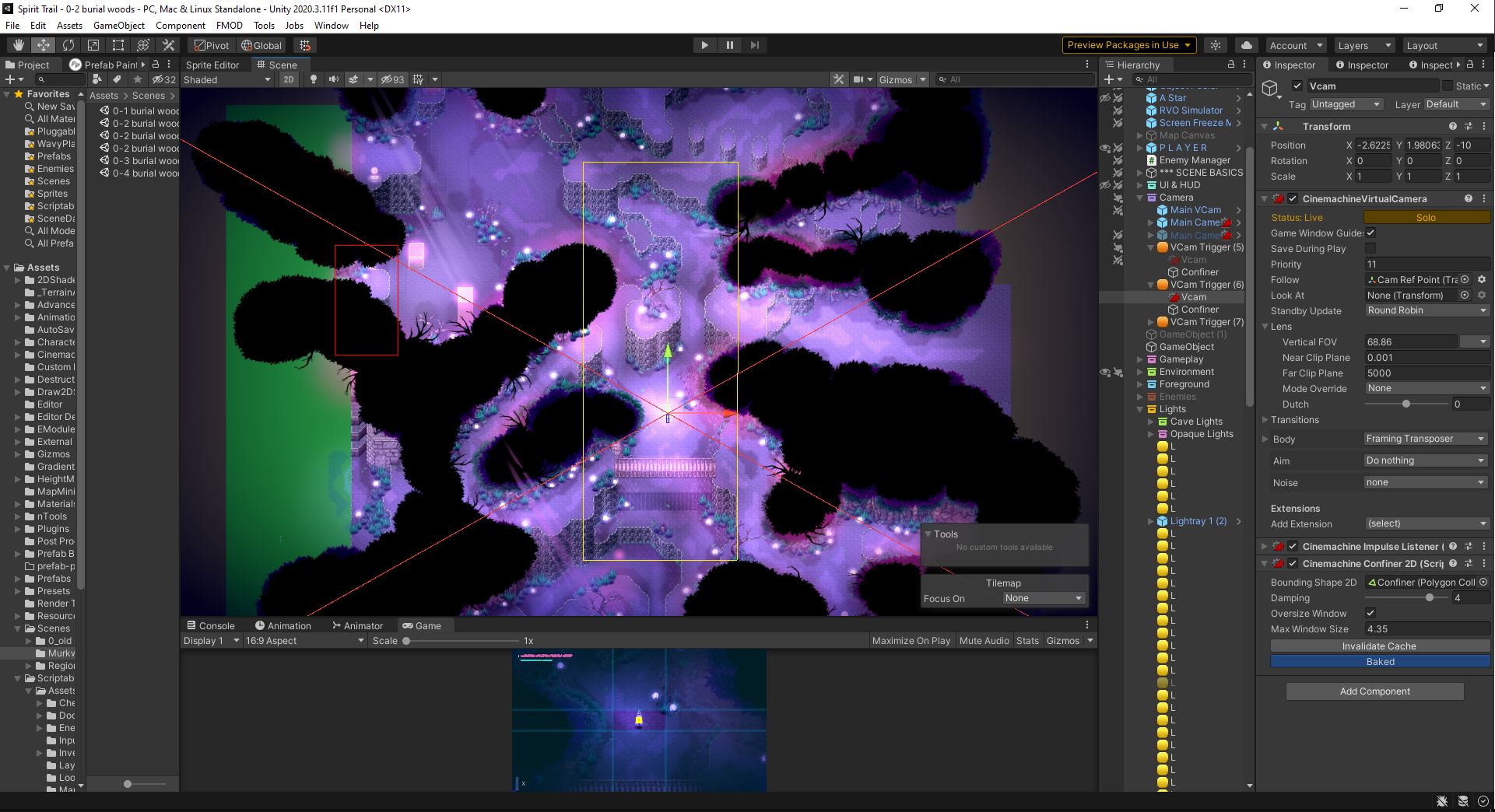
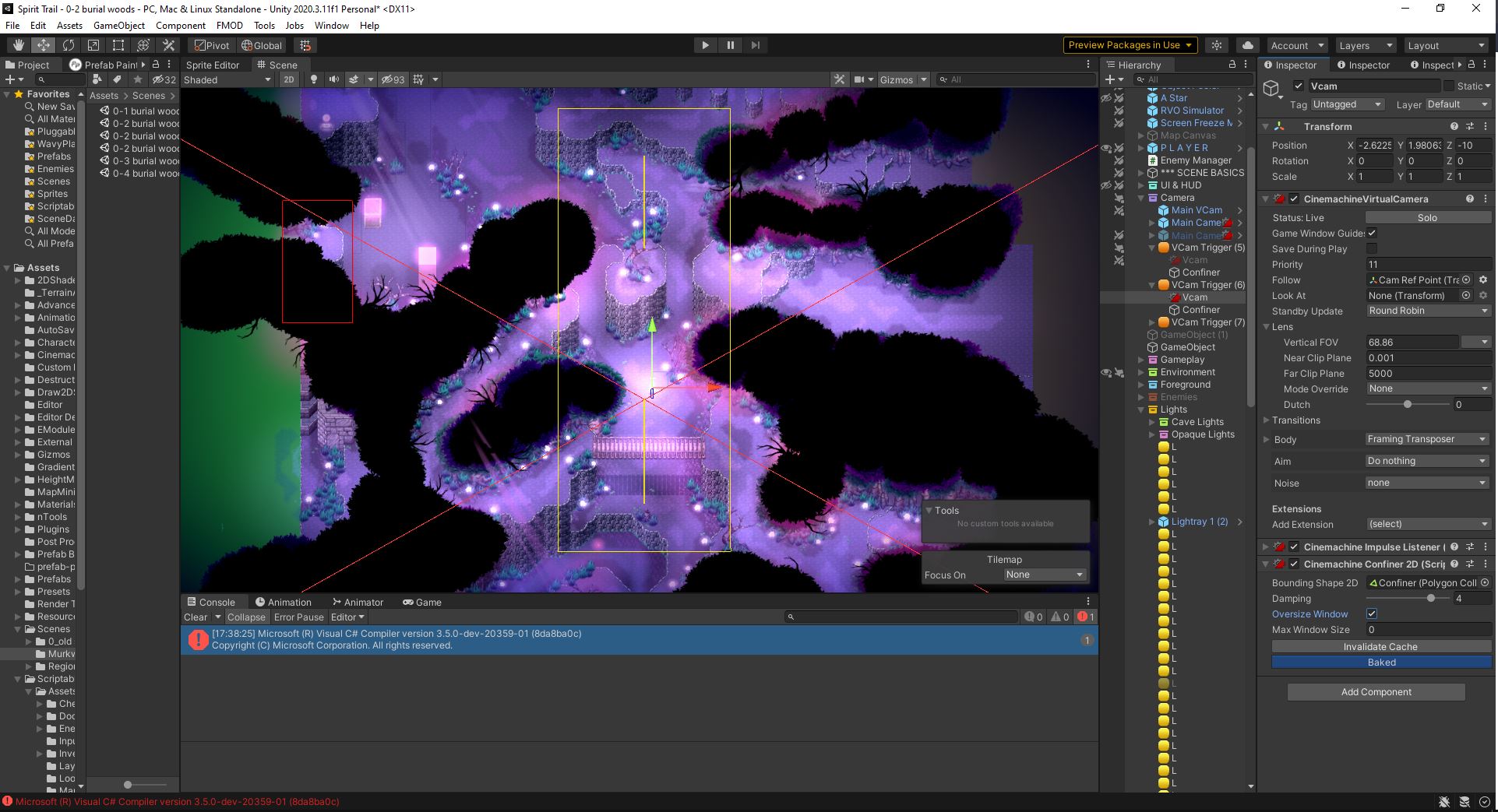
Below some screenshots in an effort to illustrate the problem:
Above is the optimal case, that as described, only works for one single Vcam. The Inner Polygon is generated perfectly and confines the screen in a way that matches perfectly with the defined bounds by the Polygon Collider. It does not seem to matter whether “Oversize Window” is checked or not, and the “Max Window Size” value does not affect it at all.
Above is how it looks on the second Vcam, with exact same settings as the other one, when “Oversize Window” is unechecked. No inner Polygon is created (and I’m of course aware I need to use the “Invalidate Cache” method).
Above is how it looks with “Oversize Window” checked on the second Vcam. It’s a bit hard to see, but there seem to be multiple small Polygons created within the collider shape which will cause the camera to “jump” between them. The “Max Window Size” only marginally affects the size of these polygons.
The screenshots were taken with the CM 2.9.0 preview installed, but the issue persist in every version from 2.7.2 onward.
Now I do not know if I’m missing something obvious or if I’m fundamentally using something in the wrong way, but I now thourughly tested this in every version of CM and seem not be able to arrive at the behaviour I need, so I decided to make this post and hope that I have described the issue in a way that one is able to make sense of it somewhat. 
I would love to hear some possible pointers in the direction of what could maybe solve this issue.
Also a huge thank you to the Cinemachine team at this point for the awesome work you guys do, I love CM and up until trying out this Confiner 2D component, never had any issues with it. Makes everything camera related sooo much easier!
Cheers,
Thierry


 I could reproduce it on my side. However, this is not a bug as I though at first.
 The behaviour in V2.7.1 to this is actually preferable I would say - here’s how the same, narrow, Confiner looks in 2.7.1: