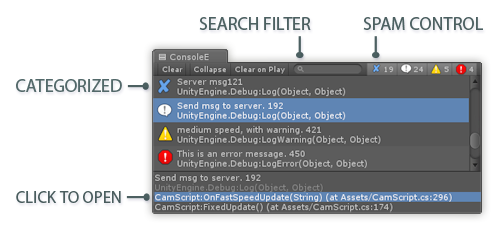
Console Enhanced is a replacement for the Unity Console. Version 2 is a massive upgrade. Check out the video for more details. Note that there is a FREE lite Version as well as a PRO version.
It’s really useful stuff you did! Cannot wait to buy it. The price sounds fine.
BTW, when storing unity logs to external files in custom format (timestamps, categories etc.) I remove “UnityEngine.Debug.Log” and own log-library stack frames because they are useless there and make log reading only more difficult. You can do this easily too. Yeah, I’ve seen you have an ability to disable them but they are still there. Even if it leads to more complicated configuration than you have now, I think it’s better because you need to configure it only once.
Nice idea Andy. Currently non-important entries are grayed-out, but perhaps we could have a way to remove them entirely, perhaps having a small button to collapse those entries away. I’ll think about adding this an update. Thanks for the feedback.
What I thought an obviously needed feature would be is filtering console output by entering a string.
Is this open source? (I mean, if I buy this, can I modify the source so I can tweak it to my personal needs?)
Yes, version 2 supports filtering the console output by entering a string.
For version 1, I gave out the source. Giving out source increases support time. Knowing customers will see the code, I find myself obsessively refactoring the code, and my progress is slower. There are other issues which I won’t go into here. Basically, based on my previous experience in giving out the source, I have decided try something different for version 2 in not giving out the source. I’m hoping that users will tell they want, and I will try to implement their features for the benefit of all users.
I had one customer tell me they only buy assets with full source because they are required to have all the original source for their projects. Keep in mind that ConsoleE is an only an editor extension, no part of it is included with your app. It just a tool to help you be more productive.
HUGE update was just released on the Asset Store! Also new is the free lite version. Even the free version is much better than the built-in Unity Console, so give it a try!
How can I disable standard Unity console? Unity automatically changes focus to it, and I don’t want to use it.
I want that Console Enhanced is a complete replacement.
It happened few times that I needed to reset Unity layout to factory settings.
This caused that I needed to type again license for Console Enhanced to activate it, which is a bit frustrating since layout bugs often.
I’m working on a new feature that intercepts clicks to the status bar. If you click the status bar, the log message in ConsoleE will be selected – and not the builtin console. If you download the “Beta Version” at Unity Console • Free Download, you’ll see that feature in there.
About your other problem, I will try to fix that in a future update. In the meantime, if you create a text file called “serialkey” (no filename extension), put this file next to ConsoleE.dll in your project. Then put your invoice number in the file. For that point, ConsoleE will pre-populate the dialog with your invoice number. This should make it less painful if you reset to factory settings.
On Friday, I released version 2.6. This version has bug fixes and small polish-related items. One new feature is that there’s a little button that takes you to the first error in the log. Usually in Unity, the first error is the most important. But if for some reason you don’t want this button, it can be removed in the Misc part of Tab settings. This is what it looks like, see the little button beneath the error icon? Click that to go to the first error.
It is supposed to work like this. It’s possible you’ve encountered a bug with “Status bar clicks”, I implemented this feature using a hack. Or you might have invalid serialization data stored in your window layout.
Try this:
Uncheck “Status bar clicks” in the Misc section. Restart Unity. Select a different layout in Layouts (choose a layout without any bugs), then recreate your preferred layout and save it using “Save Layout”. Hopefully that fixes your problem but if not you could try “Revert Factory Settings”, this will fully reset all layouts.
Hello Mark, first I want to say that Console Enhanced has become a very useful part of our pipeline!
I just have a little issue where after activating my copy (using the Unity invoice number) the line numbers have disappeared from the stack trace:
So it seems that activating the copy allows you to double-click on the stack trace lines to open them but it takes away the line numbers. I don’t know if it’s a bug or by design, but could you please add an option where you would simply display the line number as usual even after Console Enhanced is activated?
Hey great asset! Is there any way to make the font bigger in the stack trace text area? or any way to customize how that looks in general? I always found the Unity way of displaying the callstack was not super friendly. I was using a custom window where each log entry is a button a bit friendlier I found.
And, any way to set bold font on logs? Again easier to read.
Love the smooth scrolling, the search bar and tag system! Wanted to write something similar for our company but this saved me the time, thanks!