We’ve been working on a new editor tool for Unity. We’re at that stage where we can start showing off some features through GIFs and things and get feedback/suggestions from Unity users.
What is Construct?
Construct is a volume-based procedural building generator designed to save time when creating modular buildings in Unity.
Why would I use Construct?
If you’ve ever snapped together a modular building using individual pieces before, you’ll know it’s very time consuming (valuable time you would rather spend making more bad-ass art, right?) And if someone asks you to make that building longer? Wider? Higher? Pfft - forget it.
However, Construct works in 3 simple steps:
Use our node editor to create your ruleset.
Apply this ruleset to a ConstructVolume object in Unity.
Resize ConstructVolume to the desired size. Rinse and repeat.
Resizing your building is as easy as resizing the ConstructVolume.
When is Construct available?
We’re early in development but have a prototype of the ConstructVolume and the node editor up and running. We’ll be using this thread to post our progress as we develop. Once we’ve submitted to the Asset Store we’ll be sure to post that here.
Any questions or suggestions feel free to post them below
With Construct, you use your own modular building meshes that you create in 3DS Max etc (or download via the Asset Store) and plug these in using a series of rulesets in our node editor. This allows you to completely customise the way your buildings look by first creating a selection of “Lego pieces” which can then be used by Construct to create your buildings.
From what I have seen, Buildr generates the geometry of the buildings for you and then lets you customise the amount of windows etc you want via sliders and settings in the tool.
We’ll be showing examples of this as we move forward in development. The above GIF is the most basic form of building generation in Construct.
To have custom sections you would use various nodes in your ruleset to achieve this. In the above example I’m just using a simple repeat node to repeat the meshes along the X direction in the volume. We’re currently developing more nodes such as “Alternate Mesh” which will allow you to alternate between 2 meshes (window, wall, window, wall and so on).
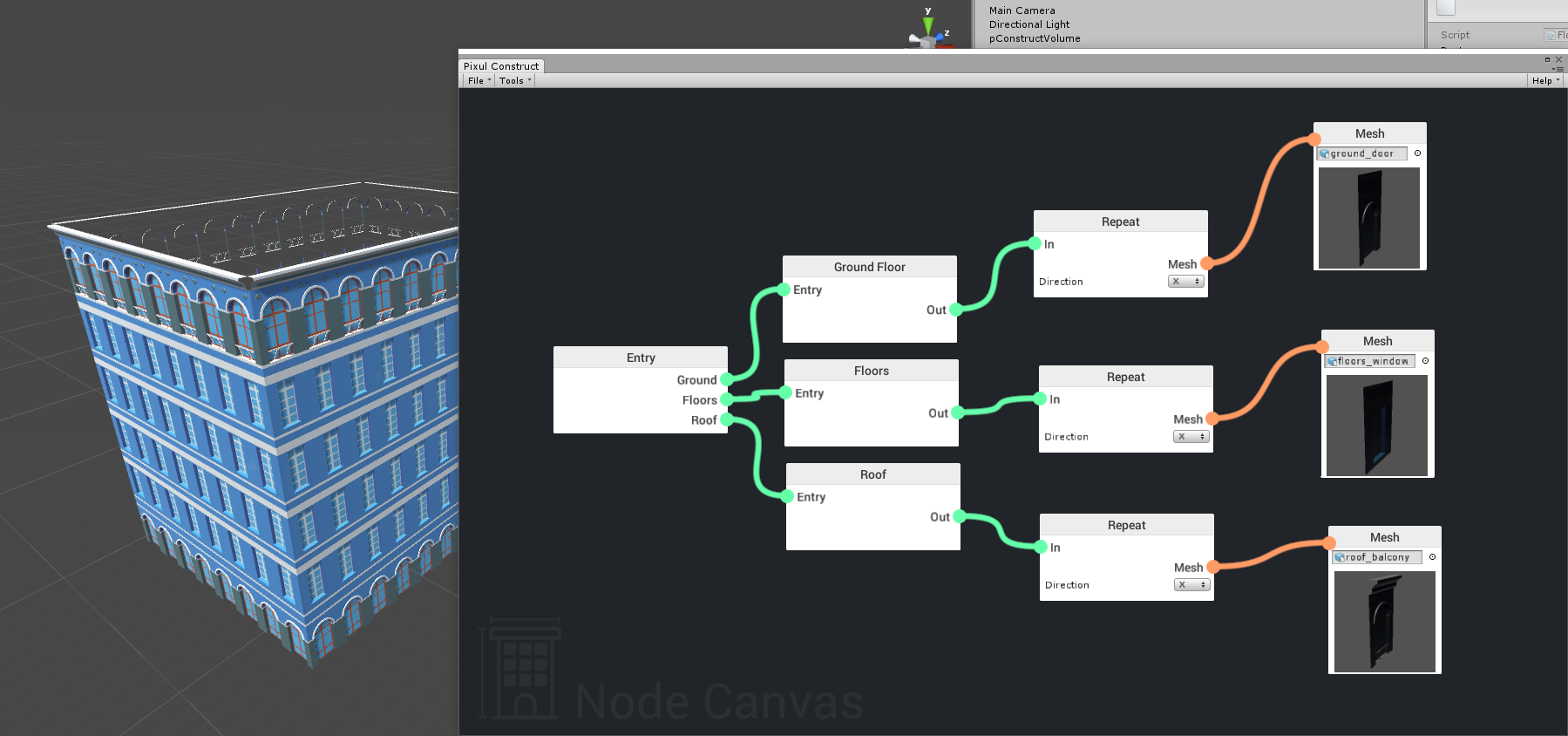
Here is the ruleset that creates the building in the above example. (Note: the node editor is still heavily work-in-progress :))
Note how you can have different “rules” for each level of your building (ground floor, middle floors, roof), this allows you to have complete control over how your building is generated.
This looks almost perfect! So, you create your own model parts, plug them in and create buildings? I want to learn more!
I need to build an old city with building parts I create. Because I need a lot of buildings, I want a fast way to create them. This looks good. So…I can make the parts in any 3d modeling program? I use Maya and Archimatix, so as long as they are prefab models, they will work? Or do they need to be fbx models?
I do not need interiors as they will be instanced.
Yep! You can create your individual pieces (doors, windows etc) in a modelling program and import into Unity. Once you’ve done that you can make them into prefabs to be used in your building. Then simply resize the volume to create your building and you’re done!
This workflow is exactly what we have done for the demo building shown above
You will then be able to duplicate a volume, apply a new ruleset to it (with new models) and resize that to get a completely different looking building. This will allow you to create towns and cities quickly and save a lot of time.
We’ve been working on the new editor for Construct. Decided to go with a more visually-sensible idea of having the nodes stacked on top of each other. The code is a lot cleaner and modular this way.
Anyway! Here’s a GIF of the editor in action for a simple building.
This looks very cool and your new editor looks like the way to go for simplicity without sacrificing power and customisation, I wish more tools are built this way.
Great Work and I am Watching this thread.