I’m creating hinge joints at run time. The hinge joints should have limits. When I get to the last one, that completes a circuit, it goes bananas. How can I avoid this?
I am creating e.g. 1/8th sections of railway in a circle as rigidbodies, procedurally, and linking them with hinge joints.
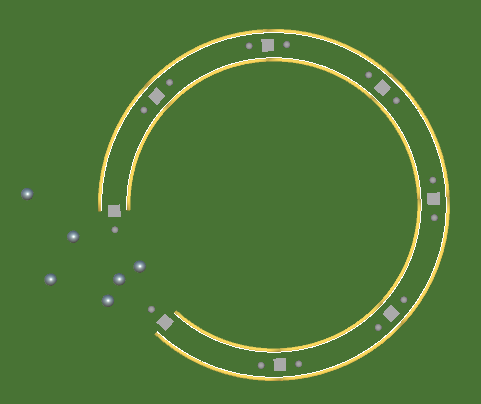
(The small grey circles are placeholder UI for adding new rail pieces. Think Brio. Here we’re just using standard 1 unit length 45 degree right bend pieces.)
When I add the last one, and link the connector from the first piece to the end connector of the last piece, the hinge joint does not work as expected.

This is because the rotations of the rigid bodies gradually increase as you go around the circle (i.e. first piece’s rigidbody has a rotation of 0, second has a rotation of 45, third has 90, etc etc), resulting in a full 360 degree increase (or thereabouts - take 45 degrees). The hinge joint therefore works if the limit values used for (min,max) are (357, 363) instead of the procedurally generated (-3, 3).
Unity’s 2D physics does not wrap angles, which is probably a good thing because you want for instance to be able to wind a spring round and round many times and then have it unwind the right amount. Nevertheless, it does put some doubt in my mind over the ability of the 2D physics engine to simulate things continuously rotating for very long periods of time. A bridge to cross when it presents itself, anyway.
So, what to do here? I can get the rotation of each of the two rigidbodies concerned, but I think I can’t rely on using their rotations, as my piece exits are sub objects of the rigidbody and are arbitrarily placed (imagine a piece that doubles back on itself, for example). So I can’t do a simple subtraction. Besides, the pieces can be dragged around arbitrarily, so their rotations and positions when being connected won’t be an exact match and I want to create the hinge joint exactly.
Anyone got any ideas?