DIGGER - Caves & overhangs for Unity terrains

Hi there!

I’m glad to introduce DIGGER, a simple tool to dig in your Unity terrains just like if it was a smooth voxel terrain.

Get Digger on the Asset Store <<
PRO version <<

Join the Discord server: Digger & Poly Terrains
See documentation.

More and more AAA games add gentle overhangs and caves to their environment to make it more realistic, more interesting and more diversified.
A common way to do this is to create 3D models with an external modeling tool, and then place them manually over the terrain and blend them with it. This is tedious, unpractical and inefficient unless you have an army of 3D artists and level designers… and even in that case, you’d probably want them to focus on more valuable work.
This is where Digger comes to action. No more external tool required, no more loss of time, no more headache. It lets you create caves and overhangs on your terrain directly within the scene view, in a few clicks.

It will make you feel like you have a voxel terrain in your hands, without the downsides. It actually keeps the new, fast and reliable Unity’s terrain system and creates seamless cave/overhangs meshes just where you need. Internally, Digger uses voxels and Marching Cubes to create meshes, but instead of replacing the entire terrain with a voxel terrain, it creates a mix of them and gives you the best of both worlds.

With this tool, you will be able to:
➤ Dig in your Unity terrain just like if it was a smooth voxel terrain.
➤ Create overhangs (the opposite of digging).
➤ Apply different textures on the overhangs, in the caves, etc.
➤ Dig in real-time, at runtime (PRO version only)
➤ Update NavMesh at runtime (only with Unity 2019.3 or more recent). (PRO version only)
➤ Persist and load at runtime. (PRO version only)

However, you won’t be able to:
➤ Generate caves procedurally.
If you need this feature, you should get a full voxel-based terrain solution, like Ultimate Terrains.

NEW: unleash the full power of Digger PRO with Unity 2019.3! Digger PRO now uses the latest Unity features to cut holes in terrain surface and is even more powerful, robust and performant than ever. From now on, Unity 2019.3 is recommended to get the best out of Digger PRO.

And a video to show quickly how it looks like in Unity:

12 Likes

Will this be able to Use CTS for textures and I am curious as to what price about ?
Thanks, this looks good for sure

Thanks! Yes, this is compatible with CTS, but with the current version of CTS it is not possible to change texture on cave meshes, which is quite limiting. I’m in discussion with the dev of CTS to change that in their next version (I hope).

Price should be around $30 for the launch offer and around $50 after.

1 Like

Really looking forward to this, especially if it is all implemented using the Unity Terrain System! So there shouldn’t be any performance penalty then for creating caves and overhangs?

EDIT - I see that a voxel terrain is generated in combination with Unity Terrain - what kind of performance do you get out of it?

1 Like

Unity terrains are based on heightmaps, so you will never be able to make cave just with it. You will always need something else. That something else can be meshes created with your favorite modeling software, or meshes created directly from Unity with… Digger :slight_smile:

Internally, Digger uses voxels to let you create cave/overhangs meshes, but you shouldn’t care about that. In the end, all you get is the Unity terrain + some meshes generated by Digger.
There can be some performance penalty because Digger has to generate bigger meshes for collision. Once Unity will release the official terrain hole feature (expected to be in 2019.2), Digger won’t have to generate bigger-than-needed meshes, which will solve the issue.
Also, the v1 doesn’t have LOD groups yet so if you put overhangs and caves everywhere there could be some performance penalty in rendering too. But adding LODs is at the top of the roadmap.

Finally, note that if you are using the default terrain shader, it will be replaced by a triplanar-mapping equivalent shader (I modified the default shader to add triplanar mapping).

3 Likes

Sounds great, especially with LOD groups. Looking forward to seeing this asset! I’m looking for a simple way to dig out a cave system, like a series of caverns with tunnels in between. I have tried other assets with cave prefab pieces, but using these limits how unique I can make the cave look.

Opps yes I forgot CTS not for meshes yet. :frowning: Still hopefully that will come, it was on the road map AFAIK …
I am looking forward to your release of this system :slight_smile:

Thanks! That’s the idea: not being limited to cave prefab pieces.

Thanks! I’m discussing with CTS dev to make it possible. I hope this will be in their next update.

2 Likes

I created a discord server for Digger: Digger & Poly Terrains
Feel free to join!

And here is the doc: Digger Documentation - Google Docs

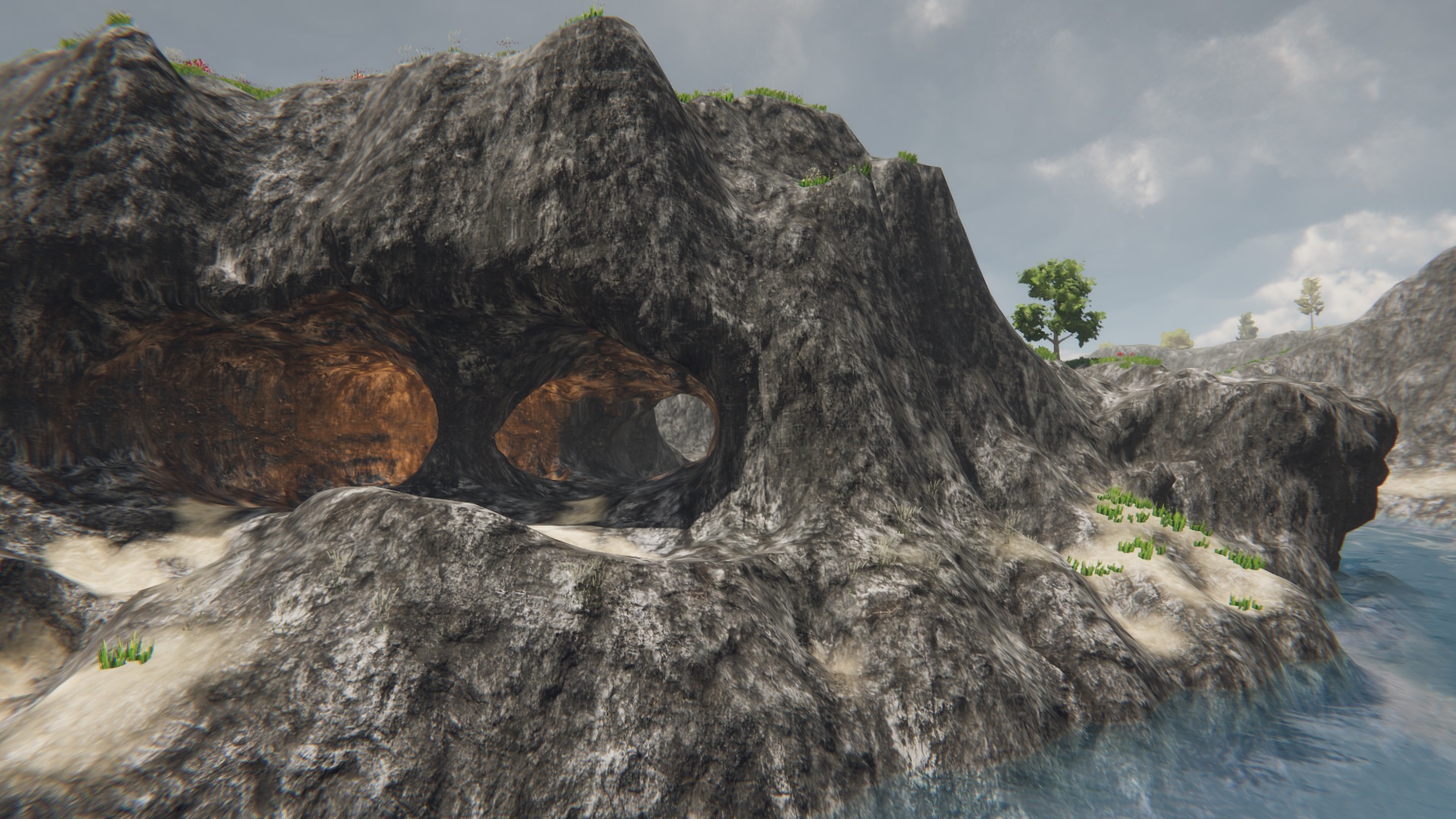
Just another screenshot in the mean time…

3 Likes

Love it !!!

1 Like

Looks nice, I’m thinking perhaps there could be other uses as well.

2 Likes

Will there be a possibility of exporting the mesh as well ?

Thanks! What other uses are you thinking about?

It creates meshes in the scene so you can do whatever you want with it. There is even a “Show debug data” toggle on DiggerSystem inspector that reveals all chunks and underlying objects.

1 Like

Pending for review :slight_smile:

BTW, just so you know, demo scene (from which I made the screenshots) has been made with Digger + Gaia + AQUAS. Nothing more.

3 Likes

Sounds cool - I own Gaia and Aquas already!

2 Likes

Hey,
Just a word to say there was a little issue during package review so I had to upload it again.

Sorry for the delay, but you’ll be happy to learn that I took this as an opportunity to add automatic LOD generation :wink:

3 Likes

Hi there!

DIGGER IS NOW AVAILABLE :wink:

Don’t miss the special LAUNCH OFFER (almost 50% off)!

I really hope you’ll enjoy it :slight_smile:

3 Likes

Will this work seemlessly with Vegetation Studio Pro and/or MicroSplat?

MicroSplat is not supported. It may be partially supported (by allowing seamless transitions but no custom texturing on caves), but will probably never be fully supported.

I have not tested it with vegetation studio, but I don’t see why it would conflict. If you question is: “is it possible to place vegetation in caves with vegetation studio?” then the answer is no.