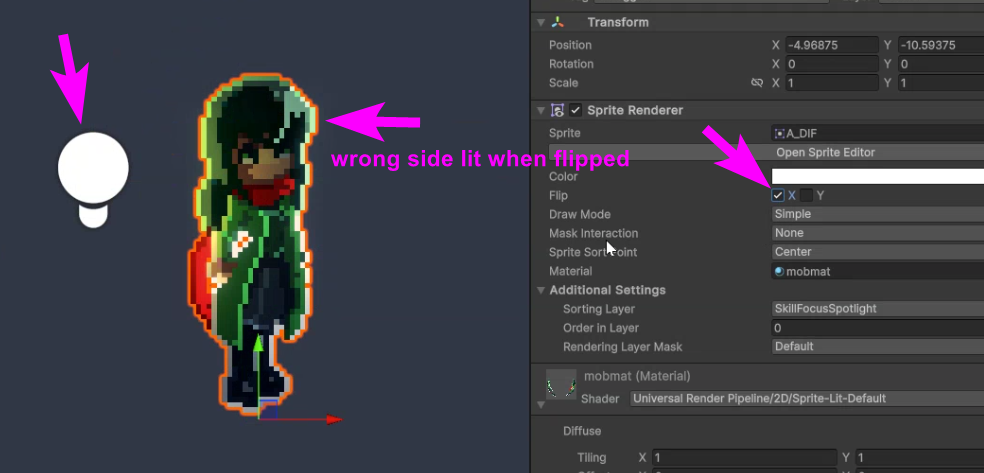
I’m working with 2D sprites and normal maps.
It seems, that if I flip the sprite, I also need to flip some color channel of the normal map in order for the lighting to work correctly.
What is the preferred workflow here? Is this done manually (ie, from code, when flipping the sprite, also flip the said color channel) or is there some feature/setting, that deals with this automatically?
I’d imagine, this could be easily achievable in a custom-edited shader with a custom property that would flip the color channel on demand.
I have some basic understanding of shader pass structure and have done simple edits to default shader code (e.g. to enable 1-pixel outline) but I’m unaware of how to flip a color channel of a texture.
In shader graph “One Minus” node seems to do the trick, but what is the equivalent code in urp/shaderlab?
I’d appreciate some help/nudge in the right direction.
Ok, I seem to have figured it out.
If anyone else needs the answer in the future, I did the following:
I decided to use Scale property (instead of spriterenderer’s flipX). In such case, after flipping the sprite, the green channel of the normal map needs to be flipped. I decided that I’ll be flipping the green channel of the normal map each time I need to use a flipped sprite.
In order to do that I made edits to Default-Lit-Shader and added a custom input parameter that will be set from code every time the main sprite is flipped.
In the shader code, under Normal pass, inside NormalsRenderingFragment method just before returning I added the follwoing:
normalTS.g = normalTS.g *= flipGreen;
where flipGreen is the custom parameter I added to the shader. If set to 1, the green channel is unflipped (default), if set to -1, the green channel is flipped.
If there’s a better way, let me know, but for now I’ll stick to this.