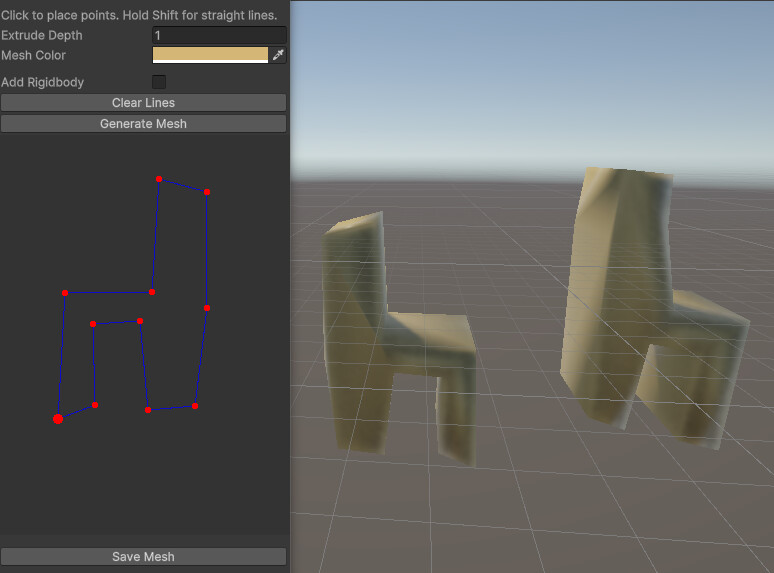
that is what i’m talking about, the only potential problem if you need to make it perfect, but it already allows lines by hold shift and it for some reason already goes not pixel by pixel, you can even set your DPI to 200 and lower to fix this issue even better with such crutch.
Here’s the code that i got in total with the only contextual prompt “Only code” from Sonnet 3.5 Code Claude
(I do not plan to sell it, maybe only put in a free asset script pack, it is CC0 basically, do anything with it. Edit: Fixed back now you can press close shape without the need to click “Generate” and have a bit more space for the finishing the last chair leg case. This thing also supports only undo’s with RMB):
using System.Collections.Generic;
using UnityEditor;
using UnityEngine;

public class MeshExtruderWindow : EditorWindow
{
    private List<Vector2> linePoints = new List<Vector2>();
    private bool isDrawing = false;
    private float extrudeDepth = 1f;
    private Color meshColor = Color.white;
    private float snapThreshold = 20f; // Distance to snap to straight lines
    private Vector2 scrollPosition;
    private float drawAreaSize = 400f;
    private Vector2? lastPoint = null;
    private bool isSnapping = false;

    private float closeThreshold = 15f; // Distance to detect closing the shape
    private bool isNearStart = false; // For highlighting possible close point

    private bool addRigidbody = false;
    private float meshMass = 1f;
    private string meshSavePath = "Assets/GeneratedMeshes";

    [MenuItem("Tools/Simple Mesh Extruder")]
    static void Init()
    {
        var window = GetWindow<MeshExtruderWindow>("Line Mesh Extruder");
        window.Show();
    }

    void OnGUI()
    {
        EditorGUILayout.Space(10);
        EditorGUILayout.LabelField("Click to place points. Hold Shift for straight lines.");
        extrudeDepth = EditorGUILayout.FloatField("Extrude Depth", extrudeDepth);
        meshColor = EditorGUILayout.ColorField("Mesh Color", meshColor);

        EditorGUILayout.Space(5);
        using (new EditorGUILayout.HorizontalScope())
        {
            addRigidbody = EditorGUILayout.Toggle("Add Rigidbody", addRigidbody);
            if (addRigidbody)
            {
                meshMass = EditorGUILayout.FloatField("Mass", meshMass);
            }
        }

        if (GUILayout.Button("Clear Lines"))
            linePoints.Clear();

        if (GUILayout.Button("Generate Mesh") && linePoints.Count >= 3)
            GenerateMesh();

        DrawArea();

        EditorGUILayout.Space(10);
        if (GUILayout.Button("Save Mesh"))
        {
            if (Selection.activeGameObject != null &&
                Selection.activeGameObject.GetComponent<MeshFilter>() != null)
            {
                SaveMesh(Selection.activeGameObject.GetComponent<MeshFilter>().sharedMesh);
            }
            else
            {
                EditorUtility.DisplayDialog("Error", "Please select a generated mesh first!", "OK");
            }
        }

    // Add back the below instructions
    EditorGUILayout.Space(10);
    EditorGUILayout.HelpBox(
        "Instructions:\n" +
        "- Click to place points\n" +
        "- Hold Shift for straight lines\n" +
        "- Click near first point to close shape\n" +
        "- Right-click to remove last point\n" +
        "- Select mesh and click 'Save Mesh' to save asset",
        MessageType.Info);
    }

    private void SaveMesh(Mesh mesh)
    {
        if (mesh == null) return;

        // Ensure the path is valid
        string meshSavePath = "Assets/GeneratedMeshes";

        // Create directory if it doesn't exist
        if (!AssetDatabase.IsValidFolder("Assets/GeneratedMeshes"))
        {
            AssetDatabase.CreateFolder("Assets", "GeneratedMeshes");
            AssetDatabase.Refresh();
        }

        string fileName = "ExtrudedMesh";
        string fullPath = $"{meshSavePath}/{fileName}.asset";

        // Check if file exists and handle accordingly
        int counter = 1;
        while (AssetDatabase.LoadAssetAtPath<Mesh>(fullPath) != null)
        {
            if (EditorUtility.DisplayDialog("File Exists",
                $"File {fileName}.asset already exists. Do you want to overwrite it?",
                "Overwrite", "Create New"))
            {
                break;
            }
            fileName = $"ExtrudedMesh_{counter}";
            fullPath = $"{meshSavePath}/{fileName}.asset";
            counter++;
        }

        // Save the mesh
        Mesh meshToSave = Instantiate(mesh);
        AssetDatabase.CreateAsset(meshToSave, fullPath);
        AssetDatabase.SaveAssets();
        AssetDatabase.Refresh();

        EditorUtility.DisplayDialog("Success",
            $"Mesh saved to {fullPath}", "OK");

        // Ping the saved mesh in the Project window
        EditorGUIUtility.PingObject(
            AssetDatabase.LoadAssetAtPath<Mesh>(fullPath));
    }

    // Add to the help box in DrawArea
    private void ShowInstructions()
    {
        EditorGUILayout.HelpBox(
            "Instructions:\n" +
            "- Click to place points\n" +
            "- Hold Shift for straight lines\n" +
            "- Click near first point to close shape\n" +
            "- Right-click to remove last point\n" +
            "- Select mesh and click 'Save Mesh' to save asset",
            MessageType.Info);
    }

    void DrawArea()
    {
        Rect drawRect = GUILayoutUtility.GetRect(drawAreaSize, drawAreaSize);
GUI.Box(drawRect, "");

Event e = Event.current;
Vector2 mousePos = e.mousePosition;

if (drawRect.Contains(mousePos))
{
    isNearStart = linePoints.Count > 2 &&
                  Vector2.Distance(mousePos, linePoints[0]) < closeThreshold;

    if (e.type == EventType.MouseDown)
    {
        if (e.button == 0) // Left click
        {
            Vector2 newPoint = mousePos;

            if (e.shift && linePoints.Count > 0)
            {
                Vector2 diff = newPoint - linePoints[linePoints.Count - 1];
                if (Mathf.Abs(diff.x) > Mathf.Abs(diff.y))
                    newPoint.y = linePoints[linePoints.Count - 1].y;
                else
                    newPoint.x = linePoints[linePoints.Count - 1].x;
            }

            if (isNearStart)
            {
                linePoints.Add(linePoints[0]);
                GenerateMesh();
                linePoints.RemoveAt(linePoints.Count - 1); // Remove the duplicate closing point
                Repaint();
            }
            else
            {
                linePoints.Add(newPoint);
                lastPoint = newPoint;
                Repaint();
            }
        }
        else if (e.button == 1 && linePoints.Count > 0) // Right click
        {
            // Remove the last point
            linePoints.RemoveAt(linePoints.Count - 1);

            // Update lastPoint
            if (linePoints.Count > 0)
                lastPoint = linePoints[linePoints.Count - 1];
            else
                lastPoint = null;

            Repaint();
            e.Use(); // Consume the event
        }
    }
            // ... rest of the input handling
        }

        Handles.BeginGUI();
        // Draw existing lines
        if (linePoints.Count > 0)
        {
            Handles.color = Color.blue;
            for (int i = 0; i < linePoints.Count - 1; i++)
            {
                Handles.DrawLine(linePoints[i], linePoints[i + 1]);
            }

            // Draw preview line
            if (drawRect.Contains(mousePos) && linePoints.Count > 0)
            {
                Vector2 previewEnd = mousePos;
                if (e.shift) // Snap preview to axis
                {
                    Vector2 diff = previewEnd - linePoints[linePoints.Count - 1];
                    if (Mathf.Abs(diff.x) > Mathf.Abs(diff.y))
                        previewEnd.y = linePoints[linePoints.Count - 1].y;
                    else
                        previewEnd.x = linePoints[linePoints.Count - 1].x;
                }
                Handles.color = isNearStart ? Color.green : Color.gray;
                Handles.DrawLine(linePoints[linePoints.Count - 1], previewEnd);
            }
        }

        // Draw points
        foreach (var point in linePoints)
        {
            // Highlight first point when mouse is near
            Handles.color = (point == linePoints[0] && isNearStart) ? Color.green : Color.red;
            Handles.DrawSolidDisc(point, Vector3.forward, point == linePoints[0] ? 5 : 3);
        }
        Handles.EndGUI();

        // Show help text for closing shape
        if (isNearStart)
        {
            Rect helpRect = new Rect(mousePos.x + 15, mousePos.y + 15, 150, 20);
            GUI.Label(helpRect, "Click to close shape", EditorStyles.helpBox);
        }

        #endregion

    }

    private void GenerateMesh()
    {
        if (linePoints.Count < 3) return;

        List<Vector3> vertices = new List<Vector3>();
        List<int> triangles = new List<int>();

        // Create vertices - ensure we don't duplicate the closing vertex
        for (int i = 0; i < linePoints.Count; i++)
        {
            Vector2 point = linePoints[i];
            // Skip if this is a duplicate of the first point
            if (i == linePoints.Count - 1 && Vector2.Distance(point, linePoints[0]) < closeThreshold)
                continue;

            vertices.Add(new Vector3((point.x - drawAreaSize / 2) / 100f,
                                   -(point.y - drawAreaSize / 2) / 100f, 0));
            vertices.Add(new Vector3((point.x - drawAreaSize / 2) / 100f,
                                   -(point.y - drawAreaSize / 2) / 100f, extrudeDepth));
        }

        int vertCount = vertices.Count / 2;

        // Create side faces
        for (int i = 0; i < vertCount; i++)
        {
            int next = (i + 1) % vertCount;
            int current = i * 2;
            int nextVertex = next * 2;

            // First triangle
            triangles.Add(current);
            triangles.Add(current + 1);
            triangles.Add(nextVertex);

            // Second triangle
            triangles.Add(nextVertex);
            triangles.Add(current + 1);
            triangles.Add(nextVertex + 1);
        }

        // Create front face
        List<Vector2> frontFacePoints = new List<Vector2>();
        for (int i = 0; i < vertCount; i++)
        {
            frontFacePoints.Add(new Vector2(vertices[i * 2].x, vertices[i * 2].y));
        }

        // Triangulate front face
        Triangulator tr = new Triangulator(frontFacePoints.ToArray());
        int[] frontIndices = tr.Triangulate();

        // Add front face triangles
        for (int i = 0; i < frontIndices.Length; i += 3)
        {
            triangles.Add(frontIndices[i] * 2);
            triangles.Add(frontIndices[i + 1] * 2);
            triangles.Add(frontIndices[i + 2] * 2);
        }

        // Add back face triangles (reversed winding)
        for (int i = 0; i < frontIndices.Length; i += 3)
        {
            triangles.Add(frontIndices[i + 2] * 2 + 1);
            triangles.Add(frontIndices[i + 1] * 2 + 1);
            triangles.Add(frontIndices[i] * 2 + 1);
        }

        Mesh mesh = new Mesh();
        mesh.vertices = vertices.ToArray();
        mesh.triangles = triangles.ToArray();
        mesh.RecalculateNormals();//21:23

        GameObject go = new GameObject("Extruded_Mesh");//21:32
        MeshFilter mf = go.AddComponent<MeshFilter>();
        mf.sharedMesh = mesh;

        MeshRenderer mr = go.AddComponent<MeshRenderer>();
        Material mat = new Material(Shader.Find("Universal Render Pipeline/Lit"));
        mat.color = meshColor;
        mat.SetFloat("_Cull", (float)UnityEngine.Rendering.CullMode.Off);
        mat.doubleSidedGI = true;
        mr.sharedMaterial = mat;

        MeshCollider mc = go.AddComponent<MeshCollider>();
        mc.convex = true;
        mc.sharedMesh = mesh;

        if (addRigidbody)
        {
            Rigidbody rb = go.AddComponent<Rigidbody>();
            rb.mass = meshMass;
        }

        Selection.activeGameObject = go;
    }
}

// Helper class for triangulation
public class Triangulator
{
    private List<Vector2> m_points = new List<Vector2>();

    public Triangulator(Vector2[] points)
    {
        m_points = new List<Vector2>(points);
    }

    public int[] Triangulate()
    {
        List<int> indices = new List<int>();

        int n = m_points.Count;
        if (n < 3)
            return indices.ToArray();

        int[] V = new int[n];
        if (Area() > 0)
        {
            for (int v = 0; v < n; v++)
                V[v] = v;
        }
        else
        {
            for (int v = 0; v < n; v++)
                V[v] = (n - 1) - v;
        }

        int nv = n;
        int count = 2 * nv;
        for (int v = nv - 1; nv > 2;)
        {
            if ((count--) <= 0)
                return indices.ToArray();

            int u = v;
            if (nv <= u)
                u = 0;
            v = u + 1;
            if (nv <= v)
                v = 0;
            int w = v + 1;
            if (nv <= w)
                w = 0;

            if (Snip(u, v, w, nv, V))
            {
                int a, b, c, s, t;
                a = V[u];
                b = V[v];
                c = V[w];
                indices.Add(a);
                indices.Add(b);
                indices.Add(c);
                for (s = v, t = v + 1; t < nv; s++, t++)
                    V[s] = V[t];
                nv--;
                count = 2 * nv;
            }
        }

        indices.Reverse();
        return indices.ToArray();
    }

    private float Area()
    {
        int n = m_points.Count;
        float A = 0.0f;
        for (int p = n - 1, q = 0; q < n; p = q++)
        {
            Vector2 pval = m_points[p];
            Vector2 qval = m_points[q];
            A += pval.x * qval.y - qval.x * pval.y;
        }
        return (A * 0.5f);
    }

    private bool Snip(int u, int v, int w, int n, int[] V)
    {
        Vector2 A = m_points[V[u]];
        Vector2 B = m_points[V[v]];
        Vector2 C = m_points[V[w]];

        if (Mathf.Epsilon > (((B.x - A.x) * (C.y - A.y)) - ((B.y - A.y) * (C.x - A.x))))
            return false;

        for (int p = 0; p < n; p++)
        {
            if ((p == u) || (p == v) || (p == w))
                continue;
            Vector2 P = m_points[V[p]];
            if (InsideTriangle(A, B, C, P))
                return false;
        }
        return true;
    }

    private bool InsideTriangle(Vector2 A, Vector2 B, Vector2 C, Vector2 P)
    {
        float ax, ay, bx, by, cx, cy, apx, apy, bpx, bpy, cpx, cpy;
        float cCROSSap, bCROSScp, aCROSSbp;

        ax = C.x - B.x; ay = C.y - B.y;
        bx = A.x - C.x; by = A.y - C.y;
        cx = B.x - A.x; cy = B.y - A.y;
        apx = P.x - A.x; apy = P.y - A.y;
        bpx = P.x - B.x; bpy = P.y - B.y;
        cpx = P.x - C.x; cpy = P.y - C.y;

        aCROSSbp = ax * bpy - ay * bpx;
        cCROSSap = cx * apy - cy * apx;
        bCROSScp = bx * cpy - by * cpx;

        return ((aCROSSbp >= 0.0f) && (bCROSScp >= 0.0f) && (cCROSSap >= 0.0f));
    }
}
P.S.
Some people are just mad on AI for no reason even the first try gave me 344 code lines, if had a bigger paid token limit i could even fix it in a less than few extra prompts.
I actually suppose that old pro’s are just jealous that nowadays there are tools that can do something that you would be making a whole working week, but still don’t understand how their behavior looks to others.
P.S.S.
It does it basic job, but is not perfect, you can give code to GPT again or modify code yourself for new features and improvements.
Screens: