Generating Dynamic Parabola

This is a math problem for you guys,

I need to be able to dynamically create a parabolic curve in-game that an object follows. The “start” and “end” of the parabolic curve are points in 3D space that the object will travel from and towards. The “vertex”, or “apex” of the parabola is located on the x-axis midway between those two points, and its y-value I want to be able to control with mouse input. All of this must be in 3D space.

I’m open to suggestions on how to do this. And no, this isn’t for a projectile, so using rigidbodies and gravity for this is useless to me.

1 Like

THIS IS IN C#

So we know that a parabola is derived from the function y = x^2

so every point in a parabola starting from the center is equal to (x, x^2) because y is literally equal to x^2

so, how can we make this in unity?

1: create a float to serve as x
2: constantly change the position

so the first part is pretty straightforward:

float x = 0;
public GameObject theObject

where theObject is the object you want to move (you can just drag him in)

you can set x to anything, this is just the starting x point.

in the Start(), lets set the vertex to 0, just by setting the object’s position to (0,0,0)

theObject.transform.localPosition = Vector3.zero;

so the second part is actually also pretty easy: (in the update)

x += 0.05f;
theObject.transform.localPosition = new Vector3(x, Mathf.Pow(x, 2), 0);

Mathf.Pow is the easiest way to just make a float to the power of a number. the x += 0.05 is just the quantity that will change in x each time. meaning the smaller it is, the longer it is going to take and the smoother it will be

the reason i used localPosition is going to be explained in just a second

This above script will make the object go up.

if you wanted it to be flat on the ground and not change height, you would put the x in the Y position, and the x^2 in the Z position.

so if you wanted to change the positioning/rotation of it, your easiest solution would be just to make your object a child to an empty, and then move that empty around to your desired location (this is why i used localPosition, so it is relative to the parent)

of course, as far as customizing, you can change the x^2 to -x^2 (just making it negative) and it will go down

you can also change the starting position of the object by just changing x at its initiation, and you can also change the direction of the path (not the curve, that’s what would happen if i did -x^2) by doing x -= 0.05f instead.

if you wanted to make it fatter, you need to multiply the x^2 by something less than 1, but greater than 0

if you wanted to make it skinnier, you just need to multiply x^2 by something more than 1

you can always just tweak around with the stuff

this is all in global positioning, but really it’s basically just 2d in a 3d world.

have fun! hope I helped. If you have any more questions just ask

1 Like

This is sort of what I’m talking about, the problem for me though isn’t in making actual parabolas, it’s in generating a parabolic formula so that an object will pass through two specific points, simply tweaking in editor the “skinniness” or “fatness” of the parabola is not enough because the formula needs to work for any two points chosen in-game, on the fly; and it has to be exact.

1423640--75104--$example.png

This is what I want, more or less. The player chooses a “ship”, the ship’s location is the first point on the parabola. The end position the player chooses is the second point, and is where the ship will travel to (along the curve). The curve of the parabola I want set by moving the mouse up-down to raise and lower the apex of the parabola, which will affect the curves.

So far, I’ve tried to do it so I create a certain amount of points between the 2 positions, so the x’s and z’s of the various points along the line are already set. I just need the y-positions of those points to correlate to a parabolic curve which I thought I could set by moving the mouse up and down… and then I can make an object move from point to point to emulate parabolic movement. I just can’t figure out how to adjust the y-positions of the points to match that curve.

1 Like

In order for it to go up 42 meters i would just attach it to an empty…
as far as the actual doing of it, i’m sure you could create an algorithm to have the points stay the same and the vertex change. It’s late and I’m tired but I’ll think about it tomorrow and see what I come up with

The points staying and the same and raising the vertex, I can already do. I have that working. The problem is making the points in between those three points (that make up the curves) to follow the rise and fall of the vertex in a manner that creates a parabolic curve.

Does it have to be parabola? Sin waves so much simpler

1 Like

No it doesn’t have to be a parabola, that gif shows exactly what I want. It has the three points, and curves relative to those 3 points which is exactly what I need. I don’t know why I didn’t think of sin waves.

Is that your own example? Do you have code? I’d love to know how to implement this.

Yeah i saw the thread and thought id see what alternatives i could come up with
Heres what I used to make that gif

    public Transform Ta, Tb, Ttop;
    Vector3 a, b, midPoint;

    void Update () {
        if ( Ta && Tb && Ttop ) {
            a = Ta.position;
            b = Tb.position;
            midPoint = ( a + b ) / 2;
            midPoint.y = Ttop.position.y;
            Ttop.position = midPoint;
        }
    }

    void OnDrawGizmos () {
        Gizmos.color = Color.red;
        Gizmos.DrawLine( a, b );
        Vector3 dir = b - a;
        float count = 20;
        Vector3 lastP = a;
        for ( float i = 0; i < count+1; i++ ) {
            Vector3 p = a + ( dir / count ) * i;
            p.y = Mathf.Sin( ( i / count ) * Mathf.PI ) * midPoint.y;
            Gizmos.color = i % 2 == 0 ? Color.blue : Color.green;
            Gizmos.DrawLine( lastP, p );
            lastP = p;
        }
    }

It’s probably not gonna be exactly what you need, instead of looping over known sample points, youll probably want to rewrite it into a function like
LerpParabola (Vector3 a, Vector3 b, float h, float t)

4 Likes

Amazing, thank you. There are some problems though:

It only works if points A and B are at a world y position of 0. I tried fixing it by doing this.

p.y = p.y + (Mathf.Sin( ( i / count ) * Mathf.PI ) * Ttop.position.y);

This didn’t work though, as the curve was no longer aligned with the mid point, etc. Any way to fix that so I could have points A and B anywhere in world space/have different y positions?

Done

	public Transform someObject; //object that moves along parabola.
	float objectT = 0; //timer for that object

	public Transform Ta, Tb; //transforms that mark the start and end
	public float h; //desired parabola height

	Vector3 a, b; //Vector positions for start and end

	void Update () {
		if ( Ta  Tb ) {
			a = Ta.position; //Get vectors from the transforms
			b = Tb.position;

			if ( someObject ) {
				//Shows how to animate something following a parabola
				objectT = Time.time % 1; //completes the parabola trip in one second
				someObject.position = SampleParabola( a, b, h, objectT );
			}
		}
	}


	void OnDrawGizmos () {
		//Draw the height in the viewport, so i can make a better gif :]
		Handles.BeginGUI();
		GUI.skin.box.fontSize = 16;
		GUI.Box( new Rect( 10, 10, 100, 25 ), h + "" );
		Handles.EndGUI();

		//Draw the parabola by sample a few times
		Gizmos.color = Color.red;
		Gizmos.DrawLine( a, b );
		float count = 20;
		Vector3 lastP = a;
		for ( float i = 0; i < count + 1; i++ ) {
			Vector3 p = SampleParabola( a, b, h, i / count );
			Gizmos.color = i % 2 == 0 ? Color.blue : Color.green;
			Gizmos.DrawLine( lastP, p );
			lastP = p;
		}
	}

	#region Parabola sampling function
	/// <summary>
	/// Get position from a parabola defined by start and end, height, and time
	/// </summary>
	/// <param name='start'>
	/// The start point of the parabola
	/// </param>
	/// <param name='end'>
	/// The end point of the parabola
	/// </param>
	/// <param name='height'>
	/// The height of the parabola at its maximum
	/// </param>
	/// <param name='t'>
	/// Normalized time (0->1)
	/// </param>S
	Vector3 SampleParabola ( Vector3 start, Vector3 end, float height, float t ) {
		if ( Mathf.Abs( start.y - end.y ) < 0.1f ) {
			//start and end are roughly level, pretend they are - simpler solution with less steps
			Vector3 travelDirection = end - start;
			Vector3 result = start + t * travelDirection;
			result.y += Mathf.Sin( t * Mathf.PI ) * height;
			return result;
		} else {
			//start and end are not level, gets more complicated
			Vector3 travelDirection = end - start;
			Vector3 levelDirecteion = end - new Vector3( start.x, end.y, start.z );
			Vector3 right = Vector3.Cross( travelDirection, levelDirecteion );
			Vector3 up = Vector3.Cross( right, travelDirection );
			if ( end.y > start.y ) up = -up;
			Vector3 result = start + t * travelDirection;
			result += ( Mathf.Sin( t * Mathf.PI ) * height ) * up.normalized;
			return result;
		}
	}
	#endregion

All you need is the parabola sampling function region, the rest is just for demo

9 Likes

Taking this approach also helped me figure out how to make them ‘proper’ parabolas, using x^2
The curve is slightly different, shown here in pink and yellow

	Vector3 SampleParabola ( Vector3 start, Vector3 end, float height, float t ) {
		float parabolicT = t * 2 - 1;
		if ( Mathf.Abs( start.y - end.y ) < 0.1f ) {
			//start and end are roughly level, pretend they are - simpler solution with less steps
			Vector3 travelDirection = end - start;
			Vector3 result = start + t * travelDirection;
			result.y += ( -parabolicT * parabolicT + 1 ) * height;
			return result;
		} else {
			//start and end are not level, gets more complicated
			Vector3 travelDirection = end - start;
			Vector3 levelDirecteion = end - new Vector3( start.x, end.y, start.z );
			Vector3 right = Vector3.Cross( travelDirection, levelDirecteion );
			Vector3 up = Vector3.Cross( right, travelDirection );
			if ( end.y > start.y ) up = -up;
			Vector3 result = start + t * travelDirection;
			result += ( ( -parabolicT * parabolicT + 1 ) * height ) * up.normalized;
			return result;
		}
	}
6 Likes

This is actually really awesome. I don’t think I’d have been able to come up with this on my own. Thank you very much!

I think something is wrong …

1427124--75492--$1212.gif
1427124--75493--$111.gif

1 Like

Actually I kind of want it the way hpjohn has it, because it generates a curve on an arbitrary axis relative to the 2 positions so the curve is even on both sides. I’d rather that for what I want.

However, anyone who feels like they can accomplish what the7347 says should be correct, feel free to post it. That’d also be cool.

Yeah, looks like the recent change to the forum code has removed some symbols from the code (posted before the forum changed)

Specifically, in that code, line 5 is missing some && between the bits, should read
if(Ta && Tb && Ttop){

For the behaviour who want the7347 you simply have to ignore the second part of the SampleParabola (easy fix): :slight_smile:

if (true) //Mathf.Abs( start.y - end.y ) < 0.1f ) {
1 Like

@hpjohn
Thank you so much. But how can I change the duration of flight of object???

I found this thread and the code examples extremely helpful for a project I am working on.

To answer @Pavan_Srivathsa :

You can change the duration of the flight of the object by changing the line:

objectT =Time.time%1; //completes the parabola trip in one second

to read:

objectT =(Time.time / 10.0f) %1; //completes the parabola trip in ten seconds

Hello readers of the future,

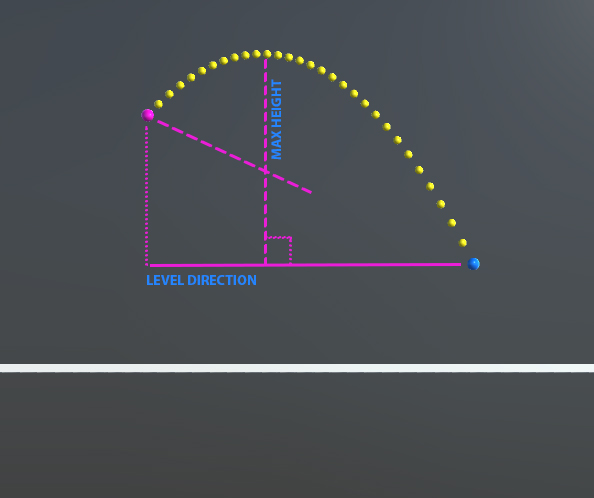
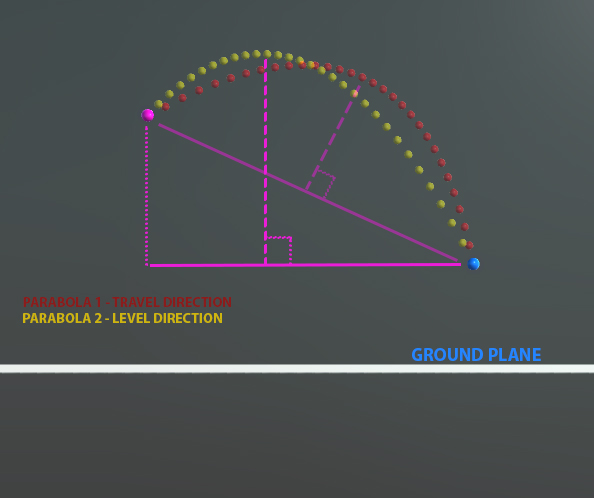
If you’re like me and found this thread super helpful, years after it was started, then here’s a solution to create the parabola ‘the7347’ demonstrated in his comment:

Change line:14 in hpJohn’s sampleParabola function to: Vector3 up = Vector3.Cross(right, levelDirection);

This is useful for applications such as trajectory predictions, which was of particular help to me.

Here’s the result from the original Line:14 - Vector3 up = Vector3.Cross(right, travelDirection);

Here’s the result from the modified Line:14 - Vector3 up = Vector3.Cross(right, levelDirection);

Here’s a comparison image:

I hope this helps someone else as much as it helped me!
Thanks again hpJohn for your great work! :smile:

7 Likes

Would you explain this bit, pointed out in the comments?