I have prefab called shape i load it from resources i want to add it directly into shapes like when i drag it from assets and then drop it into shapes but not like instatiate method it first adds the gameobject in Hierrachy then i have to add it to shapes ,if doing the second method the transform(position and scale) of prefab will be changed i do not want this to happen.

6 Answers
6Try using the Transform.SetParent method:
childGameObject.transform.SetParent(parentGameObject.transform, false);
The key is passing false for the 2nd parameter.
GameObject childObject = Instantiate(YourObject) as GameObject;
childObject.transform.parent = parentObject.transform
Edit: remember to add using System.Collections.Generic
And what 'as Transform' has to do with System.Collection.Generics? Additionally, OP stated he wants to instantiate GameObject, not Transform, so your first line should probably be changed. And finally, if childObject is a Transform, then why use childObject.transform? I wonder who upvoted your answer...
@ArkaneX Setting the parent requires a Transform, not a GameObject. But yeah, using as Transform doesn't work to get the transform. This needs to be... GameObject childObject = Instantiate(YourObject) as GameObject; childObject.transform.parent = gameObject.transform; So yeah, my bad for not noticing the as Transform. Upvote rescinded unless the code is changed.
If by directly you mean to do this using Instantiate method only, then you can’t. You have to assign a parent using Transform.parent property.
Changing transform.parent only modifies the transform by making the object the parent. Parents are a part of Transform because their position changes when they do. The only way to make an object a child with a script is using transform.parent.
– cmpgk1024I already used transform.parent but the transform of prefab will be changed i mean the scale and position,when i drag the prefab and drop it directly into shapes its transform does not change any idea ? thx for your support.
– WTPSTry using the [Transform.SetParent][1] method: childGameObject.transform.SetParent(parentGameObject.transform, false); The key is passing false for the 2nd parameter. [1]: http://docs.unity3d.com/ScriptReference/Transform.SetParent.html
You can Instantiate the object - find it - and then make it a child of another using script.
Like @ArkaneX said, look into Transform.parent and GameObject.Find
Instantiate returns an instance of the object so you can set the parent on that. No need to use Find.
@ArkaneX this way worked for the scale of all elements in shape ,but the position of gameobjects not, thank you 
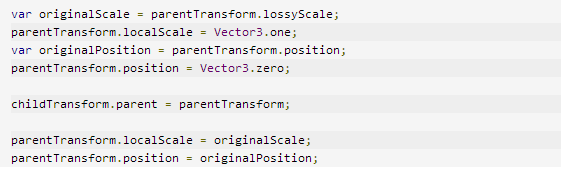
What is the problem with position? Could you give an example? And if I helped, please consider upvoting.
– ArkaneXIf i have two or more blocks(gameobjects) beside each other ,the x position increases or changes and y position also,but this thing happened for some of gameobjects not all. (I need 15 reputation for voting).
– WTPSHmm. I'm afraid I won't able to help further - in my simple scene it works, but I guess you might encounter an issue related to your setup. Maybe rotation is a cause of the problem?
– ArkaneXI know this post is old, but for anyone landing here : since Unity 5.4, it is possible to specify the parent when instantiating an object using
GameObject.Instantiate(Object obj, Transform parent)
,
GameObject.Instantiate(Object obj, Transform parent, bool inWorldSpace)
or
GameObject.Instantiate(Object obj, Vector3 position, Quaternion rotation, Transform parent)
See the official documentation for details.
This keeps your prefabs default position once it is moved inside a parent. Exactly what i was looking for!
– Dream-Baked