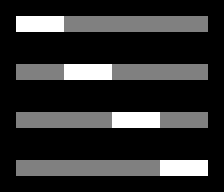
Let’s say I have a slider with 4 steps and the handle is exactly 25% of the slider width.
This is what I want:
This is how it is currently in Unity:
The handle is apparently anchored by it center and just moves in even intervals across the slider which causes it to go beyond the bounds of the parent slider (and background fill) when it’s at the first and last position. This also means the handle is not in the correct positions for the inbetween steps either. How do I fix this? Are there other components better suited for the job?
It should be such that dragging between 0-25 keeps the handle at the first position, 26-50 snaps it to the second, 51-75 to the third etc. Basically how it is everywhere else I feel.
Edit: Also, how do you get percentage widths in the GUI? Let’s say I have 4 checkboxes next to each other and I want each of them to be 25% the width of the parent element. Or setting the width of the handle to be 25% of the width of the slider in this case. I see no way to do this. Seems like a major oversight?
I don’t think our issues are the same. I’m not sure I quite understand your issue to be honest.
As for my own I’ve found a crude solution which requires a bit of extra effort to work perfectly, but it’s a start. I made a toggle group and I put this script on each toggle in the group. I then styled the toggles to look exactly like my sliders.
using UnityEngine;
using UnityEngine.UI;
using UnityEngine.EventSystems;
using System.Collections;

public class ToggleHelper : MonoBehaviour, ISelectHandler, IDragHandler {

    Toggle toggle;

    void Start() {
        toggle = GetComponent<Toggle>();
    }

    public void OnSelect(BaseEventData eventData) {
        toggle.isOn = true;
    }

    public void OnDrag(PointerEventData eventData) {

    }
}
I need to intercept the OnDrag() event to prevent my scrollview from scrolling on mouse down. I also intercept the OnSelect() event to make it possible to use a keyboard/gamepad for selecting the toggles by just navigating between them just like you would with a slider.
I still have to intercept more events and do some trickery to make it possible to click and drag between the toggles. Basically it’s a real hassle, but at least it looks the way I want it to.
As for my percentage problem I realize you can just type calculations directly into the input fields so I guess that works as a substitute. I still have to get used to working with this UI system compared to web interface design with html, css and javascript.
An alternate solution I found was to just force the slider.handleRect.localPosition in the OnValueChange callback. In my case my slider was 235 pixels wide and my handle would thus be 58.75 pixels wide:
using UnityEngine;
using System.Collections;
using UnityEngine.UI;

public class UpdateToggleSlider : MonoBehaviour {

    Slider slider;

    void Start() {
        slider = GetComponent<Slider>();
    }

    public void UpdateHandlePosition(float value) {
        if (value == 0) {
            slider.handleRect.localPosition = new Vector3(-117.5f + 29.375f, -10, 0);
        }
        else if (value == 1) {
            slider.handleRect.localPosition = new Vector3(-88.125f + 58.75f, -10, 0);
        }
        else if (value == 2) {
            slider.handleRect.localPosition = new Vector3(88.125f - 58.75f, -10, 0);
        }
        else if (value == 3) {
            slider.handleRect.localPosition = new Vector3(117.5f - 29.375f, -10, 0);
        }
    }
}
Ugly as well. Would have to do some calculations and smartery to avoid all the hardcoded values, but it’s better than the toggle group method in that all the events work like they would for a normal slider since this is a normal slider. The drag “thresholds” aren’t correct though because they still relate to the normal anchor points for the handle. So the handle will snap to the new positions at the wrong intervals, but this is hardly noticeable. If you had a wide slider with only 2 values it might be a bit glaring though. Unless someone can point me towards a cleaner solution this is the one I’m going with for now.
For anyone stumbling upon this I ended up with this code which works almost perfectly for any slider regardless of min/max value and the number of steps. The only requirement is that you set the slider to whole numbers obviously. And it has to be horizontal. There’s probably other requirements as well, but it works for the case I designed it for, which is most important.
The only issue that sometimes, fairly often actually, sizeDelta returns 0. No idea why. I’m guessing it’s because I have VerticalLayoutGroup on the parent element controlling the width of the slider, but it still shouldn’t happen. It’s inconsistently returning the correct value and 0. I’ll let it be for now and see if it’s still an issue in the final build and if I have to do some more work on it to circumvent this issue.
using UnityEngine;
using System.Collections;
using UnityEngine.UI;

public class UpdateToggleSlider : MonoBehaviour {

    Slider slider;
    // The width of the slider.
    float sliderWidth;
    // The width of the handle.
    float handleWidth;
    // The number of steps for the slider.
    int sliderSteps;

    void Start() {
        slider = GetComponent<Slider>();

        // Get the width of the slider.
        RectTransform sliderRectTransform = slider.GetComponent<RectTransform>();
        sliderWidth = sliderRectTransform.sizeDelta.x;

        // Calculate the total number of steps for the slider.
        if (slider.wholeNumbers) {
            sliderSteps = (int)slider.maxValue - (int)slider.minValue + 1;
        }

        // Set the width of the handle.
        handleWidth = sliderWidth / sliderSteps;
        slider.handleRect.sizeDelta = new Vector2(handleWidth, slider.handleRect.sizeDelta.y);

        // Set the initial handle position based on the slider value.
        SetHandlePosition((int)slider.value);
    }

    /**
     * OnChangeValue callback for the slider.
     */
    public void UpdateHandlePosition(float value) {
        SetHandlePosition((int)value);
    }

    /**
     * Set the handle to the correct position based on the slider value.
     */
    void SetHandlePosition(int value) {
        float xPosition = -1 * (sliderWidth / 2) + (handleWidth / 2) + handleWidth * (value - slider.minValue);
        slider.handleRect.localPosition = new Vector3(xPosition, slider.handleRect.localPosition.y, slider.handleRect.localPosition.z);
    }
}
IIRC sizeDelta is only used for “absolute” sizes. If you use the common “position your anchors split both ways at your elements’ corners” trick for example, sizeDelta will be 0. =)
Thanks for the reply. I suspected something like that based on the name. Is there something I can use in its place or will I have to get the width of the parent element or something?
I’m creating a menu and there’s a whole lot of learning going on at the moment. Complete code refactors every other day it feels like
Think I got it now. What I wrote above was a lie as well. The script only worked for my specific use case. I added a slider which had a different anchor and a fixed width and suddenly everything broke. This new script works for all my current sliders and I’m getting the width the correct way now I think.
I didn’t see the “Rect” property before. So I’m getting the width from rect.width now rather than sizeDelta. And where I had that odd -1 * (sliderWidth /2) in my original script I’ve instead just got sliderRect.x now.
I’ll release the entire project I’m working on soon. I feel like it’s really cool. It’s a menu and it’s probably the best thing I’ve made in Unity.
using UnityEngine;
using System.Collections;
using UnityEngine.UI;

public class GS_SteppedSlider : MonoBehaviour {

    Slider slider;
    // The slider's rect.
    Rect sliderRect;
    // The width of the handle.
    float handleWidth;
    // The number of steps for the slider.
    int sliderSteps;

    void Start() {
        slider = GetComponent<Slider>();

        // Attach the listener for the method we call when the slider value changes.
        slider.onValueChanged.AddListener(delegate { OnSliderValueChange(); });

        // Get the width of the slider.
        sliderRect = slider.GetComponent<RectTransform>().rect;

        // Calculate the total number of steps for the slider.
        if (slider.wholeNumbers) {
            sliderSteps = (int)slider.maxValue - (int)slider.minValue + 1;
        }

        // Set the width of the handle.
        handleWidth = sliderRect.width / sliderSteps;

        slider.handleRect.sizeDelta = new Vector2(handleWidth, slider.handleRect.sizeDelta.y);

        // Set the initial handle position based on the slider value.
        SetHandlePosition((int)slider.value);
    }

    /**
     * OnChangeValue callback for the slider.
     */
    void OnSliderValueChange() {
        SetHandlePosition((int)slider.value);
    }

    /**
     * Set the handle to the correct position based on the slider value.
     */
    void SetHandlePosition(int value) {
        float xPosition = sliderRect.x + (handleWidth / 2) + handleWidth * (value - slider.minValue);
        slider.handleRect.localPosition = new Vector3(xPosition, slider.handleRect.localPosition.y, slider.handleRect.localPosition.z);
    }
}
Nope. rect.width suddenly returns 0 as well. In fact the entire rect becomes 0,0,0,0. How can it be this random? And how are we supposed to do it? It’s so random it’s hard to debug as well. Just hit Play a few times in the editor and suddenly it works again, and then an hour or 5 minutes later suddenly it returns 0,0,0,0.
I really think that there’s an issue with the way Unity have made their slider and that it needs an update. It’d be great to actually have access to the ‘Slider Script’, and extend our own version of it.