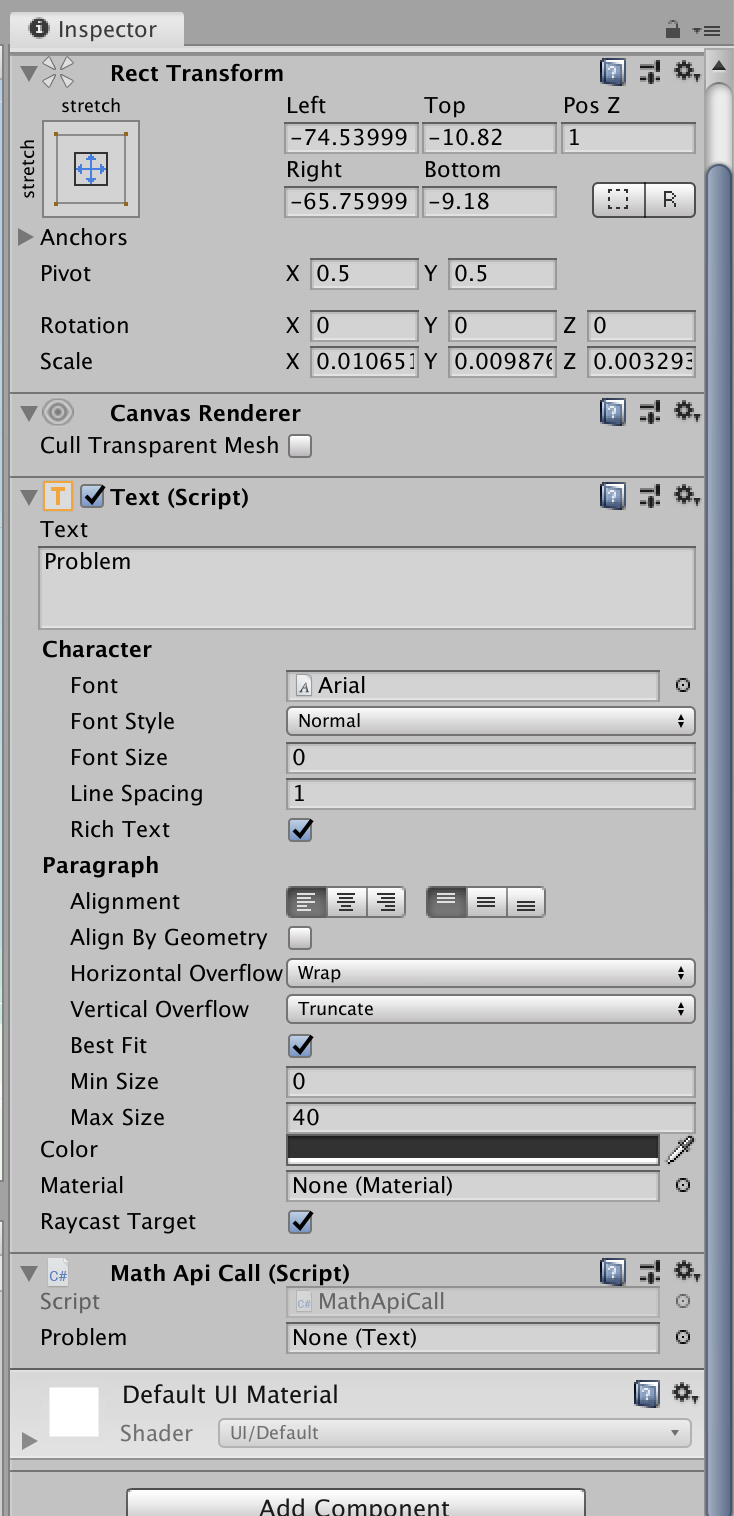
This may be a newbie question. I am trying to use an API call, and take one of the elements from that and put it into a Text UI component. I’ve first been trying to attach the component to the Text UI with no success. Here are some images to better explain my issue…
Then Here’s the script
using System.Collections;
using System.Collections.Generic;
using UnityEngine;
using UnityEngine.UI;

public class MathApiCall : MonoBehaviour
{
    public Text Problem;

    public void start()
    {
        Problem.text = "Hello Friend";
    }
}
You need to assign the Text component on the gameobject (in the inspector) onto the script. Click and drag it to the field next to “Problem” on your script in the inspector on the gameobject.
@Cornysam Sorry, let me describe what I meant. I want to change the text, so I added a script to the text ui component as displayed about. The UI is displayed above properly. It’s just that the text won’t change.
And he still gave you the correct answer. You never tell Unity what Text Component of wich Object the “Problem” variable is. As you can see in your screenshot… there is your public variable Problem in the Inspector and there is a big “None” next to it… wich means… that there is no Text component assigned to the variable. Go into the inspector… and move the Text Object you want to change into the field next to “Problem” or use the code below. Only works if you attach the script to and TextUI Object.
Problem = gameObject.GetComponent<Text>();
Problem.text = "Hello Friend";