It has been over a year, are there any snippets or examples?
@Akli-LT
Can you please share the script for “By interpolating between vertex normals you can get the movement pretty smooth.”
I’m trying to get the effect you have shown in the video but i’m unable to do that. I really appreciate it.
After a week of trial and error, I finally figured it out.
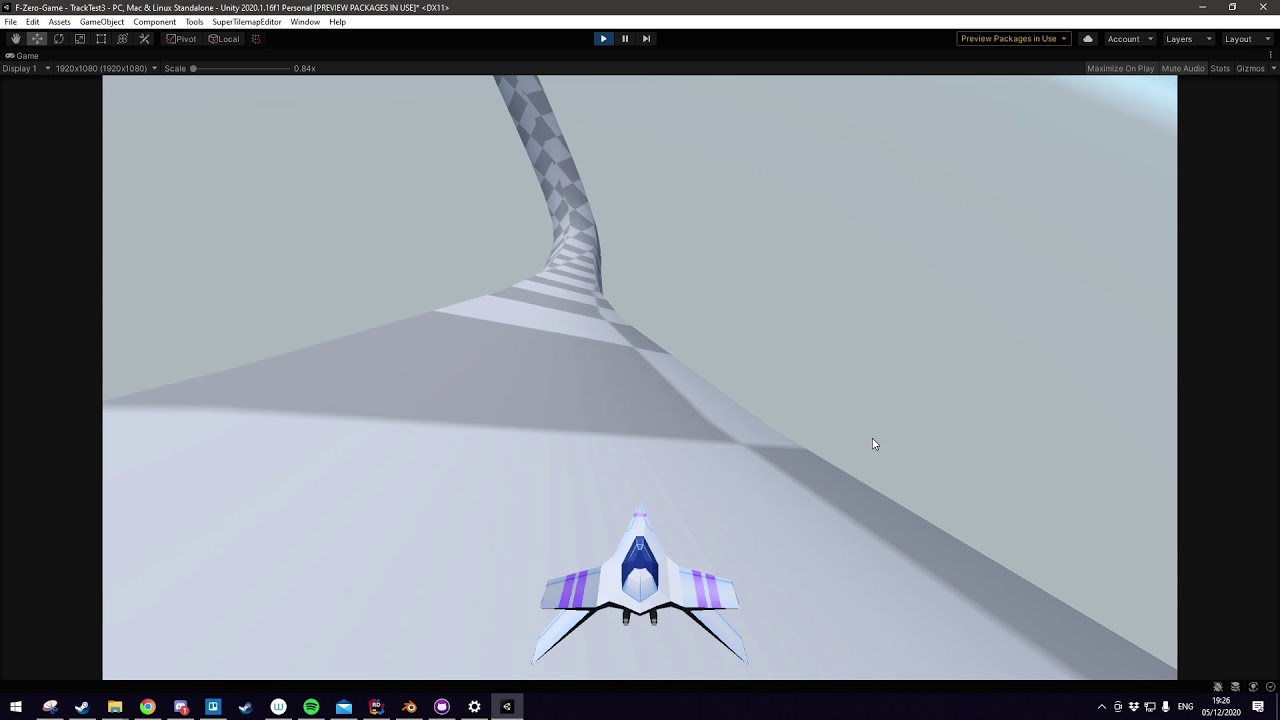
As mentioned by Akli-LT in his video’s description, you have to use barycentric coordinate interpolation. Thankfully, Unity’s RaycastHit.barycentricCoordinate documentation demonstrates how to do this: Unity - Scripting API: RaycastHit.barycentricCoordinate
I ended up using that to create the result seen in the video. I first encapsulated the code in a static class:
using UnityEngine;

public static class BarycentricCoordinateInterpolator
{
    public static Vector3 GetInterpolatedNormal(RaycastHit hit)
    {
        MeshCollider meshCollider = hit.collider as MeshCollider;

        if (!meshCollider || !meshCollider.sharedMesh)
        {
            Debug.LogWarning("No MeshCollider attached to to the mesh!", hit.collider);
            return Vector3.up;
        }

        Mesh mesh = meshCollider.sharedMesh;
        Vector3 normal = CalculateInterpolatedNormal(mesh, hit);

        return normal;
    }

    private static Vector3 CalculateInterpolatedNormal(Mesh mesh, RaycastHit hit)
    {
        Vector3[] normals = mesh.normals;
        int[] triangles = mesh.triangles;

        // Extract local space normals of the triangle we hit
        Vector3 n0 = normals[triangles[hit.triangleIndex * 3 + 0]];
        Vector3 n1 = normals[triangles[hit.triangleIndex * 3 + 1]];
        Vector3 n2 = normals[triangles[hit.triangleIndex * 3 + 2]];

        // interpolate using the barycentric coordinate of the hitpoint
        Vector3 baryCenter = hit.barycentricCoordinate;

        // Use barycentric coordinate to interpolate normal
        Vector3 interpolatedNormal = n0 * baryCenter.x + n1 * baryCenter.y + n2 * baryCenter.z;
        // normalize the interpolated normal
        interpolatedNormal = interpolatedNormal.normalized;

        // Transform local space normals to world space
        Transform hitTransform = hit.collider.transform;
        interpolatedNormal = hitTransform.TransformDirection(interpolatedNormal);

        // Display with Debug.DrawLine
        Debug.DrawRay(hit.point, interpolatedNormal);

        return interpolatedNormal;
    }
}
Then I simply used this class’ GetInterpolatedNormal method with my RaycastHit as input parameter, and converted the interpolated normal into a rotation quanternion like so:
Vector3 interpolatedNormal = BarycentricCoordinateInterpolator.GetInterpolatedNormal(hit);

rigidbody.MoveRotation(Quaternion.FromToRotation(transform.up, interpolatedNormal) * rigidbody.rotation);
And voila, it worked. I hope this is useful to someone out there.
There’s a few pitfalls along the way you should look out for:
- Your road mesh must have a MeshCollider (obviously) and must have read/write enabled.
- Your road mesh must be shaded smooth, not flat, otherwise the barycentric coordinate interpolation will not be as smooth as seen in the video.
- You should use a rigidbody with gravity disabled and set its position based on the interpolated normal. Alternatively, you can use AddForce(), but I found that just made it much more complicated.
- The rigidbody of your vehicle should have rotation frozen on the X and Z axis.
If anyone’s got any questions, feel free to ask and I’ll try to get back to you.
6 Likes
I had given up on this thread, and it’s been saved by brilliance. Just to be clear is that two separate scripts and what do I attach them to? and how do you move your ship? I am a student learning how things work, patience is appreciated! 
The BarycentricCoordinateInterpolator class is just a static class with a method you call in your ship’s movement class. BarycentricCoordinateInterpolator is not a MonoBehaviour and cannot be attached anywhere.
The second code snippet I posted would be part of your ship’s movement logic. I use a Rigidbody and set its velocity to its forward direction mulitplied by some speed value every frame in the video. I also raycast in the ship transform’s downwards direction every frame and use the resulting RaycastHit in the BarycentricCoordinateInterpolator. You probably want to use the RaycastHit to set the position of the ship to a set distance above the ground as well.
The movement implementation is up to you and depends on your specific game.
2 Likes
I have a movement script from a earlier post, can you show me where and how to add the second code snippet?
using UnityEngine;
using System.Collections;
public class ShipTest : MonoBehaviour
{
    /*Ship handling parameters*/
    public float fwd_accel = 100f;
    public float fwd_max_speed = 200f;
    public float brake_speed = 200f;
    public float turn_speed = 50f;

    /*Auto adjust to track surface parameters*/
    public float hover_height = 3f;     //Distance to keep from the ground
    public float height_smooth = 10f;   //How fast the ship will readjust to "hover_height"
    public float pitch_smooth = 5f;     //How fast the ship will adjust its rotation to match track normal

    /*We will use all this stuff later*/
    private Vector3 prev_up;
    public float yaw;
    private float smooth_y;
    private float current_speed;

    void Update ()
    {
        /*Here we get user input to calculate the speed the ship will get*/
        if (Input.GetButton("Fire1"))
        {
            /*Increase our current speed only if it is not greater than fwd_max_speed*/
            current_speed += (current_speed >= fwd_max_speed) ? 0f : fwd_accel * Time.deltaTime;
        }
        else
        {
            if (current_speed > 0)
            {
                /*The ship will slow down by itself if we dont accelerate*/
                current_speed -= brake_speed * Time.deltaTime ;
            }
            else
            {
                current_speed = 0f;
            }
        }

        /*We get the user input and modifiy the direction the ship will face towards*/
        yaw += turn_speed * Time.deltaTime * Input.GetAxis ("Horizontal");
        /*We want to save our current transform.up vector so we can smoothly change it later*/
        prev_up = transform.up;
        /*Now we set all angles to zero except for the Y which corresponds to the Yaw*/
        transform.rotation = Quaternion.Euler(0, yaw, 0);

        RaycastHit hit;
        if (Physics.Raycast(transform.position, -prev_up, out hit))
        {
            Debug.DrawLine (transform.position, hit.point);

            /*Here are the meat and potatoes: first we calculate the new up vector for the ship using lerp so that it is smoothed*/
            Vector3 desired_up = Vector3.Lerp (prev_up, hit.normal, Time.deltaTime * pitch_smooth);
            /*Then we get the angle that we have to rotate in quaternion format*/
            Quaternion tilt = Quaternion.FromToRotation(transform.up, desired_up);
            /*Now we apply it to the ship with the quaternion product property*/
            transform.rotation = tilt * transform.rotation;

            /*Smoothly adjust our height*/
            smooth_y = Mathf.Lerp (smooth_y, hover_height - hit.distance, Time.deltaTime * height_smooth);
            transform.localPosition += prev_up * smooth_y;
        }

        /*Finally we move the ship forward according to the speed we calculated before*/
        transform.position += transform.forward * (current_speed * Time.deltaTime);
    }
}
Just be aware that when you access Mesh.vertices or Mesh.normals (or any other built-in Unity property which returns arrays) it allocates a copy of the array, which will quickly cause garbage collection spikes.
1 Like
Not wanting to be too late to a party, I’ve similarly been working on a carting/F-zero hybrid style game. So far this is what I’ve come up with to have a similar effect, although minus the hovering (they’re cart-players after all):
using System.Collections;
using System.Collections.Generic;
using UnityEngine;

public class MagneticScript : MonoBehaviour
{
    public GameObject Car;
    public float magnetDistance = 100f;     //Maximum distance that a vehicle can be pulled by the track
    public float magnetForce = 50f;     //Magnitude of the magnet force

    private int LayerTrack;

    void Update()
    {
        RaycastHit hit;

        LayerTrack = LayerMask.NameToLayer("GravTrack");

        Rigidbody rb = Car.GetComponent<Rigidbody>();

        if (Physics.Raycast(Car.transform.position, Car.transform.TransformDirection(Vector3.down), out hit, magnetDistance))
        {
            if (hit.transform.gameObject.layer == LayerTrack)
                {
                Debug.Log("YES");
                rb.useGravity = false;
                rb.AddForce(magnetForce * Car.transform.TransformDirection(Vector3.down));
            }
            else
            {
                Debug.Log("Nah");
                rb.useGravity = true;
            }
        }

    }

}
Note, the “Track” in question is an object with a layer named “GravTrack”. A mesh collider works best.
You could probably get the “hover” style with this script by simply moving the mesh out from the gameobject surface, then you could play with the rigidbody masses etc to get the movement and speed just right. It’ll also allow for you to fall off and “die”, a-la F-Zero X, if you go too fast.
I know this is old, but this is how I did it
using UnityEngine;
using System.Collections;
public class ShipTest : MonoBehaviour
{
    /*Ship handling parameters*/
    public float fwd_accel = 100f;
    public float fwd_max_speed = 200f;
    public float brake_speed = 200f;
    public float turn_speed = 50f;
    /*Auto adjust to track surface parameters*/
    public float hover_height = 3f;     //Distance to keep from the ground
    public float height_smooth = 10f;   //How fast the ship will readjust to "hover_height"
    public float pitch_smooth = 5f;     //How fast the ship will adjust its rotation to match track normal
    /*We will use all this stuff later*/
    private Vector3 prev_up;
    public float yaw;
    private float smooth_y;
    private float current_speed;
    void Update ()
    {
        /*Here we get user input to calculate the speed the ship will get*/
        if (Input.GetButton("Fire1"))
        {
            /*Increase our current speed only if it is not greater than fwd_max_speed*/
            current_speed += (current_speed >= fwd_max_speed) ? 0f : fwd_accel * Time.deltaTime;
        }
        else
        {
            if (current_speed > 0)
            {
                /*The ship will slow down by itself if we dont accelerate*/
                current_speed -= brake_speed * Time.deltaTime ;
            }
            else
            {
                current_speed = 0f;
            }
        }

        /*We get the user input and modifiy the direction the ship will face towards*/
        yaw += turn_speed * Time.deltaTime * Input.GetAxis ("Horizontal");
        /*We want to save our current transform.up vector so we can smoothly change it later*/
        prev_up = transform.up;
        /*Now we set all angles to zero except for the Y which corresponds to the Yaw*/
        transform.rotation = Quaternion.Euler(0, yaw, 0);
        RaycastHit hit;
        if (Physics.Raycast(transform.position, -prev_up, out hit))
        {
            Debug.DrawLine (transform.position, hit.point);

            /*Here are the meat and potatoes: first we calculate the new up vector for the ship using lerp so that it is smoothed*/
            Vector3 desired_up = Vector3.Lerp (prev_up, hit.normal, Time.deltaTime * pitch_smooth);
            /*Then we get the angle that we have to rotate in quaternion format*/
            Quaternion tilt = Quaternion.FromToRotation(transform.up, desired_up);
            /*Now we apply it to the ship with the quaternion product property*/
            transform.rotation = tilt * transform.rotation;

           Vector3 interpolatedNormal = BarycentricCoordinateInterpolator.GetInterpolatedNormal(hit);

           // Rotate to the track's normal
           GetComponent<Rigidbody>().MoveRotation(Quaternion.FromToRotation(transform.up, interpolatedNormal) * GetComponent<Rigidbody>().rotation);

            /*Smoothly adjust our height*/
            smooth_y = Mathf.Lerp (smooth_y, hover_height - hit.distance, Time.deltaTime * height_smooth);
            transform.localPosition += prev_up * smooth_y;
        }

        /*Finally we move the ship forward according to the speed we calculated before*/
        transform.position += transform.forward * (current_speed * Time.deltaTime);
    }
}
I tried using the script provided by Vanni-del. However the behavior was quite unexpected. I imported a torus model from blender and then added the shiptest script to a sphere in unity. But when I tried to move the sphere, the sphere had jittery movement and also moved away from the torus and kept going in the x direction.