Hi,
I’m having some trouble scaling up the dropdown list in uGUI.
Using the transform → scale is not acceptable as it causes the UI to become soft (i.e. blurry).
Scaling up the main label and arrow of the dropdown list works fine, the problem comes when I try to edit the dropdown list of objects itself.
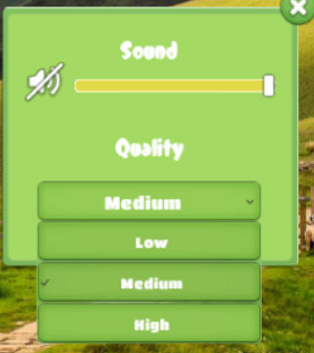
To do this, I have tried editing the “item” template object. For example, I have increase the height of the item object to 75, as well as set the checkbox and text to the size I want. The items in the list appear correctly sized, hwoever, the top of the first item and the bottom of the the last item in the dropdown lists are incomplete/wrongly sized/cut off, as shown in the picture below.
I assume it must be something I am doing wrong so If anyone could guide me on how to resize the dropdown list I would be extremely grateful