How to access differents things through scripts (basic question)...

Hey,

i have a big issue with understanding the organization of component and object organisation inside unity and how to access different things through script. I have to say i dont have a programmer background, so i am pretty new to C#… please be gentle :slight_smile:

I have a Gameobject i want to use as a prefab which can be instanced through script later on. So i try to organize all its functions in a script i attach to the Gameobject.
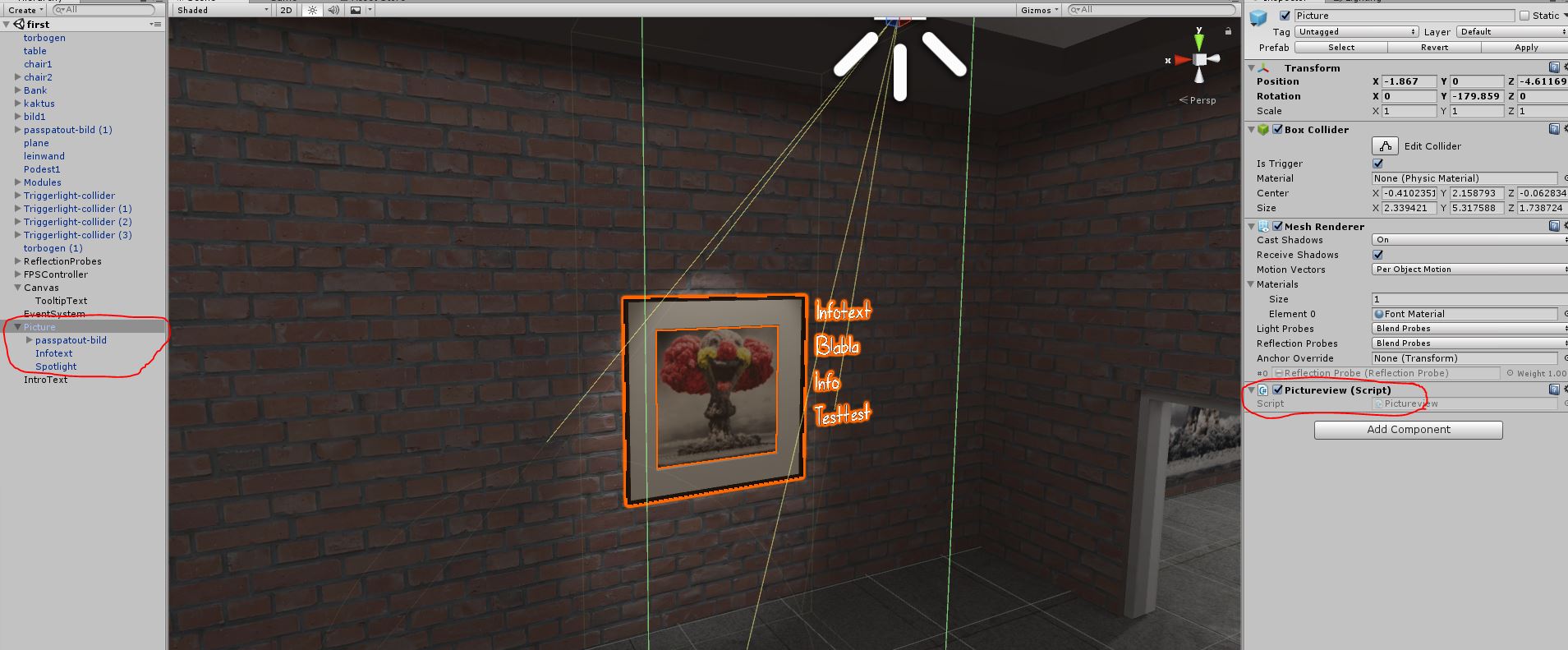
you can see the hirarchy in the screenshot i attached. there is the 3d-modell, the infotext and the light. On the Gameobject itself there is a collider as a trigger.
Now i want to make some very easy things:

  1. on start the light and the text get disabled.
  2. when entering the trigger, i want to enable the text and the light.

so from what i have understood so far, every child-object of my “picture” is a gameobject for itself. Functions and Scripts are Components. Both can be enabled and disabled.

So, is it preferable to make a single script on the parent object, which tries to access all components of the child-object?
Or is it better to make little scipts on the child-objects, which the script on the parent-object is accessing?

In my Case:
do i make a light-script attached to the light, a text-script for the info-text both with public methods and a script on the picture-object which controlls the scripts on the childs?

i hope you get my point…

i try it like this but getting errors. Please help me to understand clean accessing of different parameters…

    private GameObject infoText;
    private Light myLight;

    void Awake(){

        myLight = Transform.Find ("Spotlight").GetComponent<Light> ();
        infoText = Transform.Find ("Infotext");

    }
This video may help. (Or it might not, I’ve had mixed reviews on it.)

Anyway the basic idea to get a variable on another script is as follows.

  • Get a reference to the GameObject the script is on
  • Use GetComponent to get a reference to the script
  • Use . to access the variable

The first one is the trickiest. Find is fine when you are starting out. But you’ll want to move onto more sophisticated methods pretty soon.

Usually you should try to decouple modules as much as possible, according to the complexity of the actions.
You said right, you can make a Parent empty GameObject and put light and infoText under it.
This way you can drag and drop references from the inspector instead of using Transform.Find that can be a bit expensive.
In this case, I would make a script like ItemInteraction.cs and i would put this code inside.
(Remember to set light and infotext public so you can drag and drop them).

public GameObject infoText;
public GameObject myLight;
void Start(){
        myLight.SetActive(false);
        infoText.SetActive(false);
}
void OnTriggerEnter(Collider other) {
       // do something with collider...
       myLight.SetActive(true);
       infoText.SetActive(true);
}
void OnTriggerExit(Collider other) {
       // do something with collider...
       myLight.SetActive(false);
       infoText.SetActive(false);
}

Hope you find this usefull.

Cheers

many thanks for the replys. i will work them through and try to progress. thanks mates! :slight_smile:

AH, i got the point!!! when i make the gameobject public inside the script and drag it out of the game-object-hirarchy, it stays when i drag it in my project explorer as a prefab?
i will try that after breakfast. many many thanks! :slight_smile:

man, thanks, good video

1 Like