Hello
I have an issue when using UI panels, my panels always “hide” what is behind them with a semi transparent colored layer.
I know I can change the alpha, but then it would change the alpha of all children as well, and I use a panel with some children buttons to make it easier to disable and hide the entire panel + buttons.
But I just want to see the buttons, not this blurry layer.
My panel is at the bottom of the camera view, and contains the buttons. Ideally, the background of the panel should be transparent.
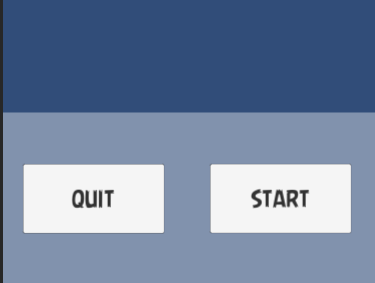
Does anybody have an idea?
Or should I just forget about panels, and just add buttons in my canvas?
(possible, but way more work to show/hide every buttons when needed)
Thanks a lot!
If I understand your qestion correctly, you want empty groups to hold your buttons? WHich are transparent.
In that case, don’t use panels (which are exactly the same as Image controls), use an Empty GameObject created on a Canvas, which will just have a RectTransform. These act as grouper objects but do not render anything, then just add your buttons as childen to this empty go.
Hope that helps.
1 Like
Thanks, yes you did understand my question correctly.
I used to use panels in order to easily display and hide a bunch of buttons that shall be displayed at the same time.
They all belong to my panel and I set the alpha and the “interract” options in just 2 lines for all of them.
Using a gameObject is a good idea, and I’ll just need to find if I can display and hide it when needed (and if that apply to all children buttons)
Thanks
PS: sorry for my average english, not my mother tongue…
@YouYouMobile
A Canvas Group might be a better way to control your group of buttons
1 Like
A CanvasGroup would also hides/affects the child components @flashframe
1 Like
Yes, sorry I meant that he could use them in conjunction with your suggestion to keep the functionality simple and control visibility.
1 Like
Remove the image script and you are fine. For anyone who is interested
Necroing this, but this will fix the same issue 2024: Well, if you remove the image script, you remove the image, init? Just set the color to not being half transparent by clicking the color and moving the alpha slider all the way up.