How to code a snake / tail with multiple elements?

I have a boss as a snake with tail with multiple elements as childs. How do I code this? Is there a spline function or something in Unity? I want that the parts of the tail follow the head. I’m not so experienced this is my first game I make in Unity.

Here a picture of the boss (the grafic are temporary not final).

You can attach a tiny script to each tail segment that makes it move and look towards the next leading segment, with the final segment being the head. Or you could do it using physics joints.

If you want the tail segments to lead perfectly, essentially you want to write a series of points to some buffer. The head writes its position as it moves through the space, and the tailing segments then read this historical data and try to position themselves accordingly. This is supposed to be a basic exercise for a blooming programmer (you should be able to design a simple system given only this terminology), however if you’re not versed it can be quite a challenge, so maybe find some video tutorial (I’m sure someone already made a tutorial for a game of Snake* somewhere).

(* Snake basically does the same thing, only instead of series of points in continuous space it uses a discrete grid space which is indexed for easier look-up, performance and low resolution of old hardware.)

The original SNAKE game was just dots in a grid, so super-simple data model, super-easy to have pointers to the previous segment, iterate from the head, pull it forward, traverse to the tail and delete it.

Modern implementations of SNAKE often have individual GameObjects going along behind each other conga-line-style, and that’s how I would implement SNAKE if I did it today.

And as @orionsyndrome points out, this used to be an intro programming question, but it is a tricky one for sure.

Meanwhile, years ago I made a little “follow-en-trail” package, which I shall herewith attach for your enjoyment.

9815508–1410297–FollowEnTrail.unitypackage (6.64 KB)

It’s a List of Vector3 (or a struct with it if you want more data for each segment) representing the position of every segment on the screen. You move the snake by shifting the position of the last segment to the front of the snake. Growth is done by briefly skipping the step of removing the last segment when adding to the front.

https://blog.pramp.com/coding-interviews-and-the-snake-game-have-this-one-thing-in-common-e0189fba1c9c

Yes, making the snake itself isn’t very difficult, and many folks have already suggested a few options. Here’s another one with a small piece of code: you need to fill in an array of snake parts in the inspector, where the first element should be the HEAD. Then, by changing the position of the HEAD, the snake will crawl smoothly:

SnakeMoving.cs

using System.Collections.Generic;
using System.Linq;
using UnityEngine;

public class SnakeMoving : MonoBehaviour
{
    public Transform[] SnakeParts; // 0 - head, etc

    [Min(0.01f)]
    public float Radius = 1f;
  

    private Vector3 _lastHeadPos;
    private List<Vector3> _currentPoints;
    private Vector3 _head => SnakeParts[0].position;


    private void Start()
    {
        _currentPoints = SnakeParts.Select(i => i.position).ToList();
        _lastHeadPos = _currentPoints[0];
    }

    private void Update()
    {
        float headDist = (_head - _currentPoints[0]).magnitude;

        if (headDist > Radius * 2)
        {
            for (int i = 0; i < (int)headDist; i++)
            {
                var newHeadPos = _currentPoints[0] + (_head - _currentPoints[0]).normalized * Radius * 2;
                _currentPoints.Insert(0, newHeadPos);
                _currentPoints.RemoveAt(_currentPoints.Count - 1);
            }

            headDist = headDist - (int)headDist;
        }


        // update snake parts, skip head
        for (int i = 1; i < _currentPoints.Count; i++)
        {
            var current = _currentPoints[i];
            var prev = _currentPoints[i - 1];

            // moving
            SnakeParts[i].position = Vector3.Lerp(current, prev, headDist / (Radius * 2));
        }

    }

}

But what’s interesting is that you can additionally add some standard sin/cos for undulation to all of this.
Add wave height:

Wave width:

Offset for the wave:

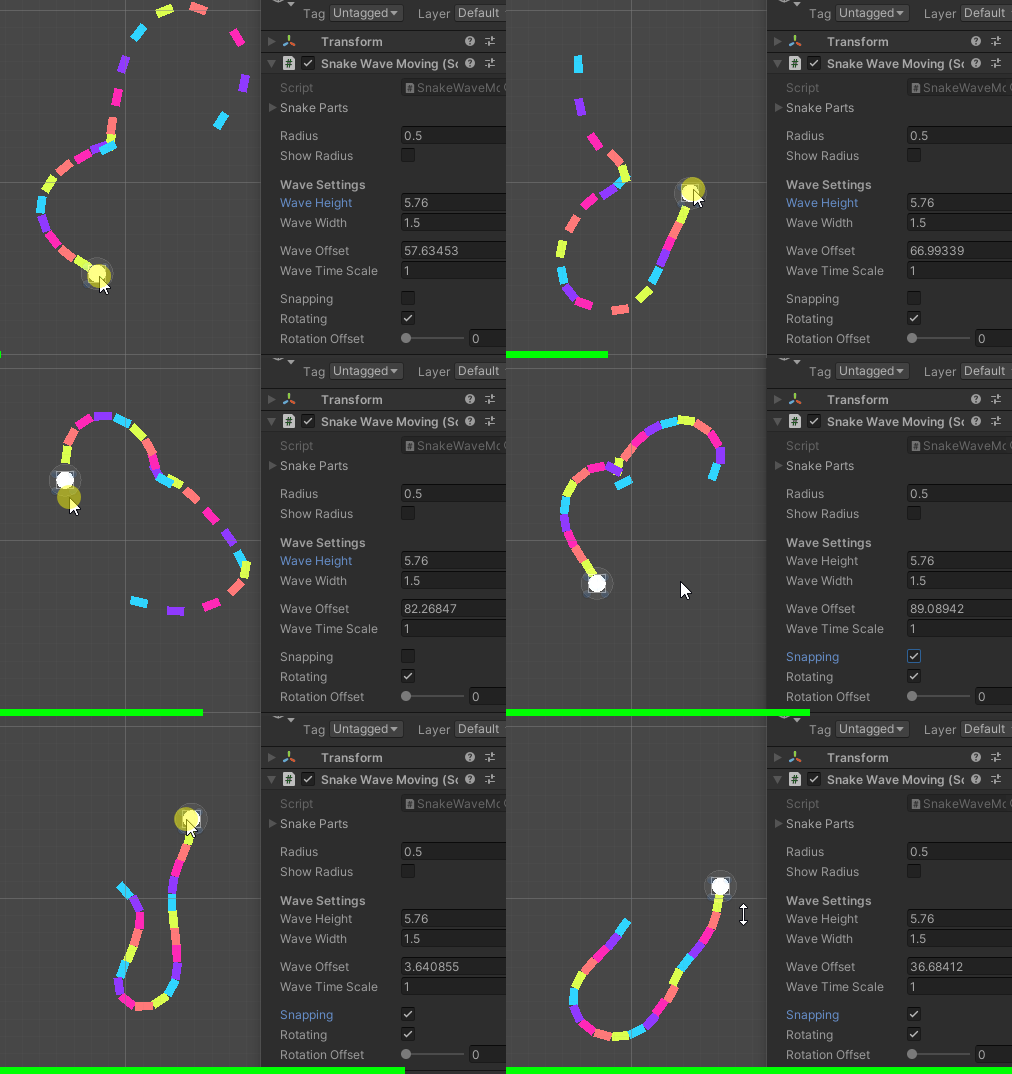
And if you make the offset parameter dependent on the distance traveled by the HEAD, you’ll get a crawling effect. Here, I’m simply moving the HEAD with the mouse, and the body bends on its own:

Don’t forget to set the radius in the inspector; mine is 0.5 because I used the standard Circle sprite, which has a diameter of 1.

SnakeWaveMoving.cs

using System.Collections.Generic;
using System.Linq;
using UnityEngine;

public class SnakeWaveMoving : MonoBehaviour
{
    public Transform[] SnakeParts; // 0 - head, etc

    [Min(0.01f)]
    public float Radius = 1f;

    [Header("Wave Settings")]

    [Min(0)]
    public float WaveHeight = 1f;

    [Min(0)]
    public float WaveWidth = 1f;

    [Space]
    public float WaveOffset = 0;
    public float WaveTimeScale = 1;


    private Vector3 _lastHeadPos;
    private List<Vector3> _currentPoints;
    private Vector3 _head => SnakeParts[0].position;


    private void Start()
    {
        _currentPoints = SnakeParts.Select(i => i.position).ToList();
        _lastHeadPos = _currentPoints[0];
    }

    private void Update()
    {
        float headDist = (_head - _currentPoints[0]).magnitude;

        if (headDist > Radius * 2)
        {
            for (int i = 0; i < (int)headDist; i++)
            {
                var newHeadPos = _currentPoints[0] + (_head - _currentPoints[0]).normalized * Radius * 2;
                _currentPoints.Insert(0, newHeadPos);
                _currentPoints.RemoveAt(_currentPoints.Count - 1);
            }

            headDist = headDist - (int)headDist;
        }


        // wave offset by head dist
        WaveOffset += (_head - _lastHeadPos).magnitude;
        WaveOffset %= 100;

        _lastHeadPos = _head;


        // update snake parts, skip head
        for (int i = 1; i < _currentPoints.Count; i++)
        {
            var current = _currentPoints[i];
            var prev = _currentPoints[i - 1];

            // moving
            var nextPos = Vector3.Lerp(current, prev, headDist / (Radius * 2));


            // wave
            float coef = (float)i / SnakeParts.Length;

            float ang = coef * WaveWidth;
            float sin = Mathf.Cos(Mathf.PI * 2 * ang - WaveOffset * WaveTimeScale) * WaveHeight;

            var toPrevDir = (current - prev).normalized;
            var perpendicular = new Vector3(-toPrevDir.y, toPrevDir.x, 0);

            var nextWavePos = perpendicular * sin * coef;


            // apply position
            var pos = nextPos + nextWavePos;
            SnakeParts[i].position = pos;
        }

    }

}

Of course, your situation is more complex since you also need to rotate the snake parts according to the direction of movement. But the examples above don’t solve your task; they’re more of a starting point for reflection and experimentation.

Just in case, I’ve attached the package with the example.

9782265–1402944–SnakeExample.unitypackage (9.06 KB)

Thank you all very much, I will look into this.

I tried your code, it works fine if the radius is 0.5 but if the radius is 1 or 2 there is a strange behaviour.

https://www.youtube.com/watch?v=zKYrBHp1jtQ

Sorry for the bug, looks like I didn’t test the code thoroughly back then. I’ve fixed it now and also added a gizmo to make adjusting the radius easier, along with some optimizations.

using System.Linq;
using UnityEngine;

public class SnakeWaveMoving : MonoBehaviour
{
    public Transform[] SnakeParts; // 0 - head, etc

    [Min(0.01f)]
    public float Radius = 1f;
#if UNITY_EDITOR
    public bool ShowRadius;
#endif

    [Header("Wave Settings")]

    [Min(0)]
    public float WaveHeight = 1f;

    [Min(0)]
    public float WaveWidth = 1f;

    [Space]
    public float WaveOffset = 0;
    public float WaveTimeScale = 1;

    private Vector3 _lastHeadPos;
    private Vector3[] _fixedPoints;
    private Vector3 _head => SnakeParts[0].position;


    private void Start()
    {
        _fixedPoints = SnakeParts.Select(i => i.position).ToArray();
        _lastHeadPos = _fixedPoints[0];
    }

    private void Update()
    {
        float diameter = Radius * 2;


        float headDist = (_head - _fixedPoints[0]).magnitude;

        if (headDist >= diameter)
        {
            int steps = Mathf.FloorToInt(headDist / diameter);

            for (int i = 0; i < steps; i++)
            {
                for (int j = _fixedPoints.Length - 1; j > 0; j--)
                {
                    _fixedPoints[j] = _fixedPoints[j - 1];
                }

                _fixedPoints[0] += (_head - _fixedPoints[0]).normalized * diameter;
            }

            headDist %= diameter;
        }


        // wave offset by head dist
        WaveOffset += (_head - _lastHeadPos).magnitude;
        WaveOffset %= 100;

        _lastHeadPos = _head;


        // update snake parts, skip head
        for (int i = 1; i < _fixedPoints.Length; i++)
        {
            var current = _fixedPoints[i];
            var prev = _fixedPoints[i - 1];

            // moving
            var nextPos = Vector3.Lerp(current, prev, headDist / diameter);


            // wave
            float coef = (float)i / SnakeParts.Length;

            float ang = coef * WaveWidth;
            float sin = Mathf.Cos(Mathf.PI * 2 * ang - WaveOffset * WaveTimeScale) * WaveHeight;

            var toPrevDir = (current - prev).normalized;
            var perpendicular = new Vector3(-toPrevDir.y, toPrevDir.x, 0);

            var nextWavePos = perpendicular * sin * coef;


            // apply position
            var pos = nextPos + nextWavePos;

            //SnakeParts[i].position = pos;
            SnakeParts[i].position = Vector3.Lerp(SnakeParts[i].position, pos, 0.5f); //for smoothing
        }

    }


#if UNITY_EDITOR
    private void OnDrawGizmos()
    {
        if (ShowRadius && SnakeParts != null)
        {
            foreach (var part in SnakeParts)
            {
                Gizmos.DrawWireSphere(part.position, Radius);
            }
        }
    }
#endif

}

Thank you very much! Now it works with greater radius. Sadly I have to ask you another question, if the head is touching the floor after beeing in air, some buggy happens sometimes, see the video. I don’t understand why, because it happens not allways.

My code to move the head (“m_rb” is RigidBody2D of the head):

        if (playerIsLeft)
            laserDirectionToPlayer2D = Vector2.left;
        else
            laserDirectionToPlayer2D = Vector2.right;
        m_rb.velocity = laserDirectionToPlayer2D * speed;

Ok, it seems I have found the bug, it is in my code and not in your code. The bug was, that I teleport the player and the head secretly, so I have to update the single positions in the list with the teleport.

Thank you very much for your help.

When the snake encounters balls, it looks fine. But currently, your boss in the game doesn’t look correct because its parts aren’t rotated in the direction of movement. I think we need to add something to the code so that the snake’s parts also rotate towards each other, making it look more natural.

Yeah, the rotation I have to make at next. I will redesign the boss too. I just started to create this boss, everything is in the beginning. Now I have to make the small steps and the details.

I’m asking me, if I should use just a list of the rotations like it is made with the positions in your code.

No, do them on the fly. It’s just

var delta = thisPos - prevPos;
var angle = Mathf.Atan2(delta.y, delta.x); // in radians
var direction = new Vector2(Mathf.Cos(angle), Mathf.Sin(angle)); // for debugging (see * below)
var rotation = Quaternion.AngleAxis(angle * Mathf.Rad2Deg, Vector3.forward);
somePart[i].transform.localRotation = rotation;
  • Maybe you want to add +/- PI/2 to the angle (90 degrees). Draw this direction to see how it’s oriented. Maybe your graphics is rotated by 90 degrees but the direction is fine, so experiment with it. You can also use this direction for shooting or something similar.

Edit:
A slightly more optimal way (if at all) to do the same thing would be

var direction = (thisPos - prevPos).normalized;
var angle = Mathf.Atan2(direction.y, direction.x); // in radians
var rotation = Quaternion.AngleAxis(angle * Mathf.Rad2Deg, Vector3.forward);
somePart[i].transform.localRotation = rotation;

thisPos and prevPos refer to single segments previous and current point (i.e. somePart*.transform.localPosition and somePart[i-1].transform.localPosition respectively).*
Edit2:
to visualize direction
```
*Vector2 _pos, _dir; // you have some position and direction stored here

void OnDrawGizmos() {
DrawDirectionAt(_pos, _dir);
}

void DrawDirectionAt(Vector2 pos, Vector2 dir) {
Gizmos.color = Color.green;
Gizmos.DrawLine((Vector3)pos, (Vector3)(pos + dir));
}*
```

Regarding rotations, I tried adding such functionality. Now there’s a checkbox and a slider for additional rotation offset, just in case it’s needed.

Also, I noticed that at high Wave Height values, when making sharp swirls, the snake breaks into parts closer to the tail. It makes sense given the algorithm that bends it, but it doesn’t look very good (although it depends on the concept, in some cases it might even be cool). So, I added another checkbox for “Snapping” segments to each other.

In sharp turns, the snake isn’t always smooth, and some parts seem offset, so it’s better to adjust the “wave heights” a bit lower if possible.

Code

using System.Linq;
using UnityEngine;

public class SnakeWaveMoving : MonoBehaviour
{
    public Transform[] SnakeParts; // 0 - head, etc
  
    [Space]
    [Min(0.01f)]
    public float Radius = 1f;

#if UNITY_EDITOR
    public bool ShowRadius;
#endif

    [Header("Wave Settings")]

    [Min(0)]
    public float WaveHeight = 1f;

    [Min(0)]
    public float WaveWidth = 1f;

    [Space]
    public float WaveOffset = 0;
    public float WaveTimeScale = 1;

    [Space]
    public bool Snapping = true;
    public bool Rotating = true;

    [Range(0, 360)]
    public float RotationOffset = 0;


    private Vector3 _lastHeadPos;
    private Vector3[] _fixedPoints;
    private Vector3 _head => SnakeParts[0].position;


    private void Start()
    {
        _fixedPoints = SnakeParts.Select(i => i.position).ToArray();
        _lastHeadPos = _fixedPoints[0];
    }

    private void Update()
    {
        float diameter = Radius * 2;


        float headDist = (_head - _fixedPoints[0]).magnitude;

        if (headDist >= diameter)
        {
            int steps = Mathf.FloorToInt(headDist / diameter);

            for (int i = 0; i < steps; i++)
            {
                for (int j = _fixedPoints.Length - 1; j > 0; j--)
                {
                    _fixedPoints[j] = _fixedPoints[j - 1];
                }

                _fixedPoints[0] += (_head - _fixedPoints[0]).normalized * diameter;
            }

            headDist %= diameter;
        }


        // wave offset by head dist
        WaveOffset += (_head - _lastHeadPos).magnitude;
        WaveOffset %= 100;

        _lastHeadPos = _head;


        // update snake parts, skip head
        for (int i = 1; i < _fixedPoints.Length; i++)
        {
            var current = _fixedPoints[i];
            var prev = _fixedPoints[i - 1];

            // moving
            var nextPos = Vector3.Lerp(current, prev, headDist / diameter);


            // wave
            float coef = (float)i / SnakeParts.Length;

            float ang = coef * WaveWidth;
            float sin = Mathf.Cos(Mathf.PI * 2 * ang - WaveOffset * WaveTimeScale) * WaveHeight;

            var toPrevDir = (current - prev).normalized;
            var perpendicular = new Vector3(-toPrevDir.y, toPrevDir.x, 0);

            var nextWavePos = perpendicular * sin * coef;


            // apply position
            var pos = nextPos + nextWavePos;
            //SnakeParts[i].position = pos;
            SnakeParts[i].position = Vector3.Lerp(SnakeParts[i].position, pos, 0.5f); //for smoothing
        }


        if (Snapping)
        {
            for (int i = 1; i < SnakeParts.Length; i++)
            {
                var current = SnakeParts[i].position;
                var prev = SnakeParts[i - 1].position;

                var dir = prev - current;
                var dist = dir.magnitude;
                var offset = dist - diameter;

                var nextPos = SnakeParts[i].position + dir.normalized * offset;
                SnakeParts[i].position = nextPos;
            }
        }

        if (Rotating)
        {

            for (int i = 1; i < SnakeParts.Length - 1; i++)
            {
                var prev = SnakeParts[i - 1].position;
                var next = SnakeParts[i + 1].position;

                var nextToPrevDir = (prev - next).normalized;
                var perpendicular = new Vector3(-nextToPrevDir.y, nextToPrevDir.x);
                perpendicular = Quaternion.AngleAxis(RotationOffset, Vector3.forward) * perpendicular;

                SnakeParts[i].up = perpendicular;
            }

            // last part
            {
                var prev = SnakeParts[SnakeParts.Length - 2].position;
                var last = SnakeParts[SnakeParts.Length - 1].position;

                var prevToLastDir = (prev - last).normalized;
                var perpendicular = new Vector3(-prevToLastDir.y, prevToLastDir.x);
                perpendicular = Quaternion.AngleAxis(RotationOffset, Vector3.forward) * perpendicular;

                SnakeParts[SnakeParts.Length - 1].up = perpendicular;
            }

        }

    }

    private void OnDrawGizmos()
    {

        if (SnakeParts != null && ShowRadius)
        {
            Gizmos.color = Color.green;
            foreach (var item in SnakeParts)
            {
                Gizmos.DrawWireSphere(item.position, Radius);
            }
        }

        //if (_fixedPoints != null)
        //{
        //    Gizmos.color = Color.gray;
        //    for (int i = 0; i < _fixedPoints.Length; i++)
        //    {
        //        Gizmos.DrawWireSphere(_fixedPoints[i], Radius);
        //    }
        //}
    }

}

Don’t mind this part, I just wanted to see if this kind of code can be super-streamlined

var direction = (thisPos - prevPos).normalized;
var angle = Mathf.Atan2(direction.y, direction.x); // in radians
var rotation = Quaternion.AngleAxis(angle * Mathf.Rad2Deg, Vector3.forward);
somePart[i].transform.localRotation = rotation;

It turns out it can

// using System;
var ha = MathF.Atan2(thisPos.y - prevPos.y, thisPos.x - prevPos.x) * .5f;
somePart[i].transform.localRotation = new Quaternion(0f, 0f, MathF.Sin(ha), MathF.Cos(ha));

Quaternion is built via trigonometry anyways, so we can avoid normalization.

What’s interesting (to me, ymmv) is that skipping doing the angle should also work because of half-angle identities, but then we need more square roots (I haven’t tested this variant though, might do it later)

var d = thisPos - prevPos;
var idm = .5f * sqrt(d.x * d.x + d.y * d.y); // inverse double magnitude
var cha = sign(d.x) * sqrt(idm * (d.y + d.x));
var sha = sign(d.y) * sqrt(idm * (d.y - d.x));
somePart[i].transform.localRotation = new Quaternion(0f, 0f, sha, cha);

Edit: This variant also allows one to extract direction for free.

var d = thisPos - prevPos;
var im = 1f / sqrt(d.x * d.x + d.y * d.y);
var dir = d * im;
var cha = sign(d.x) * sqrt(2f * im * (d.y + d.x));
var sha = sign(d.y) * sqrt(2f * im * (d.y - d.x));
somePart[i].transform.localRotation = new Quaternion(0f, 0f, sha, cha);

Edit2: I should probably normalize d components before using them, have to try this, will fix later.

@samana1407 & @orionsyndrome
Thank you both very much! I will looking into this and report my results.

I have tested your code with textures, it works but there are 2 problems:

-The texture is sometimes with the upperside down because of the rotation. My goal is it that the upperside of texure is allways on the top

-Sometimes the left-right side of the texture is horizontal flipped

For flipping horizontal to change the direction of the boss I use a negative scale:

    public void FlipR()
    {
        if (m_facingRight)
            return;

        m_facingRight = true;
        Vector3 scale = transform.localScale;
        scale.x = Mathf.Abs(transform.localScale.x);
        transform.localScale = scale;
    }
    public void FlipL()
    {
        if (!m_facingRight)
            return;

        m_facingRight = false;
        Vector3 scale = transform.localScale;
        scale.x = Mathf.Abs(transform.localScale.x) * -1;
        transform.localScale = scale;
    }

I tried to understand your code, but this is above my skill. This is my first game in Unity.

For example I don’t understand this:

            int steps = Mathf.FloorToInt(headDist / diameter);

            for (int i = 0; i < steps; i++)
...

https://www.youtube.com/watch?v=MziiDDMQRJ4

I apologize for my late response. Yes, the video clearly shows the issues with the flipping of the ‘snake’ parts that you mentioned. And once again, I realize that my version of the ‘snake’ doesn’t quite fit your idea. After all, I experimented with the behavior of the ‘snake’ first on simple spheres, and then on simple sticks with solid colors, where any ‘flips’ are not visible even if they occur (and I didn’t even think about it).

Although you showed what your ‘snake’ looks like right at the beginning of the thread, and I should have immediately realized that spheres wouldn’t work here.

I think specifically for your boss, we need to come up with a different implementation of its movement, so that it looks correct and cohesive.

In development, sometimes unexpected problems arise (or I didn’t think about them), and you have to find a way to solve them. This is exactly one of those cases. In short, all the positions of all parts of the snake are initially at the same distance from each other, and when the head moves further away than this distance, a new position appears at this distance. But it turns out that the snake can be given a very high movement speed, and in one frame, it moves so far away that all this distance (from its head to its body) needs to be filled with a dozen positions at the same distance.

No problem, I’m very thankfully for your help. If I wait, I will work on other parts of the game.

I have new information, your code works good, if the boss is not flipped with transform-scale.x = -1

If the boss looks at right side and moves to the right side, everything is ok. Only if I flipp to the left side, the problems occours.

https://www.youtube.com/watch?v=T20-UDQ2cTc