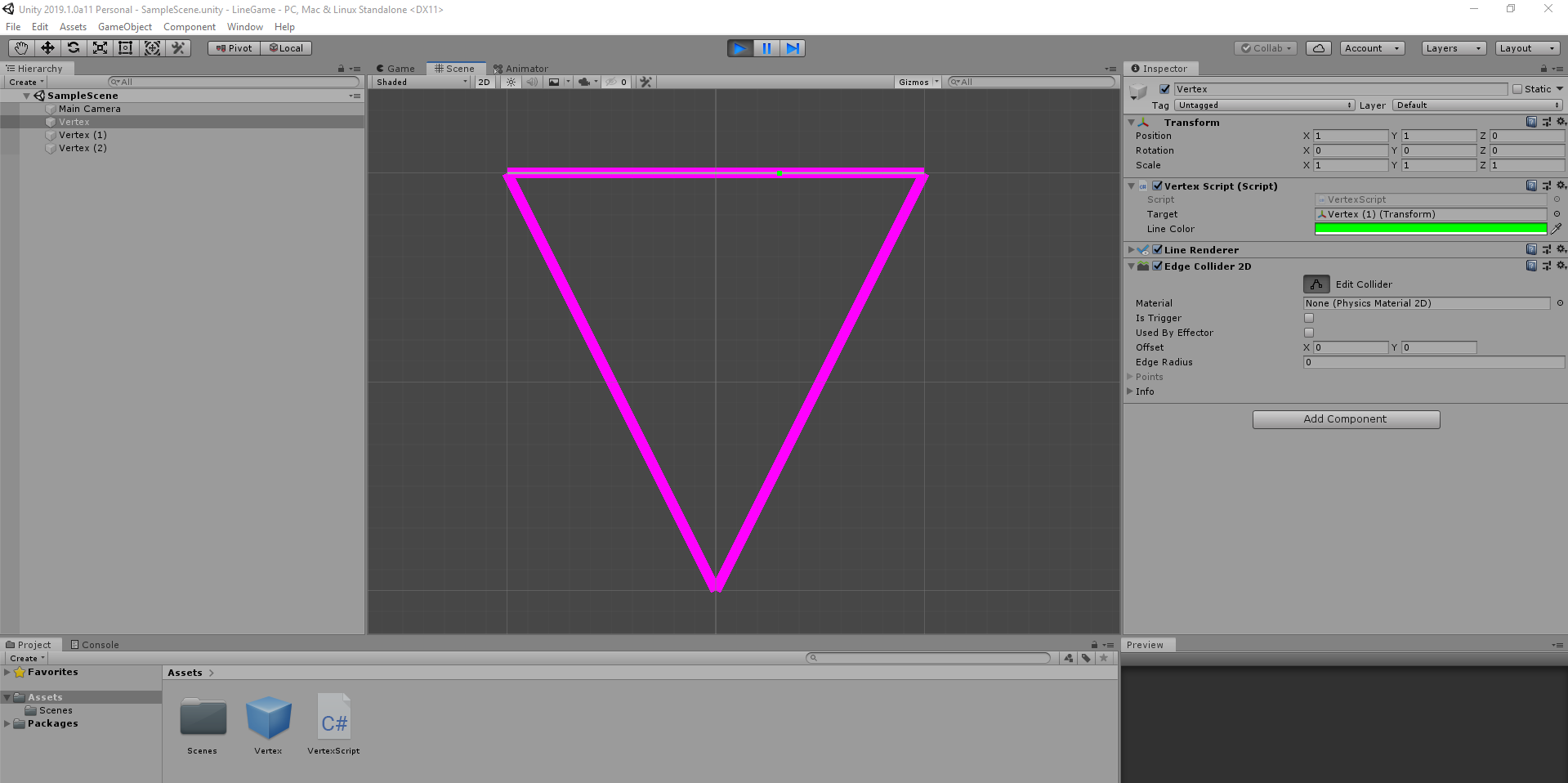
How to make levels out of just lines?

Hi!
I would like to make a 2D classic vector like game with only lines representing the level borders.
My question is:
What is the easiest way to make such levels?
Is there a way to draw such lines direcly in unity automatically with an edge collider attached?
Is there maybe an asset for this?
A good example for this is gravitar

THANKS!

I suggest using the line renderer component and edge colliders.
You could make a script that executes during update so you can build the level in the editor.
You could make the script draw a line from its game object and lead to another game object, which in turns leads to antoher and another, etc…

It’s a cool idea, I might give this a go myself one day.

public class VertexScript : MonoBehaviour
{
    [SerializeField] private LineRenderer lRenderer;
    [SerializeField] private Transform target;
    [SerializeField] private float lineWidth = 0.2f;

    void Awake()
    {
        lRenderer.startWidth = lineWidth;
        lRenderer.endWidth = lineWidth;
    }

    [ExecuteInEditMode]
    void Update()
    {
        lRenderer.SetPosition ( 0 , transform.position );
        lRenderer.SetPosition ( 1 , target.position );
    }
}

Thanks for your suggestion!
I tried it out and it works for drawing lines. Very cool.

BUT:

I could not manage the edge collider to work with the drawn lines.

okey dokey, give this a whirl.

using UnityEngine;

[RequireComponent ( typeof ( LineRenderer ) )]
[RequireComponent ( typeof ( EdgeCollider2D ) )]
public class VertexScript : MonoBehaviour
{
    private LineRenderer lRenderer;
    private EdgeCollider2D edgeCollider2D;

    [SerializeField] private Transform target;
    [SerializeField] private Color lineColor = Color.green;
 
    private float lineWidth = 0.05f;

    [ExecuteInEditMode]
    private void Update()
    {
        // Move me to Start() or Awake()
        {
                lRenderer = GetComponent<LineRenderer> ( );
                edgeCollider2D = GetComponent<EdgeCollider2D> ( );
        }
        //width
        lRenderer.startWidth = lineWidth;
        lRenderer.endWidth = lineWidth;
        //colour
        lRenderer.startColor = lineColor;
        lRenderer.endColor = lineColor;
        //position
        lRenderer.SetPosition ( 0 , transform.position );
        lRenderer.SetPosition ( 1 , target.position );

        Vector2 [ ] points = new Vector2 [ 2 ]
        {
            Vector2.zero,
            target.position - transform.position
        };

        //update the edge colliders points
        edgeCollider2D.points = points;
    }
}

1 Like

There is also a Vectrosity package which is good for Lines stuff.

In case you decide to move from straight to curved/bezier/circles lines, it will have ready methods to create those

Does the vectrosity package offer a collision dedection for lines? Is it possible to make a game like gravitar with it?

Thimble2600

Big thanks for your support!

Unfortunately it does not work for me. I played around with it for kind a while now.
What makes me suspicious is the fact that in your screenshot there are 3 instances of vertex.
The target of vertex is vertex(1).
I tried this configuration besides of many others but no luck.

Yes. You just have to set the collider property to true and it will generate colliders for your line.

Yes you should be able to create Gravitar like game with it.

myLine.collider = true;

Thank you, I think I will give it a try (although it is not free :wink: )

Ok I purchased the vectrosity package but no luck with the collider in scene mode.
I turned on the “Collider” in the Vector Object 2D (script) as described in the manual to activate the collider on the lines but it does not work. I am using the 2D Space in unity as also described in the manual.

Using a script to draw points makes no sense to me because I want to see what I am drawing.
I am a little bit disapointed to say the least.

Any suggestions?
Thanks

What do you mean by that? I added a line. Enabled Collider and Saw the collider was applied to it.
Click on Edit collider to see the collider in scene space .
What else are expecting, Please clarify.

After some tries I got it to work.
I don´t know why , but when I added a new scene it suddenly worked.
Before I could not manage the edge collider to add or update points.

What I am really missing badly is the ability to add points between two existing points in the visual editor. I can only remove points but not add them.
I contacted the author but he said that this would be a feature of a quote “super-complex bloated drawing app” and he also claims that the visual editor is not meant to be used at all.
Funny statement, to say at least.

Anyway thank you