Hi all,
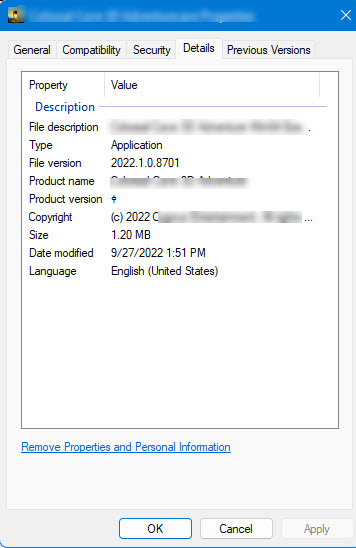
i would like to add information in final compiled application (windows standalone: myapp.exe) about “Copyright” and change file version from unity version to my own.
Is it possible? If yes, how can i do it?
screenshot with that i would like to do is attached:
Yes. There is an option to “Generate Visual Studio Solution” in the build window. Instead of generating final executable, it generates a visual studio project that builds the final executable. You can then change it in whatever way you want.
Well. I work on integration this in TeamCity. Tautvydas-Zilys, Do you know the way how to create visual studio solution for windows standalone through command line?
You could also rebuild the executable once, and then commit it to your source control and just overwrite the one from the regular build - it should make your build faster.
Is this still possible in Unity 2019.3? I am able to open the build in Visual Studios, but I am unable to locate and update the WindowsPlayerVersion.rc?
I do see that WindowsPlayer.rc has a line of code that includes “WindowsPlayerVersion.rc”, and that the Windows PlayerEngine located in the Unity Editor application folder has a file named “WindowsPlayerVersion.rc” but I am unable to change that file.
What is the best approach for updating this file within Visual Studios to where I can still rebuild the project for distribution?
Thank you for your help. I was trying to find this file within the Visual Studios solution but it was not showing up within the IDE’s Resource View panel, and then I must have overlooked it when checking through the directory.
I just wanted to confirm this is the only way(compile solution and then change) and that there is no other automation-friendly way, and also wanted to ask the reason the version number doesn’t cascade from the app/unity version number.
While I can generate a .sln file - I’m no C++ expert and without documentation on what to change in WindowsPlayerVersion.rc – everything I’ve tried just corrupts the WindowsPlayerVersion.rc file and I have to start over again. There must be more documentation out there but I can’t find it?
VS_VERSION_INFO VERSIONINFO
FILEVERSION UNITY_VERSION_VER,UNITY_VERSION_MAJ,UNITY_VERSION_MIN,UNITY_VERSION_BLD
PRODUCTVERSION UNITY_VERSION_VER,UNITY_VERSION_MAJ,UNITY_VERSION_MIN,UNITY_VERSION_BLD
FILEFLAGSMASK 0x17L #ifdef _DEBUG
FILEFLAGS 0x1L #else
FILEFLAGS 0x0L #endif
FILEOS 0x4L
FILETYPE 0x0L
FILESUBTYPE 0x0L
BEGIN
BLOCK “StringFileInfo”
BEGIN
BLOCK “040904b0”
BEGIN
VALUE “FileVersion”, UNITY_VERSION_WIN
VALUE “ProductVersion”, UNITY_VERSION_WIN
VALUE “Unity Version”, UNITY_VERSION_UNDER_HASH
END
END
BLOCK “VarFileInfo”
BEGIN
VALUE “Translation”, 0x409, 1200
END
END
How would I add UNITY_COPYRIGHT as it isn’t populated with this code?
#include <windows.h>
#include "UnityConfigureRevision.gen.h"
#include "UnityConfigureVersion.gen.h"
#include "UnityConfigureOther.gen.h"

VS_VERSION_INFO VERSIONINFO
 FILEVERSION UNITY_VERSION_VER,UNITY_VERSION_MAJ,UNITY_VERSION_MIN,UNITY_VERSION_BLD
 PRODUCTVERSION UNITY_VERSION_VER,UNITY_VERSION_MAJ,UNITY_VERSION_MIN,UNITY_VERSION_BLD
 FILEFLAGSMASK 0x17L
#ifdef _DEBUG
 FILEFLAGS 0x1L
#else
 FILEFLAGS 0x0L
#endif
 FILEOS 0x4L
 FILETYPE 0x0L
 FILESUBTYPE 0x0L
BEGIN
    BLOCK "StringFileInfo"
    BEGIN
        BLOCK "040904b0"
        BEGIN
            VALUE "FileVersion", UNITY_VERSION_WIN
            VALUE "ProductVersion", UNITY_VERSION_WIN
            VALUE "Unity Version", UNITY_VERSION_UNDER_HASH
            VALUE "LegalCopyright", "RambosRide (c) 2022"
        END
    END
    BLOCK "VarFileInfo"
    BEGIN
        VALUE "Translation", 0x409, 1200
    END
END
IDK if I’m doing something wrong but if I comment out
FILEVERSION UNITY_VERSION_VER,UNITY_VERSION_MAJ,UNITY_VERSION_MIN,UNITY_VERSION_BLD
On the compiled exe the File Version gets set to 0.0.0.0 and not the FileVersion in StringFileInfo.
In the Screen grab you can see it still shows unity FILEVERSION, not MY_VERSION
I can override the FILEVERSION values but would have thought the StringFileInfo:FileVersion would populate that field.
I think those are two separate properties, and Properties dialog only shows one of them. If you used a tool that showed full information, you’d probably see both. You’ll have to change FILEVERSION if you want it to show up in the Properties dialog.
When we went to 2021.3.4 the windowsstandalone visual studio sln project was changed (still using VS2019)
When I compile now the ProductVersion displaying odd character, in code I use the same constant I use for File Version which does display correctly - any ideas? Thanks!
VALUE “FileVersion”, UNITY_VERSION_WIN
VALUE “ProductVersion”, UNITY_VERSION_WIN