When I revert prefab, transform stays the same, which is undesirable in my case
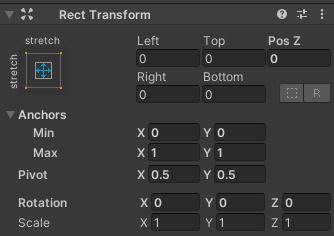
I need an automated way to revert this.
I don’t want to click on every section and revert it manually on hundreds and hundreds of objects…
I tried PrefabUtility.RevertPrefabInstance(selection[i],InteractionMode.AutomatedAction); but it doesn’t revert the transform.
All things I tried can’t revert the transform (including for example Reverting several GameObjects to Prefab settings at once - Questions & Answers - Unity Discussions)
Does anyone know how to revert the transform?
As far as I remember the position of the root of the prefab was never counted as part of the prefab, which makes sense. The whole point of the prefab is to be instances of a archetype put around the scene. Rotation and scale are stored though.
I can see that you’re trying to do this in a UI canvas. What’s your use-case here?
I want to revert all transform fields, not only one at a time.
Let’s say I have this setup in an instance

And the prefab for the instance has it like this

To revert the rect transform to the prefab value, I need to click:
Right click on PosX ► Revert
Right click on PosY ► Revert
Right click on PosZ ► Revert
Right click on Anchors ► Revert
Right click on Pivot ► Revert
Right click on Rotation ► Revert
Right click on Scale ► Revert
I want to revert everything anyway, so I want an option to revert all of the above with 2 clicks
There is no option to revert everything in the context menu

Like in every other component

Interesting. It seems that you actually can revert the position of prefab root to its prefab value. There seems to be a difference in how the UI elements and normal game objects handle the position values. And that also affects the way revert option works on it.
I’m looking at the PrefabUtility.RevertPropertyOverride documentation, and it seems to be obsolete. There are other more specific methods to revert the changes:
Also, I would suggest to try reverting localPosition, anchoredPosition and anchoredPosition3D and see which one actually gets the override. When animating UI elements anchoredPosition gets changed in animation track so I would assume either that or anchorPosition3D should be reverted. Something like this:
var obj = new SerializedObject(RectTransform);
var prop = obj.FindProperty("anchoredPosition");
PrefabUtility.RevertPropertyOverride(prop)
You can also get the list of all the current overrides and see what you need to revert using this method:
I couldn’t get this to work using your methods, the FindProperty always returned null for me. IDK why. I tried all sorts of things… for example:
SerializedObject serializedObject = new SerializedObject(transform.GetComponent<RectTransform>());
Debug.Log(serializedObject.targetObject.GetType().ToString()); // works
SerializedProperty serializedSizeDelta = serializedObject.FindProperty("sizeDelta");
Debug.Log(serializedSizeDelta); // null
PrefabUtility.RevertPropertyOverride(serializedSizeDelta, InteractionMode.AutomatedAction);
I also tried reverting all overrides, including the default ones, but it didn’t work either (It couldn’t revert the RectTransform overrides):
foreach (var over in PrefabUtility.GetObjectOverrides(gameObject, true))
{
    over.Revert();
}
As a workaround, I just copy-pasted the props from the prefab:
string[] propsToRevert =
{
    "anchorMin",
    "anchorMax",
    "anchoredPosition",
    "anchoredPosition3D",
    "pivot",
    "sizeDelta",
    "offsetMin",
    "offsetMax",
    "localPosition",
    "localEulerAngles",
    "localScale",
};

RectTransform rectTransform = GetComponent<RectTransform>();
RectTransform prefabRectTransform = PrefabUtility.GetCorrespondingObjectFromSource(gameObject).transform.GetComponent<RectTransform>();
PropertyInfo[] props = rectTransform.GetType().GetProperties(BindingFlags.Public | BindingFlags.NonPublic | BindingFlags.Instance | BindingFlags.SetProperty);

foreach (string propName in propsToRevert)
{
    var prop = props.Where(p => p.Name == propName).First();
    prop.SetValue(rectTransform, prop.GetValue(prefabRectTransform));
}
Gets the job done
The only way I found to create a really clean variant (without the annoying default overrides) is this one:
private static readonly string[] defaultOverrides =
{
    "m_RootOrder",
    "m_LocalPosition",
    "m_LocalRotation",
    "m_LocalEulerAnglesHint"
};

private static GameObject CreateCleanVariant(GameObject prefab)
{
    var cleanVariant = (GameObject)PrefabUtility.InstantiatePrefab(prefab);
    var serializedObject = new SerializedObject(cleanVariant.transform);
    foreach (var defaultOverride in defaultOverrides)
    {
        var property = serializedObject.FindProperty(defaultOverride);
        if (property != null)
            PrefabUtility.RevertPropertyOverride(property, InteractionMode.AutomatedAction);
    }
    return cleanVariant;
}
The variant will be instantiated as a new GameObject in the currently active scene.
If you want to save it as a project asset instead, just call PrefabUtility.SaveAsPrefabAsset and Object.DestroyImmediate right after.
The better workflow for me is to create a “ForcedRectTransform” that serializes all the RectTransform properties I need in a separate component and applies them on every editor update and on awake, so I don’t have to rely on the RectTransform overrides at all. I just rely on overrides on a regular component that work correctly.
Here’s the code for context menu action for RectTransform that reverts all of its properties.
using UnityEditor;

internal static class RevertPrefabTransformAction
{
    private const string RevertPrefabTransformMenuName = "CONTEXT/RectTransform/Revert Prefab Transform";

    [MenuItem(RevertPrefabTransformMenuName)]
    private static void RevertPrefabTransform(MenuCommand command)
    {
        var serObj = new SerializedObject(command.context);
        var prop = serObj.GetIterator();
        while (prop.NextVisible(true))
        {
            PrefabUtility.RevertPropertyOverride(prop, InteractionMode.UserAction);
        }
    }

    [MenuItem(RevertPrefabTransformMenuName,validate = true)]
    private static bool RevertPrefabTransformValidate(MenuCommand command)
    {
        var obj = command.context;
        return PrefabUtility.IsPartOfPrefabInstance(obj);
    }
}
Thank you! What a champion!