Guys , as the title suggests , how can I wait for an animation to finish, please answer in the most simplistic way cuz im pretty new to unity , thanks a lot, have a great day 
1 Like
You have several options to achieve this.
-
Add an Animation Event to your last key frame.
See https://docs.unity3d.com/Manual/animeditor-AnimationEvents.html -
In Update you can continuously check if the animation has completed.
See AnimatorStateInfo -
Start a coroutine that yields and waits for the animation to complete.
18 Likes
Thanks buddy
For AnimatorStateInfo, which property needs to be used to check if the animation has completed one cycle?
if normalizedtime > 1 then it has completed 1 cycle
I tried this:
if (animator.GetCurrentAnimatorStateInfo(0).normalizedTime > 1)
  {
            Debug.Log($"Animation over");
        }
I want to put it in a different method other than Update. It didn’t work. Any solution to the problem?
1 Like
you can put in other method but u must decide when u want to call that method
1 Like
You can also just use the animator transition to force it to finish.
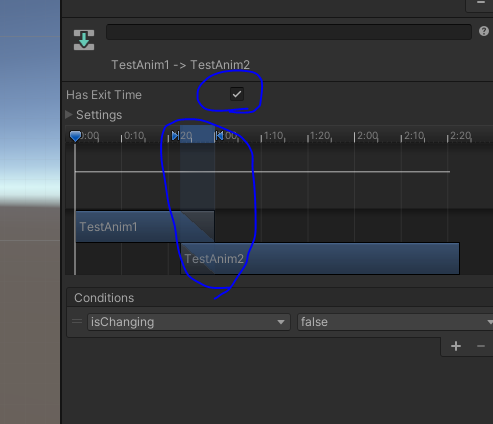
Check Has Exit Time and then you can Move the 2nd animation to NOT overlap with the first. In the screenshot i share, there is a default overlap. If you move the little arrow handles and then move the bar, it can remove that overlap.
What CornySam suggests works, but if you don’t want a fancy transition into the next state, you can also do the following:
- Enable ‘Has exit time’
- Set ‘Exit time’ to 0
- Set ‘Transition Duration’ to 0

2 Likes
I made a small package which you can use to wait for animations to start or finish inside coroutines. You can check it out here: GitHub - ComradeVanti/UnityWaitForAnim: A custom yield-instruction for Unity to wait for animations to finish
2 Likes
I’m getting some errors with webgl and the browser entering into a background process state (dropping frames), I’m currently polling the state info anyone know the best solution for such an issue?
if (animator.GetCurrentAnimatorClipInfo(0)[0].clip.name == name && !animator.IsInTransition(0) && animator.GetCurrentAnimatorStateInfo(0).normalizedTime >= 0.99f)
If you have a transition between two states (animations), you need to wait until the transition is done to have the next clip information in th Animator.GetCurrentAnimatorStateInfo(0) and Animator.GetCurrentAnimatorStateInfo(0)
Do this after a Animator.SetTrigger() to wait for the transition:
// Wait for the transition to end
yield return new WaitUntil(() => _Animator.GetCurrentAnimatorStateInfo(0).normalizedTime <= 1.0f );

// Do some action

// Wait for the animation to end
yield return new WaitWhile(() => _Animator.GetCurrentAnimatorStateInfo(0).normalizedTime <= 1.0f);

// Do some action
5 Likes
Thanks @Fenikkel ! Your post was almost exactly what I wanted, but I did a tiny alteration, because I wanted to know the moment when the animation finished, so that I could trigger something as it started transitioning back to the idle state:
_Animator.SetTrigger("anim_state");
// Wait for the transition to end
yield return new WaitUntil(() => _Animator.GetCurrentAnimatorStateInfo(0).normalizedTime <= 1.0f );

// Do some action

// Wait for the animation to end
yield return new WaitWhile(() => _Animator.GetCurrentAnimatorStateInfo(0).IsName("anim_state"));

// Do some action
(as soon as the state name is no longer the triggered animation, assume the transition back to the idle state)
2 Likes
This is the one for me. I try not to use code when the functionality is already there. Thank you. Worked a treat.