Awesome, thank you!
    public bool IsLeftMouseDown()
    {
        return inputActions.UI.Click.triggered;
    }
Is there a way to poll the information without generating the C# code for this input action asset?
Yes, if you get the Input action instance then you can use it however you want. For example, getting the action from the asset itself:
bool pressed = asset.FindAction( actionNameStr ).IsPressed();
1 Like
Thank you very much. Think I should wait until InputSystem1.1 comes out.
1 Like
Been fiddling with this for 3-4 days now, and I give up for now.
It is the “OnButtonUp” situation that just will not work.
Only get debugs for:
if (action.performed) {
Debug.Log("Button Down");
}
At one point I got both for that and for:
if (action.canceled) {
Debug.Log("Button Up");
}
When pressing my jump bindings (Space [Keyboard] & Button South [Gamepad])
Most of the time while problem solving nothing showed up in console for ‘Canceled’
I’m using both new and old to get what I want atm, and will wait for 1.1 too.
It works great for my horizontal movement.
Easier to have this than to fix a custom for d-pad, I think.
Thank you so much for adding these! Can you please clarify if version 1.1 will eventually become “verified” for a 2019.4 patch release or 1.0 will remain the one “bundled” by default for the current LTS stream?
1 Like
This may work in the cases you’ve described, but what if I wanted to have a bool be false, and then be true just for the frame that the button was pressed, and even if the button is held, the bool returns to false? Basically I want to implement the behavior of if (Keyboard.current.spaceKey.wasPressedThisFrame) as a Unity event using an InputActions asset so that I don’t need to hard-code it for a bunch of different platforms.
3 Likes
This i my issue too. I need to know the difference between a button being pressed on first frame vs it being pressed on every frame thereafter.
What is the difference between isPressed() and wasPressed()? Or started and performed?
It seems they run on both the first frame and every frame thereafter until release making them indentical. Only WasReleasedThisFrame() and canceled tell me anything different - the frame of release. Have i done something wrong or is that really how it works?
I can track each button press and compare it to the last frame myself but it is so much uglier.
Hi,
I have found that WasPressedThisFrame() and .triggered seem to “drop” some key presses.
I’m reading the event in FixedUpdate to perform a jump but it seems that maybe the input system is only guaranteed to read the input values immediately prior to Update as in https://docs.unity3d.com/2021.1/Documentation/Manual/ExecutionOrder.html?_ga=2.76398549.191861334.1614200602-1480888868.1606545039 ??
Not sure why it would work most of the time but not everytime.
Maybe this is obvious to everyone but it caused me a lot of grief.
I ended up using IsPressed()/ReadValue as I was manually applying the isJumping check anyway and this cleared the issue up straight away.
Have you set the InputSystem’s UpdateMode to Fixed Update as per the documentation?
https://docs.unity3d.com/Packages/com.unity.inputsystem@1.1/manual/Settings.html#update-mode
The code below worked for me to set up a crouch toggle using the new Input system. Works like a charm. Unity 2020.3.2f1 LTS
private void HandleCrouchingInput()
    {
        if ( playerControls.PlayerActions.Crouch.triggered )
        {
            if(!isCrouched)
            {
                isCrouched = true;
                sign = 1;
                layerWeight = 0;
            }
            else
            {
                isCrouched = false;
                sign = -1;
                layerWeight = 1;
            }

            StartCoroutine ( ToggleCrouch ( ) );
        }
    }

    IEnumerator ToggleCrouch ( )
    {
        if(isCrouched)
        {
            while(layerWeight <= 1 )
            {
                layerWeight += Time.deltaTime * sign * 6;
                animator.SetLayerWeight ( 1, layerWeight );
                yield return null;
            }
        }
        else
        {
            while(layerWeight >= 0)
            {
                layerWeight += Time.deltaTime * sign * 6;
                animator.SetLayerWeight ( 1, layerWeight );
                yield return null;
            }
        }
    }
Shake my head, honestly…for something that used to be a simple task now looks like a hella bloats of a mess
5 Likes
Hey Rene-Damm,
I use C# Generated Class and inherits from the interface which inputs callbacks are there.
For instance:
KeyboardInput: IPlayerControls
{
     public void OnJump(InputAction.CallbackContext context)
     {
        jump = context.ReadValueAsButton() && context.started;
     }
}
As you can see I use context.started as a replacement for GetButtonDown but the problem is, it doesn’t work. As I noticed it is because started and performed are done in a single frame so that jump variable is always false.
Is it a bug or I miss something here ?
Hey for anyone in 2021 trying to deal with UI and it flickers with clicking
Dont do this. flickers hard
controls.Gameplay.Jump.performed += i => playerMovement.isJumping = true;
controls.Gameplay.Jump.canceled += i => playerMovement.isJumping = false;
Just set this on a void easy and no more flickering UI
if (controls.UI.Menu.WasPressedThisFrame() && !playerCanvas.isMenuPressed)
{
playerCanvas.isMenuPressed = true;
}
else
{
playerCanvas.isMenuPressed = false;
}
I have:
InputActions:
PrimaryPress,
Primary Release,
PrimaryHeld,
PrimaryDoubleClick,
PrimaryTripleClick.
I have set all of their interactions as:
Press:Press,
Press:Release,
Hold,
Tap2,
Tap3.
They work…
However, it fires all of the events. Is there a way to prevent firing until it has determined if it is one of the 5 options? So that essentially, it only fires the relevant event? In my old system I handled this… but I dont want to attach events to events, seems counter productive.
It’s very sad for unity that something that can be one line of code in old system must now be a bunch of complicated code !! , the new generation as usual trying to take their place in system , by replace the oldest -“heavy duty code” , instead of repair it , this is the place for competitors.
1 Like
For those who are still struggling with this, and since this is the first google search result I got when searching for this, here’s how I solved it:
Example code
public struct PlayerInput
{
    public float2 Move;
    public float2 Look;
    public float Scroll;
    public bool JumpDown;
    public bool JumpUp;
    public bool AimDown;
    public bool AimUp;
    public bool ShootDown;
    public bool ShootUp;
}

public class GameInputManager : MonoBehaviour
{
    public PlayerInput PlayerInput;
    public GameInputActions InputActions;

    protected void Start()
    {
        InputActions = new GameInputActions();
        InputActions.Enable();
        InputActions.DefaultMap.Enable();
    }

    protected void Update()
    {
        DefaultMapActions inputMap = InputActions.DefaultMap;

        PlayerInput = new PlayerInput
        {
            Move = Vector2.ClampMagnitude(inputMap.Move.ReadValue<Vector2>(), 1f),
            Look = inputMap.Look.ReadValue<Vector2>(),
            Scroll = inputMap.Scroll.ReadValue<float>(),
            JumpDown = ButtonDown(inputMap.Jump),
            JumpUp = ButtonUp(inputMap.Jump),
            AimDown = ButtonDown(inputMap.Aim),
            AimUp = ButtonUp(inputMap.Aim),
            ShootDown = ButtonDown(inputMap.Shoot),
            ShootUp = ButtonUp(inputMap.Shoot),
        };
    }

    public static bool ButtonDown(InputAction action)
    {
        return action.ReadValue<float>() > 0.5f && action.triggered;
    }

    public static bool ButtonUp(InputAction action)
    {
        return action.ReadValue<float>() < 0.5f && action.triggered;
    }

    public static bool ButtonHeld(InputAction action)
    {
        return action.ReadValue<float>() > 0.5f;
    }
}
See more specifically the ButtonDown, ButtonUp, ButtonHeld utilities at the end.
However, there is one very important thing you must set up in the input actions window:
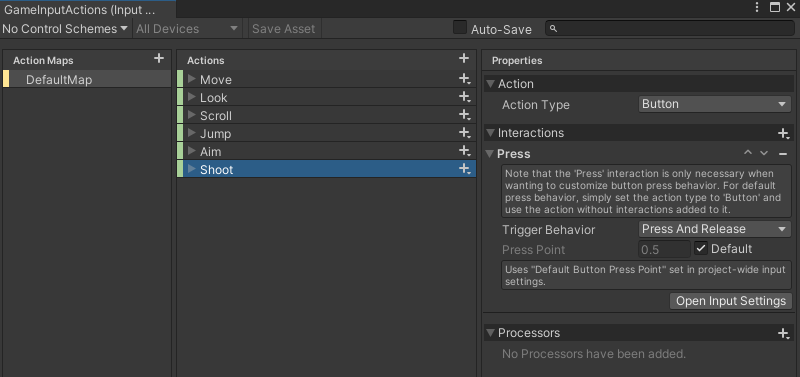
You need the ActionType to be “Button”, and you need a “Press” interaction with a TriggerBehaviour set to “Press and Release”
9 Likes
It is maybe a little bit ridiculously that the new input system has 5 ways to do the same thing, but the documentation consistently failed at pointing out the easiest solution.
I challenge Unity documentation team to find this info on these manual page:
https://docs.unity3d.com/Packages/com.unity.inputsystem@1.0/manual/Interactions.html
https://docs.unity3d.com/Packages/com.unity.inputsystem@1.0/manual/HowDoI.html
https://docs.unity3d.com/Packages/com.unity.inputsystem@1.0/manual/Migration.html
https://docs.unity3d.com/Packages/com.unity.inputsystem@1.0/api/UnityEngine.InputSystem.InputAction.CallbackContext.html
Seriously, Unity team, have page out to explain some basic usage example of CallbackContext, so that your users are NOT using random snippet from the forum that may or may not be the best practices.
Hundreds of users posting on forum “I don’t know if this is good but it works for me” snippets are not a good look.
5 Likes
My solution of problem “GetButtonDown” was like that:
using System.Collections;
using System.Collections.Generic;
using UnityEngine;
using UnityEngine.UI;

public class Controls : MonoBehaviour
{
    private NewInputActions inputs;

    public static float horizontal       = 0;
    public static float vertical            = 0;
    public static bool jump                = false;
    public static bool fire                   = false;

    private void Awake()
    {
        inputs = new NewInputActions();

        inputs.Player.Axises.performed += context => horizontal = inputs.Player.Axises.ReadValue<Vector2>().x ;
        inputs.Player.Axises.canceled += context => horizontal = 0;

        inputs.Player.Axises.performed += context => vertical = inputs.Player.Axises.ReadValue<Vector2>().y;
        inputs.Player.Axises.canceled += context => vertical = 0;

        inputs.Player.Fire.performed += context => fire = true;
        inputs.Player.Fire.canceled += context => fire = false;

        //in this case we have problems with emulating GetButtonDown function
        //therefore we need another solution, for example, like in Update method
        //
        //inputs.Player.Jump.started += context => jump = true;
        //inputs.Player.Jump.canceled += context => jump = false;

    }

    private void Update()
    {
        jump = inputs.Player.Jump.triggered;
        //debugging input
        //Debug.Log("Jump" + inputs.Player.Jump.triggered);

    }

    private void OnEnable()
    {
        inputs.Enable();
    }

    private void OnDisable()
    {
        inputs.Disable();
    }
}
Where the button should be held down (“Fire”), I used standard events. And where I need only one press (“Jump”) is the trigger. I don’t know if this is correct, but it works.