Good Morning.
I am trying to create a single horizontal line of grid and tile to create a limited space where the player will be able to build only in that space.
I already search multiple forums for this question but was unable to find any answer to my question.
I am using PititL Unity Course - Stardew Valley like grid-based building system on Youtube to create my current system.
The Problem I face:
-
When we create a 2d Object > Tilemap, we create an unlimited number of x and y grids, thus allowing the player to build anywhere on the screen without any limitation.
-
When I try to increase the Y cell gap to the grid, it is Possible to click on and above the space of the grid to build exactly where I want them to be built. But, when the player clicks the space below the grid, the building will be built below the in-game screen and the game will validate the action thus reducing the player’s money.
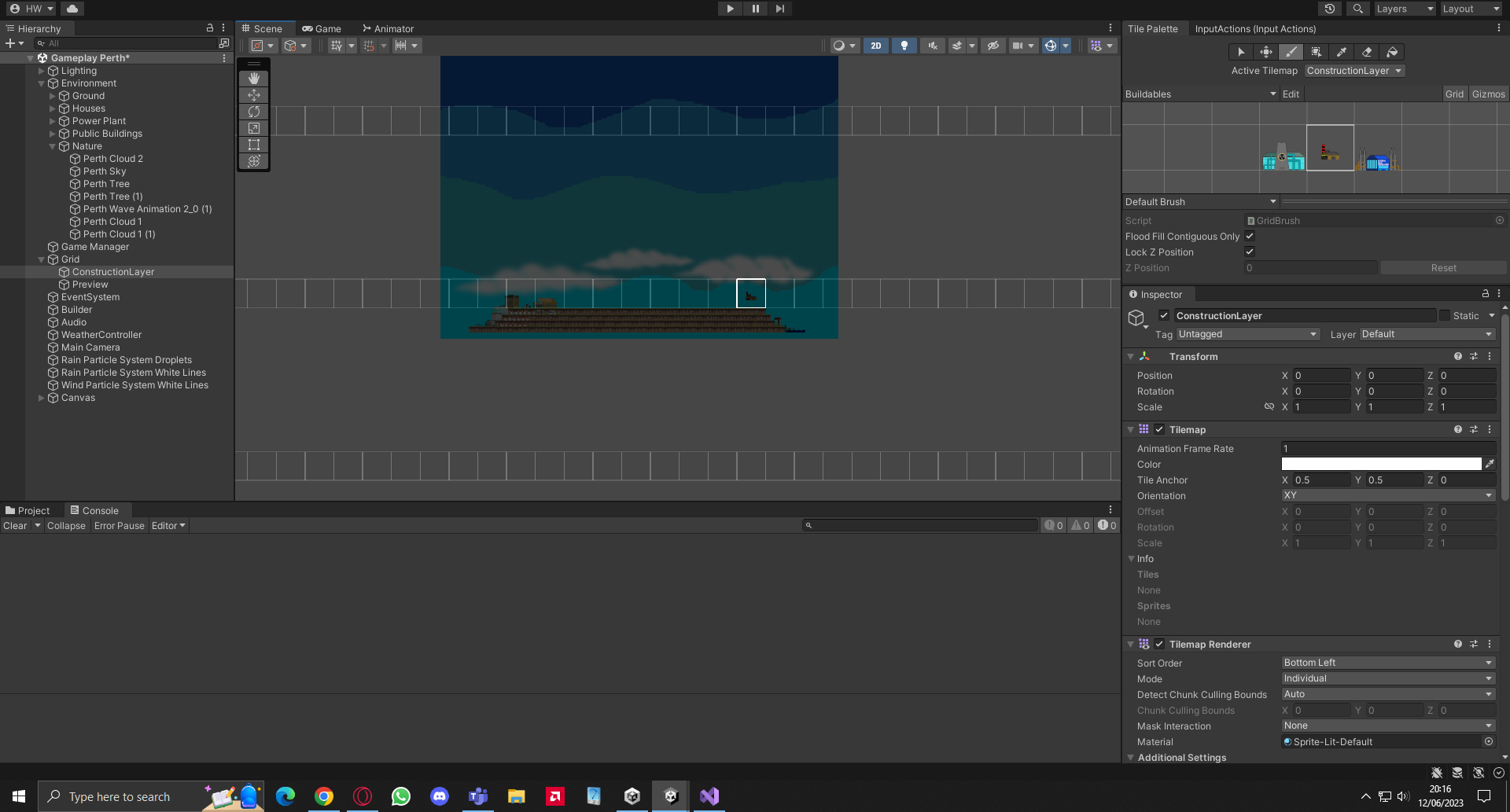
- The tutorial let me create a script to be attached to a gameobject that allows me to put it in the middle of the building space and inserting a max building distance lets me create a limited building space. Unfortunately, the space is a circle since the maximum building distance didn’t specify the x and y independently.
The Solution that I can think of:
-
The simplest solution might be for Unity to let me create a limited amount of grids, like creating a table in Excel. But searching around the internet convinces me that this solution might not exist, or at least might need advanced programming to achieve.
-
The maximum building distance should be able to be modified to ensure that the x and y distance can be independently changed, but I am terribly sorry to say that I am not able to do this. Any guidance will be greatly appreciated. Below is the code used by PitilT regarding the maximum building distance. To avoid creating a very long thread, I only show the script that I think has anything to do with the solution. But please, I will provide all the scripts upon request. Thank you in advance for any guidance.
using GameInput;
using System.Collections;
using System.Collections.Generic;
using UnityEngine;
using UnityEngine.Rendering.UI;
using BuildingSystem.Models;
using System;
using static UnityEngine.Rendering.DebugUI;

namespace BuildingSystem
{
    public class BuildingPlacer : MonoBehaviour
    {
        public event Action ActiveBuildableChanged;

        [field: SerializeField]
        public BuildableItem ActiveBuildable { get; private set; }

        [SerializeField]
        private float _maxBuildingDistance = 3f;

        [SerializeField]
        private ConstructionLayer _constructionLayer;

        [SerializeField]
        private PreviewLayer _previewLayer;

        [SerializeField]
        private MouseUser _mouseUser;

        private void Update()
        {
            _previewLayer.ClearPreview();

            if (!IsMouseWithinBuildableRange() || _constructionLayer == null)
            {
                _previewLayer.ClearPreview();
                return;
            }

            var mousePos = _mouseUser.MouseInWorldPosition;

            if (_mouseUser.IsMouseButtonPressed(MouseButton.Right) &&
                GameManager.Instance.CurrentMoney >= 500f &
                _constructionLayer.IsNotEmpty(mousePos)
                )
            {
                _constructionLayer.Destroy(mousePos);
                GameManager.Instance.CurrentMoney -= 500f;
                GameManager.Instance.gameData.TotalExpenses += 500f;
                GameManager.Instance.UpdateUI();
            }

            if (ActiveBuildable == null)
            {
                return;
            }

            _previewLayer.ShowPreview(ActiveBuildable,
                mousePos,
                _constructionLayer.IsEmpty(mousePos)
                );

            if (_mouseUser.IsMouseButtonPressed(MouseButton.Left) &&
                _constructionLayer.IsEmpty(mousePos) &&
                GameManager.Instance.CurrentMoney >= 1000f
                )
            {
                _constructionLayer.Build(mousePos, ActiveBuildable);
                GameManager.Instance.CurrentMoney -= 1000f;
                GameManager.Instance.gameData.TotalExpenses += 1000f;
                GameManager.Instance.UpdateUI();
            }
        }

        private bool IsMouseWithinBuildableRange()
        {
            return Vector3.Distance(
                _mouseUser.MouseInWorldPosition,
                transform.position) <= _maxBuildingDistance;
        }

        public void SetActiveBuildable(BuildableItem item)
        {
            ActiveBuildable = item;
            ActiveBuildableChanged?.Invoke();
        }
    }
}
using System;
using System.Collections;
using System.Collections.Generic;
using System.Xml.Serialization;
using UnityEngine;
using UnityEngine.UIElements;
using UnityEngine.InputSystem;

namespace GameInput
{

    public enum MouseButton
    {
        Left, Right
    }
    public class MouseUser : MonoBehaviour
    {
        private InputActions _inputActions;

        public Vector2 MousePosition { get; private set; }
        public Vector2 MouseInWorldPosition => Camera.main.ScreenToWorldPoint(MousePosition);

        private bool _isLeftMouseButtonPressed;
        private bool _isRightMouseButtonPressed;


        private void OnEnable()
        {
            _inputActions = InputActions.Instance;
            _inputActions.Game.MousePosition.performed += OnMousePositionPerformed;
            _inputActions.Game.PerformAction.performed += OnPerformedActionPerformed;
            _inputActions.Game.PerformAction.canceled += OnPerformedActionCanceled;
            _inputActions.Game.CancelAction.performed += OnCancelActionPerformed;
            _inputActions.Game.CancelAction.canceled += OnCancelActionCanceled;
        }

        private void OnDisable()
        {
            _inputActions.Game.MousePosition.performed -= OnMousePositionPerformed;
            _inputActions.Game.MousePosition.performed -= OnMousePositionPerformed;
            _inputActions.Game.PerformAction.performed -= OnPerformedActionPerformed;
            _inputActions.Game.PerformAction.canceled -= OnPerformedActionCanceled;
            _inputActions.Game.CancelAction.performed -= OnCancelActionPerformed;
            _inputActions.Game.CancelAction.canceled -= OnCancelActionCanceled;
        }

        private void OnMousePositionPerformed(InputAction.CallbackContext ctx)
        {
            MousePosition = ctx.ReadValue<Vector2>();
        }

        private void OnPerformedActionPerformed(InputAction.CallbackContext ctx)
        {
            _isLeftMouseButtonPressed = true;
        }

        private void OnPerformedActionCanceled(InputAction.CallbackContext ctx)
        {
            _isLeftMouseButtonPressed = false;
        }

        private void OnCancelActionPerformed(InputAction.CallbackContext ctx)
        {
            _isRightMouseButtonPressed = true;
        }

        private void OnCancelActionCanceled(InputAction.CallbackContext ctx)
        {
            _isRightMouseButtonPressed = false;
        }

        public bool IsMouseButtonPressed(MouseButton button)
        {
            return button == MouseButton.Left ? _isLeftMouseButtonPressed : _isRightMouseButtonPressed;
        }
    }
}