Is there any easy way to add more sprites to your inline graphic options besides keeping a PSD and adding new graphics every time you need a new icon inside your text?
If I have gold, food, etc… then I realize I want to add an Iron bar to my inline options it seems like a huge pain.
The tag allows you to access multiple sprite sheets.
The format is <sprite=“Name of Sprite Asset” name=“Name of Sprite”>.
The sprite asset must be located in a Resources folder at the location specified in the TMP Settings file.
Keep in mind that you get (1) draw call per material used in Unity. Therefore, if your sprites are contained in individual sprite sheets, you will get (1) draw calls for each of them.
In order to minimize draw calls, it is best to combine sprites into a single sprite atlas. That way, a sprite sheet containing 700 sprites will only result in (1) draw call.
When I added support for Sprite Assets in TextMesh Pro, it was not possible to leverage the 2D Sprite Atlas packing system due to missing API functionality. Since the required functionality is being added, it will be possible in the future to have individual sprites which Unity packs into a single Sprite Sheet at runtime.
The last paragraph was what I was looking for, thanks
In the meantime I guess I’ll hunt down an atlas packing tool so that it’s not some horrible workflow when needing to add or remove images. It seems best practice to use the name of the sprite instead of the position since this could change at any time if you’re in major dev mode.
Would be really nice if this could be updated soon. Having to use TextuePacker to place these in a Atlas seems a bit silly at this point, especially now that we have the nice new Sprite Atlas API’s.
Font files that contains sprites have these sprites encoded as png inside the font file. These are typically represented at different sizes like 16 x 16, 32 x 32, 64 x 64, etc. Unlike Glyphs (characters) sprites are bitmap data using RGBA.
Typically when creating a font atlas texture which contains bitmap or SDF glyphs, this font atlas texture is using 8 bit alpha. In order to try to combine the sprites from the font file into the same atlas as the glyphs, you would have to switch to using an RGBA texture which would be 4 times the size for no real gain and even performance impact on some mobile devices. Furthermore, you would have data contained in a font atlas texture that is potentially encoded differently.
I’ll certainly be looking at simpler ways to generate sprite atlas textures from source font files but these atlas textures should remain separate from the atlas texture that contains glyphs.
I just had to do this. It’s not super easy, but it’s possible.
I have a sprite sheet with specific offsets. I wanted to add a sprite to that without having to copy all the settings. This particular sprite sheet isn’t very big, but I’m also preparing to add emoji support which will be huge.
To add the new sprite:
Slice the updated sprite sheet, adding a the new sprite to it.
Create a new TextMesh Pro Sprite Asset from the updated sprite.
Open the original and new sprite assets in a text editor and copy the entry from the new one to the original one (Note: if you create your sprite sheet in a grid, in order from left to right and up to down this will be easiest as it will be the last entry). A single entry looks like this:
You could automate this if it’s something that you need to do regularly.
If that doesn’t work, copy the original entries to the new asset (instead of copying the new entry to the original asset), and replace the original asset with the new one.
Hi to all, had a same problem, so I rewrote TMP_SpriteAssetImporter. I’ve used TexturePackerPro for generating Json-data, and then updated TMP_Asset with this window:
using UnityEngine.TextCore;
#if UNITY_EDITOR
using UnityEngine;
using UnityEditor;
using System.IO;
using System.Collections.Generic;
using TMPro.EditorUtilities;
using TMPro.SpriteAssetUtilities;

namespace TMPro
{
    public class TMP_SpriteAssetImporterCustom : EditorWindow
    {
        // Create Sprite Asset Editor Window
        [MenuItem("Window/TextMeshPro/Sprite Importer Custom", false, 2026)]
        public static void ShowFontAtlasCreatorWindow()
        {
            var window = GetWindow<TMP_SpriteAssetImporterCustom>();
            window.titleContent = new GUIContent("Importer Custom");
            window.Focus();
        }

        Texture2D m_SpriteAtlas;
        SpriteAssetImportFormats m_SpriteDataFormat = SpriteAssetImportFormats.TexturePacker;
        TextAsset m_JsonFile;

        string m_CreationFeedback;

        TMP_SpriteAsset m_SpriteAsset;
        List<TMP_Sprite> m_SpriteInfoList = new List<TMP_Sprite>();


        void OnEnable()
        {
            // Set Editor Window Size
            SetEditorWindowSize();
        }

        protected override void OnGUI()
        {
            base.OnGUI();
            DrawEditorPanel();
        }


        void DrawEditorPanel()
        {
            // label
            GUILayout.Label("Import Settings", EditorStyles.boldLabel);

            EditorGUI.BeginChangeCheck();

            // Sprite Texture Selection
            m_JsonFile = EditorGUILayout.ObjectField("Sprite Data Source", m_JsonFile, typeof(TextAsset), false) as TextAsset;

            m_SpriteDataFormat = (SpriteAssetImportFormats)EditorGUILayout.EnumPopup("Import Format", m_SpriteDataFormat);

            // Sprite Texture Selection
           m_SpriteAtlas = EditorGUILayout.ObjectField("Sprite Texture Atlas", m_SpriteAtlas, typeof(Texture2D), false) as Texture2D;

            if (EditorGUI.EndChangeCheck())
            {
                m_CreationFeedback = string.Empty;
            }

            GUILayout.Space(10);

           GUI.enabled = m_JsonFile != null && m_SpriteAtlas != null && m_SpriteDataFormat == SpriteAssetImportFormats.TexturePacker;

            // Create Sprite Asset
            if (GUILayout.Button("Create Sprite Asset"))
            {
                m_CreationFeedback = string.Empty;

                // Read json data file
                if (m_JsonFile != null && m_SpriteDataFormat == SpriteAssetImportFormats.TexturePacker)
                {
                   TexturePacker.SpriteDataObject sprites = JsonUtility.FromJson<TexturePacker.SpriteDataObject>(m_JsonFile.text);


                    if (sprites != null && sprites.frames != null && sprites.frames.Count > 0)
                    {
                        int spriteCount = sprites.frames.Count;

                        // Update import results
                        m_CreationFeedback = "<b>Import Results</b>\n--------------------\n";
                       m_CreationFeedback += "<color=#C0ffff><b>" + spriteCount + "</b></color> Sprites were imported from file.";

                        // Create sprite info list
                        m_SpriteInfoList = CreateSpriteInfoList(sprites);
                    }
                }

            }

            GUI.enabled = true;

            // Creation Feedback
            GUILayout.Space(5);
            GUILayout.BeginVertical(EditorStyles.helpBox, GUILayout.Height(60));
            {
                EditorGUILayout.LabelField(m_CreationFeedback, TMP_UIStyleManager.label);
            }
            GUILayout.EndVertical();

            GUILayout.Space(5);
           GUI.enabled = m_JsonFile != null && m_SpriteAtlas && m_SpriteInfoList != null && m_SpriteInfoList.Count > 0;    // Enable Save Button if font_Atlas is not Null.
            if (GUILayout.Button("Save Sprite Asset") && m_JsonFile != null)
            {
               string filePath = EditorUtility.SaveFilePanel("Save Sprite Asset File", new FileInfo(AssetDatabase.GetAssetPath(m_JsonFile)).DirectoryName, m_JsonFile.name, "asset");

                if (filePath.Length == 0)
                    return;

                SaveSpriteAsset(filePath);

            }
            GUI.enabled = true;
        }


        /// <summary>
        ///
        /// </summary>
        List<TMP_Sprite> CreateSpriteInfoList(TexturePacker.SpriteDataObject spriteDataObject)
        {
            List<TexturePacker.SpriteData> importedSprites = spriteDataObject.frames;

            List<TMP_Sprite> spriteInfoList = new List<TMP_Sprite>();

            string path = AssetDatabase.GetAssetPath(m_SpriteAtlas);

            TextureImporter importer = (TextureImporter)AssetImporter.GetAtPath(path);

            importer.textureType = TextureImporterType.Sprite;

            importer.spriteImportMode = SpriteImportMode.Multiple;
            var newMetaData = new SpriteMetaData[importedSprites.Count];
            importer.isReadable = true;

            for (int i = 0; i < importedSprites.Count; i++)
            {
                TMP_Sprite sprite = new TMP_Sprite();

                sprite.id = i;
                sprite.name = Path.GetFileNameWithoutExtension(importedSprites[i].filename) ?? "";
                sprite.hashCode = TMP_TextUtilities.GetSimpleHashCode(sprite.name);

                // Attempt to extract Unicode value from name
                int unicode;
                int indexOfSeperator = sprite.name.IndexOf('-');
                if (indexOfSeperator != -1)
                    unicode = TMP_TextUtilities.StringHexToInt(sprite.name.Substring(indexOfSeperator + 1));
                else
                    unicode = TMP_TextUtilities.StringHexToInt(sprite.name);

                sprite.unicode = unicode;

                sprite.x = importedSprites[i].frame.x;
                sprite.y = m_SpriteAtlas.height - (importedSprites[i].frame.y + importedSprites[i].frame.h);
                sprite.width = importedSprites[i].frame.w;
                sprite.height = importedSprites[i].frame.h;

                //Calculate sprite pivot position
                sprite.pivot = importedSprites[i].pivot;


                // Properties the can be modified
                sprite.xAdvance = sprite.width;
                sprite.scale = 1.0f;
                sprite.xOffset = 0 - (sprite.width * sprite.pivot.x);
                sprite.yOffset = sprite.height - (sprite.height * sprite.pivot.y);

                spriteInfoList.Add(sprite);

                var rect = new Rect(sprite.x, sprite.y, sprite.width, sprite.height);


                newMetaData[i] = new SpriteMetaData();

                newMetaData[i].name = sprite.name;
                newMetaData[i].pivot = sprite.pivot;

                Debug.Log(newMetaData[i].pivot);


                newMetaData[i].rect = rect;
                newMetaData[i].alignment = (int)SpriteAlignment.Custom;

                //Debug.Log($"{ newMetaData[i].name} { newMetaData[i].rect}");
            }

            importer.spritesheet = newMetaData;

            EditorUtility.SetDirty(importer);
            importer.SaveAndReimport();
            //AssetDatabase.SaveAssets();
            //AssetDatabase.Refresh();
            //AssetDatabase.ImportAsset(path, ImportAssetOptions.ForceUpdate);

            return spriteInfoList;
        }


        /// <summary>
        ///
        /// </summary>
        /// <param name="filePath"></param>
        void SaveSpriteAsset(string filePath)
        {
            filePath = filePath.Substring(0, filePath.Length - 6); // Trim file extension from filePath.

            string dataPath = Application.dataPath;

            if (filePath.IndexOf(dataPath, System.StringComparison.InvariantCultureIgnoreCase) == -1)
            {
               Debug.LogError("You're saving the font asset in a directory outside of this project folder. This is not supported. Please select a directory under \"" + dataPath + "\"");
                return;
            }

            string relativeAssetPath = filePath.Substring(dataPath.Length - 6);
            string dirName = Path.GetDirectoryName(relativeAssetPath);
            string fileName = Path.GetFileNameWithoutExtension(relativeAssetPath);
            string pathNoExt = dirName + "/" + fileName;


            if (AssetDatabase.LoadMainAssetAtPath(pathNoExt + ".asset") as TMP_SpriteAsset)
            {
                m_SpriteAsset = AssetDatabase.LoadMainAssetAtPath(pathNoExt + ".asset") as TMP_SpriteAsset;
                Debug.Log("asset already exist");
            }
            else
            {
                // Create new Sprite Asset using this texture
                m_SpriteAsset = CreateInstance<TMP_SpriteAsset>();
                AssetDatabase.CreateAsset(m_SpriteAsset, pathNoExt + ".asset");
                Debug.Log("create new asset");
            }
            // Compute the hash code for the sprite asset.
            m_SpriteAsset.hashCode = TMP_TextUtilities.GetSimpleHashCode(m_SpriteAsset.name);

            // Assign new Sprite Sheet texture to the Sprite Asset.


            m_SpriteAsset.spriteSheet = m_SpriteAtlas;
            m_SpriteAsset.spriteInfoList = m_SpriteInfoList;
            Debug.Log(m_SpriteAsset.spriteInfoList[0].name);

            string path = AssetDatabase.GetAssetPath(m_SpriteAtlas);

            var index = 0;
            var sprites = AssetDatabase.LoadAllAssetsAtPath(path);

            //importer = (TextureImporter)AssetImporter.GetAtPath(path);

            for (var i = 0; i < sprites.Length; i++)
            {
                if (!(sprites[i] is Sprite)) continue;

                m_SpriteInfoList[index].sprite = (Sprite) sprites[i];
                //Debug.Log($"{sprites[i].name} {importer.spritesheet[index].pivot}");
                index++;
            }


            // Add new default material for sprite asset.
            AddDefaultMaterial(m_SpriteAsset);

            UpgradeSpriteAsset(m_SpriteAsset);

            EditorUtility.SetDirty(m_SpriteAsset);
            AssetDatabase.SaveAssets();
            AssetDatabase.Refresh();
            AssetDatabase.ImportAsset(pathNoExt + ".asset");
            //AssetDatabase.CreateAsset(m_SpriteAsset, pathNoExt + ".asset");
        }


        /// <summary>
        /// Create and add new default material to sprite asset.
        /// </summary>
        /// <param name="spriteAsset"></param>
        static void AddDefaultMaterial(TMP_SpriteAsset spriteAsset)
        {
            Shader shader = Shader.Find("TextMeshPro/Sprite");
            Material material = new Material(shader);
            material.SetTexture(ShaderUtilities.ID_MainTex, spriteAsset.spriteSheet);

            spriteAsset.material = material;
            material.hideFlags = HideFlags.HideInHierarchy;
            AssetDatabase.AddObjectToAsset(material, spriteAsset);
        }


        /// <summary>
        /// Limits the minimum size of the editor window.
        /// </summary>
        void SetEditorWindowSize()
        {
            EditorWindow editorWindow = this;

            Vector2 currentWindowSize = editorWindow.minSize;

            editorWindow.minSize = new Vector2(Mathf.Max(230, currentWindowSize.x), Mathf.Max(300, currentWindowSize.y));
        }

        private void UpgradeSpriteAsset(TMP_SpriteAsset asset)
        {
            asset.spriteCharacterTable.Clear();
            asset.spriteGlyphTable.Clear();

            for (int i = 0; i < m_SpriteInfoList.Count; i++)
            {
                TMP_Sprite oldSprite = m_SpriteInfoList[i];

                TMP_SpriteGlyph spriteGlyph = new TMP_SpriteGlyph();
                spriteGlyph.index = (uint)i;
                spriteGlyph.sprite = oldSprite.sprite;
               spriteGlyph.metrics = new GlyphMetrics(oldSprite.width, oldSprite.height, - oldSprite.width / 2f + oldSprite.sprite.pivot.x, oldSprite.height / 2f + oldSprite.sprite.pivot.y, oldSprite.xAdvance);
               spriteGlyph.glyphRect = new GlyphRect((int)oldSprite.x , (int)oldSprite.y, (int)oldSprite.width, (int)oldSprite.height);

                spriteGlyph.scale = 1.0f;
                spriteGlyph.atlasIndex = 0;

                asset.spriteGlyphTable.Add(spriteGlyph);

                TMP_SpriteCharacter spriteCharacter = new TMP_SpriteCharacter((uint)oldSprite.unicode, spriteGlyph);
                spriteCharacter.name = oldSprite.name;
                spriteCharacter.scale = oldSprite.scale;

                asset.spriteCharacterTable.Add(spriteCharacter);
            }

            // Clear legacy glyph info list.
            //spriteInfoList.Clear();

            asset.UpdateLookupTables();

#if UNITY_EDITOR
            EditorUtility.SetDirty(this);
            AssetDatabase.SaveAssets();
#endif
        }

    }
}
#endif
The Sprite Asset Importer was updated in the latest release of TMP which is version 1.5.0-preview.x for Unity 2018.4 and 2.1.0-preview.x for Unity 2019.x or newer.
The Sprite Asset Importer still only works with JSON Array because that is available in the free version of TexturePacker.
I would suggest testing the changes in the latest release. Please let me know if you run into any issues and as usual feel free to provide feedback / suggestions.
It does not currently support the Unity Sprite Atlas system. I need some functionality to be added by the 2D team for this to work correctly in the Editor and at runtime.
I just paid $150 for a perma license for texture packer so I can add a few inline sprites to my text, when Unity’s built in sprite atlas system should definitely be able to support Unity’s built in text display system, lol.
are the texture packer guys giving you some $$ kickback to delay integration? If not, they should be
I would recommend upgrading to Unity 2018.4 given it is the LTS release that is unless you have technical reasons not to uppgrade.
If you can upgrade to 2018.4 then be sure to grab the latest release of the TMP package which is version 1.5.0-preview.7 as I believe the sprite creation issues should have been addressed. Let me know if that is not the case.
That’s great news, thanks. We are code locked to 2018.2 right now, but I’ll install 2018.4 separately so I can try the sprite creation in there. I’m assuming once I have the sprites set up I can throw them back in 2018.2 for use. I’ll report if there are any issues there as well.
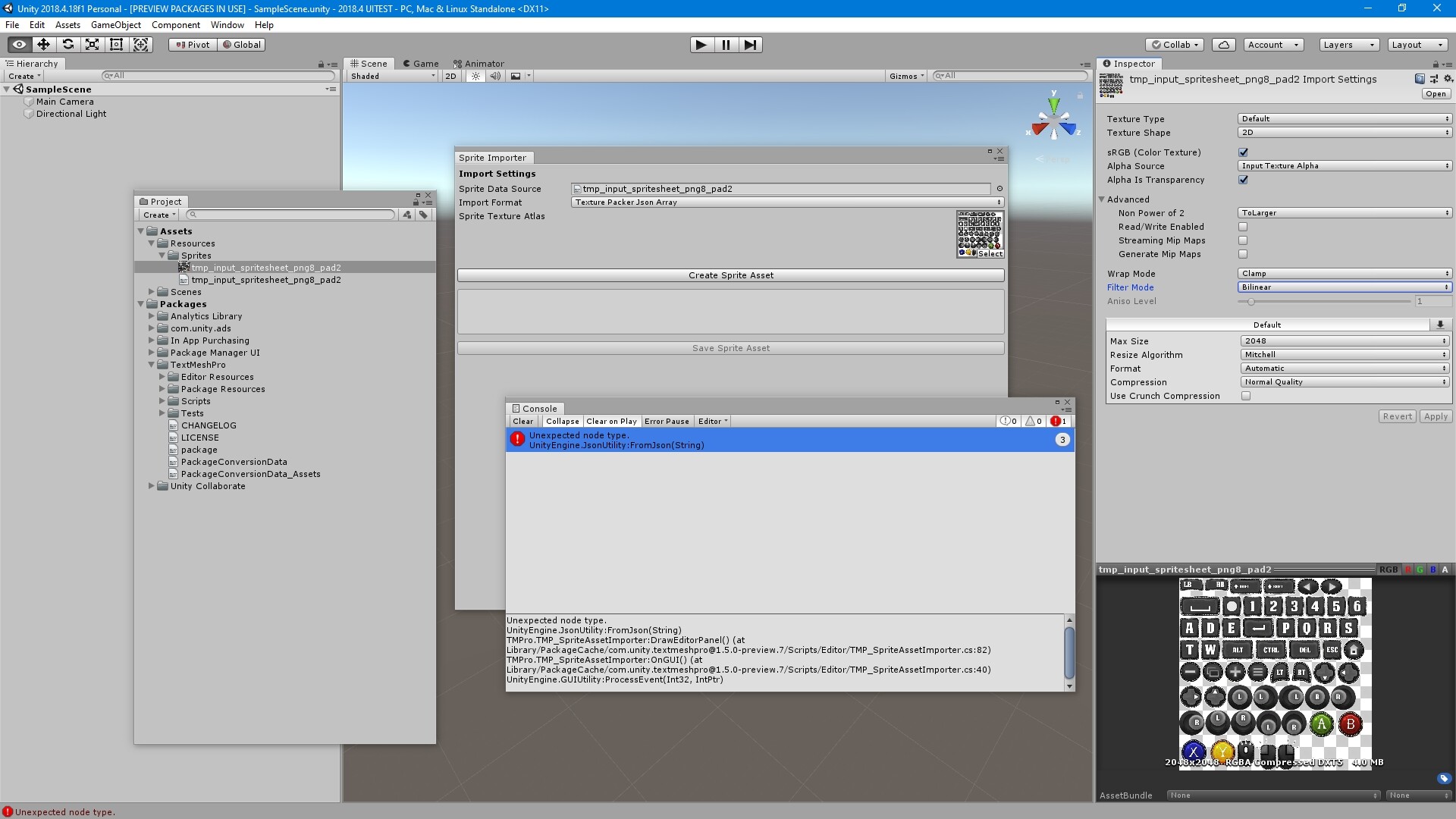
unfortunately getting the same error after installing 2018.4 & updating TMP to 1.50.7. This is also using the latest version of texture packer, and with some very friendly settings (basic spacing, no rotation, etc)
In case it’s helpful, I’ve also attached a zip of the json file & sprite sheet from TMP